


Ugreen
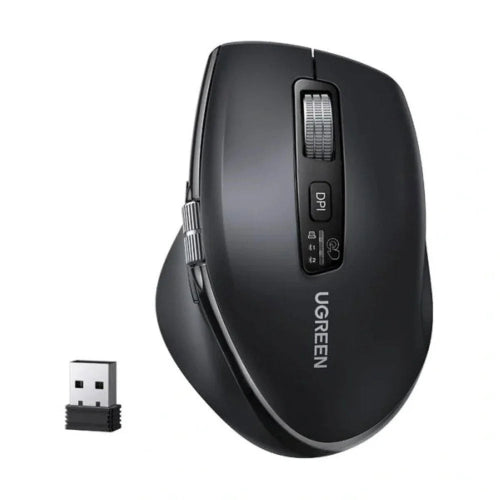
UGREEN M751 55468 Bluetooth + 2.4GHz Wireless Mouse
UGREEN M751 55468 Bluetooth + 2.4GHz Wireless Mouse
Couldn't load pickup availability
The UGREEN M751 55468 Bluetooth + 2.4GHz Wireless Mouse is a versatile dual-mode wireless mouse designed for modern laptops, desktop computers, tablets and everyday productivity setups. With support for both Bluetooth and 2.4GHz wireless connectivity, the M751 gives users the flexibility to choose the connection method that best suits their device.
The mouse is designed for comfortable everyday computer use, offering smooth optical tracking, adjustable cursor sensitivity and a practical wireless design without the clutter of a permanently attached cable.
For laptop users, Bluetooth connectivity can help keep USB ports available for other accessories. For desktop PCs and computers without Bluetooth, the included 2.4GHz wireless receiver provides a convenient alternative.
Whether you're working in Microsoft Office, browsing the web, studying, attending online meetings or simply controlling your computer, the UGREEN M751 55468 provides a clean and convenient wireless experience.
Dual-Mode Wireless Connectivity
The M751 supports two different wireless connection methods.
Bluetooth
Bluetooth is ideal for compatible laptops and other devices that already have built-in Bluetooth.
It eliminates the need to occupy a USB port with the wireless receiver and is particularly convenient for:
- Modern laptops
- Portable workstations
- Minimal desk setups
- Travel
- Bluetooth-enabled computers
2.4GHz Wireless
The 2.4GHz wireless mode uses the included USB receiver.
It is especially useful for desktop PCs and computers without Bluetooth.
Simply connect the receiver to a compatible USB port and use the mouse wirelessly.
Flexible Wireless Setup
The ability to use either Bluetooth or 2.4GHz makes the M751 more flexible than a mouse that supports only one wireless technology.
For example:
Laptop → Bluetooth → UGREEN M751
or
Desktop PC → USB Receiver → UGREEN M751
This makes it a useful option for people who regularly move between different computers.
Comfortable Everyday Design
The M751 is designed for everyday productivity and general computer use.
Its shape provides a comfortable grip for common tasks such as:
- Web browsing
- Document editing
- Spreadsheet work
- Online classes
- Office applications
- Graphic and productivity software
- General Windows navigation
A comfortable mouse can make a noticeable difference when you're using a computer for several hours each day.
Smooth Optical Tracking
The UGREEN M751 uses optical tracking for reliable cursor movement.
It is suitable for standard surfaces such as:
- Mouse pads
- Office desks
- Wooden desks
- Smooth work surfaces
Optical tracking provides the precision needed for regular clicking, selecting, dragging and scrolling.
For the most consistent performance, using the mouse on a suitable mouse pad is recommended.
Adjustable Cursor Sensitivity
The M751 provides adjustable DPI/cursor sensitivity, allowing users to configure how quickly the pointer moves across the screen.
A higher sensitivity setting can be useful with large or high-resolution displays, while lower sensitivity can provide greater control for precise pointer movements.
This flexibility makes the mouse suitable for different working environments.
2.4GHz Wireless Receiver
The included 2.4GHz receiver provides a straightforward wireless connection.
It is particularly useful for desktop computers where Bluetooth may not be built in.
The receiver allows you to maintain a cable-free mouse setup while avoiding the need for an internal Bluetooth adapter.
Bluetooth Connectivity for Laptops
Bluetooth makes the M751 particularly convenient for laptop users.
Instead of using a USB receiver, a compatible laptop can connect directly to the mouse through Bluetooth.
This means you can keep your available USB ports free for:
- USB flash drives
- External SSDs
- USB hubs
- Card readers
- Mobile devices
- Other peripherals
Cable-Free Workspace
The M751 removes the need for a traditional wired mouse cable.
This helps create a cleaner desk setup and gives you greater freedom to position your mouse.
It's suitable for:
- Home offices
- Corporate offices
- Study desks
- Gaming setups
- Meeting rooms
- Shared workstations
Battery-Powered Wireless Operation
The M751 is designed for wireless operation using battery power.
There is no permanently attached data cable required during normal use.
This makes the mouse convenient for users who prefer a simple wireless setup without having to keep a charging cable connected to the mouse.
Battery performance can vary according to usage, connection mode and operating conditions.
Ideal for Office Work
The M751 is particularly well suited to productivity.
It can be used for:
- Microsoft Word
- Excel
- PowerPoint
- Web browsing
- Accounting software
- Business applications
- Remote work
- Online learning
Its dual wireless connectivity gives users additional flexibility when moving between computers.
Great for Laptop Users
Laptop users can benefit from Bluetooth connectivity without occupying a USB port.
This is especially useful for thin laptops and notebooks that provide only a limited number of physical ports.
The M751 can therefore help maintain a cleaner portable workstation.
Suitable for Desktop Computers
Desktop PCs without built-in Bluetooth can use the included 2.4GHz receiver.
This makes the M751 an easy wireless upgrade over a traditional wired mouse.
No mouse cable needs to run from your desk to the computer.
Portable Wireless Mouse
The M751's wireless design makes it suitable for users who carry a mouse between home, office and school.
It can easily become part of a laptop accessory kit alongside:
- Laptop
- USB-C hub
- Power bank
- Keyboard
- Headset
- External SSD
Productivity Rather Than Competitive Gaming
The M751 is primarily designed as a general-purpose wireless productivity mouse.
It can handle casual gaming, but users who need competitive gaming features such as extremely high polling rates, gaming-specific sensors or customizable gaming controls should consider a dedicated gaming mouse instead.
For everyday gaming and general computer use, however, the M751 provides a convenient wireless option.
Key Features
- UGREEN M751
- Model 55468
- Bluetooth wireless connectivity
- 2.4GHz wireless connectivity
- Dual-mode wireless operation
- USB wireless receiver
- Optical tracking
- Adjustable DPI/cursor sensitivity
- Wireless operation
- Comfortable everyday design
- Battery-powered
- Suitable for laptops
- Suitable for desktop PCs
- Ideal for office work
- Suitable for home use
- Suitable for students
- Portable design
- Cable-free workspace
- Bluetooth connection for compatible devices
- 2.4GHz receiver for computers without Bluetooth
Specifications Chart
| Specification | Details |
|---|---|
| Brand | UGREEN |
| Model | M751 |
| Model Number | 55468 |
| Product Type | Wireless Mouse |
| Connectivity | Bluetooth + 2.4GHz |
| Wireless Mode | Dual Mode |
| 2.4GHz Receiver | USB Receiver |
| Tracking | Optical |
| DPI | Adjustable |
| Connection Type | Wireless |
| Power | Battery |
| Design | Ergonomic/Comfort-Oriented |
| Intended Use | Office / Home / Productivity |
| Compatible Devices | Compatible PCs, laptops and Bluetooth devices |
| Cable | None for normal operation |
| Color | Black |
| Brand | UGREEN |
Note: Specifications and package contents can vary by regional version. The exact SKU 55468 should be checked against the supplied product packaging before listing additional technical specifications.
Connectivity Comparison
| Feature | Bluetooth | 2.4GHz Wireless |
|---|---|---|
| USB Receiver | Not Required | Required |
| USB Port Used | No | Yes |
| Bluetooth Required | Yes | No |
| Ideal Device | Laptops | Desktop PCs |
| Setup | Pair through Bluetooth | Plug in receiver |
| Cable-Free | Yes | Yes |
| Portability | Excellent | Very Good |
| Best Use | Modern laptops | PCs without Bluetooth |
UGREEN M751 vs Wired Mouse
| Feature | UGREEN M751 | Wired Mouse |
|---|---|---|
| Wireless | Yes | No |
| Bluetooth | Yes | No |
| 2.4GHz | Yes | No |
| USB Receiver | Yes | Usually No |
| Cable Clutter | None | Yes |
| Portability | Excellent | Good |
| Laptop Convenience | Excellent | Good |
| Battery | Yes | No |
| Desk Flexibility | High | Limited |
| Best For | Wireless productivity | Continuous wired use |
UGREEN M751 vs Basic Wireless Mouse
| Feature | UGREEN M751 | Basic Wireless Mouse |
|---|---|---|
| Bluetooth | Yes | Often No |
| 2.4GHz | Yes | Usually Yes |
| Dual Wireless Modes | Yes | Usually No |
| USB Receiver | Yes | Usually |
| Optical Tracking | Yes | Yes |
| Adjustable DPI | Yes | Varies |
| Laptop Friendly | Excellent | Good |
| Desktop Friendly | Excellent | Good |
| Multi-Device Flexibility | Better | Limited |
Who Should Buy UGREEN M751 55468?
Office Professionals
A good choice for people who spend hours working with documents, spreadsheets, browsers and business software.
Laptop Users
Bluetooth connectivity lets compatible laptops use the mouse without occupying a USB port.
Desktop PC Users
The 2.4GHz receiver makes it suitable for desktop computers, including systems without built-in Bluetooth.
Students
Useful for assignments, online classes, browsing and general computer work.
Remote Workers
The wireless design keeps a home-office desk clean and flexible.
Home Users
Suitable for everyday browsing, multimedia control and general PC usage.
Multi-Computer Users
The dual-mode design gives users flexibility when switching between different compatible computers.
Frequently Asked Questions
1. What is UGREEN M751 55468?
The UGREEN M751 55468 is a Bluetooth + 2.4GHz wireless mouse designed for everyday computer use.
2. Does UGREEN M751 support Bluetooth?
Yes. It supports Bluetooth wireless connectivity.
3. Does it support 2.4GHz wireless?
Yes. The mouse supports 2.4GHz wireless through its USB receiver.
4. Does it come with a USB receiver?
Yes, the 2.4GHz wireless connection uses a USB receiver.
5. Can I use it with a desktop PC?
Yes. The 2.4GHz receiver is ideal for desktop computers.
6. Can I use it with a laptop?
Yes. You can connect it through Bluetooth or use the 2.4GHz receiver where appropriate.
7. Do I need Bluetooth to use this mouse?
No. Bluetooth is optional because the mouse also supports 2.4GHz wireless through the USB receiver.
8. Can I use it without the USB receiver?
Yes, when connected through compatible Bluetooth.
9. Is UGREEN M751 ergonomic?
It is designed for comfortable everyday computer use and an ergonomic-style grip.
10. Does it have adjustable DPI?
Yes, the mouse provides adjustable cursor sensitivity.
11. Is it suitable for office work?
Yes. It is particularly suitable for productivity and office applications.
12. Is it good for laptops?
Yes. Bluetooth connectivity is convenient for laptops and helps keep USB ports free.
13. Is it good for desktop PCs?
Yes. The included 2.4GHz receiver allows it to work with compatible desktop computers.
14. Does it require a cable?
No. It is designed for wireless operation.
15. Does it require batteries?
Yes. The M751 uses battery power for wireless operation.
16. Can I use it for gaming?
Yes, it can handle casual gaming, although it is primarily designed for productivity rather than competitive gaming.
17. Is it suitable for long working hours?
Its comfortable design makes it suitable for everyday and extended computer use.
18. Can I use it with a Mac?
Bluetooth mouse functionality may work with compatible Mac computers, but users should verify exact operating-system support for SKU 55468 before purchase.
19. Can I use it with Windows?
Yes. It is designed for use with compatible Windows computers.
20. Does Bluetooth save a USB port?
Yes. When connected through Bluetooth, the mouse does not need its 2.4GHz USB receiver.
21. Is 2.4GHz better than Bluetooth?
Neither is universally better. Bluetooth is convenient when you want to save USB ports, while 2.4GHz is convenient for computers without Bluetooth and provides a dedicated wireless receiver connection.
22. Can I switch between Bluetooth and 2.4GHz?
The mouse provides both connection methods, allowing you to select the appropriate wireless mode for your device. The exact switching procedure depends on the mouse's controls.
23. Is the M751 portable?
Yes. Its wireless design makes it convenient to carry with a laptop.
24. Is it good for remote work?
Yes. It is well suited to home-office and productivity environments.
25. Is UGREEN M751 55468 worth buying?
Yes, if you want a practical wireless mouse with both Bluetooth and 2.4GHz connectivity, adjustable cursor sensitivity and a comfortable design for everyday productivity.
Important Buying Note
Before buying the UGREEN M751 55468, consider your preferred connection:
Laptop with Bluetooth: Use Bluetooth and keep your USB ports available.
Desktop without Bluetooth: Use the included 2.4GHz receiver.
Office productivity: The M751 is designed primarily for everyday work and general computer use.
Competitive gaming: A dedicated gaming mouse may be a better choice if you require gaming-specific performance features.
Conclusion
The UGREEN M751 55468 Bluetooth + 2.4GHz Wireless Mouse is a flexible everyday mouse designed for users who want the convenience of wireless operation with two connection options.
Its combination of Bluetooth, 2.4GHz wireless connectivity, USB receiver, optical tracking, adjustable sensitivity and comfortable design makes it suitable for laptops, desktop PCs, offices, home workstations and students.
Bluetooth provides a convenient cable-free solution for modern laptops, while the 2.4GHz receiver makes the mouse compatible with desktop computers that don't have built-in Bluetooth.
For customers searching for UGREEN M751 55468 Price in Pakistan, the M751 is a practical choice for everyday productivity where wireless flexibility and comfortable computer control are the priorities.
Share
You may also like
Customers also bought these products
No recommendations available at this time.