


Ugreen
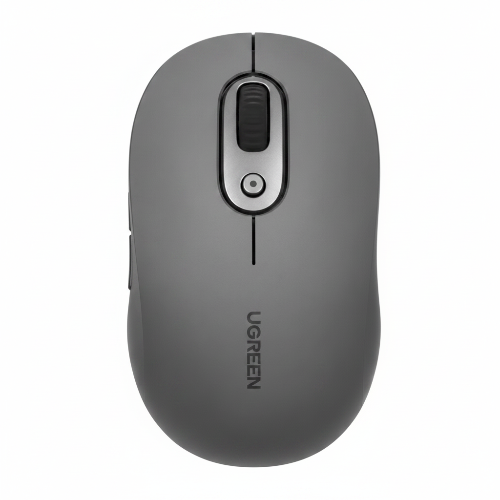
UGREEN M556S Bluetooth + 2.4GHz Dual Mode Wireless Dongle Mouse
UGREEN M556S Bluetooth + 2.4GHz Dual Mode Wireless Dongle Mouse
Couldn't load pickup availability
The UGREEN M556S Bluetooth + 2.4GHz Dual Mode Wireless Mouse is built for users who need more flexibility than a standard wireless mouse can provide. Instead of relying on only a USB receiver or Bluetooth, it offers both connection methods, making it suitable for a wide variety of modern computing setups.
You can connect the M556S to a compatible laptop through Bluetooth, keeping your USB ports available for other accessories. Alternatively, you can use the included 2.4GHz wireless dongle when working with a desktop PC or another device where a traditional wireless receiver is more convenient.
The M556S also focuses on productivity. It features six buttons, adjustable sensitivity with five DPI levels from 800 to 4000 DPI, quiet clicking and an ergonomic shape designed for comfortable everyday use.
Its wireless range reaches up to approximately 10 metres, giving you freedom from the restrictions of a wired mouse. The mouse uses an AA battery, making it convenient for users who prefer replaceable batteries rather than charging a built-in rechargeable battery.
Whether you are working from an office, studying at home, browsing on a laptop or managing a multi-device workstation, the M556S provides a practical combination of wireless freedom, precision and productivity-focused controls.
Bluetooth + 2.4GHz Dual-Mode Connectivity
The main advantage of the M556S is its dual wireless connectivity.
Bluetooth
Bluetooth is ideal for laptops and compatible devices where you want to avoid occupying a USB port.
It is particularly useful for:
- Laptops
- MacBooks
- Bluetooth-enabled PCs
- Compatible tablets
- Portable workstations
2.4GHz Wireless Dongle
The included wireless dongle provides a conventional 2.4GHz connection.
This is useful for desktop computers and devices without Bluetooth.
UGREEN's M556 documentation identifies Bluetooth 5.0 and 2.4GHz USB receiver connectivity, while the M556S is specifically identified as the M556S variant/product code 45757 in current listings.
Five Adjustable DPI Levels
The M556S provides five DPI levels ranging from 800 to 4000 DPI, allowing you to customize cursor speed according to your task.
| DPI Level | Best Use |
|---|---|
| 800 DPI | Detailed cursor control |
| Low/Medium | Precision office work |
| Medium | General productivity |
| High | Fast browsing |
| 4000 DPI | Large/high-resolution displays |
Lower DPI can provide more controlled movement, while higher DPI allows you to move the cursor farther with less physical mouse movement.
Six Buttons for Better Productivity
Unlike a basic three-button mouse, the M556S features six buttons. This provides additional controls that can make navigation and productivity more convenient.
Additional buttons can be particularly useful when:
- Browsing websites
- Working with documents
- Navigating applications
- Switching between pages
- Performing repetitive tasks
The exact function of programmable buttons can depend on the operating system and available UGREEN software.
Quiet Clicking for Shared Environments
The M556S is designed with silent-click operation, helping reduce the distracting sound produced by conventional mouse buttons.
This makes it particularly appropriate for:
- Offices
- Libraries
- Classrooms
- Study rooms
- Shared workspaces
- Home offices
- Late-night work
Silent does not mean completely soundless; mechanical operation can still produce some noise.
Ergonomic Shape
The M556S uses an ergonomic shape intended to provide a comfortable grip during everyday computer use.
It is designed for people who regularly use a mouse for:
- Office work
- Web browsing
- Documents
- Spreadsheets
- Programming
- Online classes
- Remote work
- General computing
Comfort ultimately depends on hand size, grip style and desk setup, so ergonomic design should not be considered a medical treatment.
Up to 10 Metres Wireless Range
The M556 family is specified with a wireless range of up to 10 metres under suitable conditions.
This provides more than enough range for normal desk use and gives you freedom to position your computer and mouse without being restricted by a cable.
Actual range can vary depending on:
- Wireless interference
- Walls
- Metal objects
- USB-port placement
- Nearby 2.4GHz devices
AA Battery Powered
The M556 uses one AA battery. Current UGREEN M556 documentation lists approximately 4–6 months of operation, depending on usage and conditions.
The replaceable battery design means you can quickly restore operation by installing a new AA battery rather than waiting for an internal battery to recharge.
Works Across Multiple Platforms
The M556 family supports a wide range of operating systems, including:
- Windows
- macOS
- Linux
- Chrome OS
- Android
- iOS/iPadOS
UGREEN's published M556 compatibility information includes Windows 7/8.1/10/11, macOS 10.5+, iOS 13.4+, iPadOS 14+, Linux, Chrome OS and Android 5.0+.
Actual functionality can vary depending on the host device and operating system.
Wide Surface Compatibility
UGREEN's M556 product information describes tracking across a variety of surfaces, including traditional mouse pads, wood, glass, paper, fabric and some soft surfaces.
For the most consistent cursor control, however, a quality mouse pad remains recommended.
Practical Design Details
The M556 family includes several small design details intended to improve everyday usability.
The scroll mechanism incorporates damping to make scrolling smoother and quieter, while the bottom uses low-friction feet for easier movement. The magnetic top cover provides access to the battery and wireless receiver.
The receiver can therefore remain with the mouse rather than being stored separately, which is useful when travelling.
Key Features
- UGREEN M556S
- Dual-mode wireless connectivity
- Bluetooth connectivity
- 2.4GHz wireless dongle
- Five adjustable DPI levels
- DPI range: 800–4000 DPI
- Six-button design
- Quiet/silent clicking
- Ergonomic shape
- Wireless range up to 10 metres
- Optical tracking
- AA battery powered
- Smooth scrolling
- Low-friction mouse feet
- Receiver storage
- Suitable for Windows, macOS, Linux and other compatible platforms
- Ideal for office, home, study and productivity use
- Portable wireless design
Specifications Chart
| Specification | Details |
|---|---|
| Brand | UGREEN |
| Model | M556S |
| Product Code | 45757 |
| Product Type | Dual-Mode Wireless Mouse |
| Connectivity | Bluetooth + 2.4GHz |
| Bluetooth | Bluetooth 5.0 |
| Wireless Receiver | USB 2.4GHz Dongle |
| Wireless Range | Up to 10 m |
| Sensor | Optical |
| DPI | 800–4000 DPI |
| DPI Levels | 5 |
| Buttons | 6 |
| Click Type | Quiet/Silent |
| Scroll Wheel | Quiet/smooth scrolling design |
| Battery | 1 × AA |
| Battery Life | Approx. 4–6 months* |
| Dimensions | Approx. 105 × 58.5 × 38 mm* |
| Weight | Approx. 130 g with battery* |
| Compatibility | Windows, macOS, Linux, Chrome OS, Android, iOS/iPadOS |
| Intended Use | Office / Productivity / Home / Study |
| Color | Gray/Black depending on SKU |
*Dimensions, weight and battery-life figures are based on current UGREEN M556 family specifications and may vary by regional M556S package/SKU.
UGREEN M556S vs Basic Wireless Mouse
| Feature | UGREEN M556S | Basic Wireless Mouse |
|---|---|---|
| Bluetooth | Yes | Usually No |
| 2.4GHz | Yes | Yes |
| Dual Mode | Yes | Usually No |
| DPI Levels | 5 | Varies |
| DPI Range | 800–4000 | Varies |
| Buttons | 6 | Usually 3 |
| Silent Click | Yes | Varies |
| Ergonomic Shape | Yes | Basic |
| Wireless Range | Up to 10 m | Varies |
| Battery | AA | Varies |
| Productivity | Excellent | Basic |
| Multi-Connection Flexibility | High | Limited |
Bluetooth vs 2.4GHz
| Feature | Bluetooth | 2.4GHz Dongle |
|---|---|---|
| USB Receiver | No | Yes |
| USB Port Required | No | Yes |
| Best For | Laptops | Desktop PCs |
| Bluetooth Required | Yes | No |
| Cable-Free | Yes | Yes |
| Setup | Pairing | Plug & Play |
| Portability | Excellent | Excellent |
| Main Advantage | Saves USB ports | Works without Bluetooth |
Who Should Buy UGREEN M556S?
Office Professionals
The M556S is a good choice for users who spend long hours working with documents, spreadsheets, email and business software.
Laptop Users
Bluetooth connectivity means you can use the mouse without occupying a USB port.
Desktop PC Users
The 2.4GHz dongle provides convenient wireless connectivity for PCs without Bluetooth.
Students
Quiet clicking and the ergonomic design make the M556S suitable for studying and online classes.
Remote Workers
Its wireless design helps create a clean and flexible home-office setup.
Programmers
The six-button layout and adjustable DPI can make navigation and repetitive computer tasks more convenient.
Designers and Creators
Adjustable sensitivity allows users to choose a cursor speed that suits detailed work and large displays.
Multi-Device Users
Bluetooth + 2.4GHz connectivity makes it useful for people who work across different computers.
Frequently Asked Questions
1. What is UGREEN M556S?
UGREEN M556S is a dual-mode wireless mouse supporting Bluetooth and 2.4GHz wireless connectivity.
2. What is the product code of UGREEN M556S?
Current product listings identify the M556S with product code 45757.
3. Does the M556S support Bluetooth?
Yes. It supports Bluetooth wireless connectivity.
4. Does it support 2.4GHz?
Yes. It can connect through a 2.4GHz wireless USB dongle.
5. How many DPI levels does it have?
The M556S offers five DPI levels from 800 to 4000 DPI.
6. How many buttons does the M556S have?
It features six buttons.
7. Is the M556S silent?
Yes. It is designed with quiet/silent clicking to reduce operating noise.
8. What is the wireless range?
The M556 family supports up to approximately 10 metres under suitable conditions.
9. What battery does it use?
It uses one AA battery.
10. Is it rechargeable?
No. The M556 uses a replaceable AA battery.
11. How long does the battery last?
UGREEN's M556 specifications quote approximately 4–6 months, depending on usage.
12. Can I use it with a laptop?
Yes. Bluetooth makes it especially convenient for compatible laptops.
13. Can I use it with a desktop PC?
Yes. You can use the 2.4GHz USB dongle.
14. Does it work with Mac?
Yes. The M556 family supports compatible macOS systems.
15. Does it work with Windows?
Yes. Windows compatibility is supported.
16. Does it work with Linux?
Yes. Linux is listed among supported platforms.
17. Can it work with Android?
Compatible Android devices can use the supported wireless connection methods. UGREEN lists Android 5.0 and later for the M556 family.
18. Is the M556S good for office work?
Yes. Its quiet operation, six buttons, adjustable DPI and wireless connectivity make it well suited to productivity.
19. Is it good for gaming?
It can handle casual gaming, but the M556S is primarily designed for productivity rather than competitive gaming.
20. Is the M556S ergonomic?
It has an ergonomic shape intended to provide comfortable everyday handling. Individual comfort depends on hand size, grip and working position.
21. Does the mouse store the USB receiver?
The M556 family design includes storage for the USB receiver inside the mouse.
22. Can I use the mouse on a glass surface?
UGREEN describes the M556 as capable of tracking across a wide variety of surfaces, including glass. However, surface performance can vary, and a mouse pad generally provides the most consistent tracking.
23. Is it suitable for students?
Yes. Its quiet operation and wireless design make it suitable for studying, online classes and general computer use.
24. Is it suitable for remote workers?
Yes. It is a practical choice for home-office productivity.
25. Is UGREEN M556S worth buying?
Yes, if you want a productivity-focused wireless mouse with Bluetooth + 2.4GHz connectivity, six buttons, five DPI levels, quiet clicking and an ergonomic design.
Conclusion
The UGREEN M556S Bluetooth + 2.4GHz Dual Mode Wireless Dongle Mouse is a versatile productivity mouse built for users who want more flexibility than a basic wireless mouse provides.
Its combination of Bluetooth 5.0, 2.4GHz wireless connectivity, six buttons, five DPI levels from 800 to 4000, quiet operation, ergonomic construction and up to 10 m wireless range makes it a strong option for office work, study, remote work and everyday computing.
For laptop users, Bluetooth helps keep USB ports free. For desktop users, the 2.4GHz dongle provides a convenient wireless connection. The six-button design and adjustable sensitivity also provide additional flexibility for productivity.
For customers searching for UGREEN M556S Price in Pakistan, this is a solid choice for anyone looking for a feature-rich dual-mode wireless mouse for everyday professional and personal use.
Share
You may also like
Customers also bought these products
No recommendations available at this time.