


Ugreen
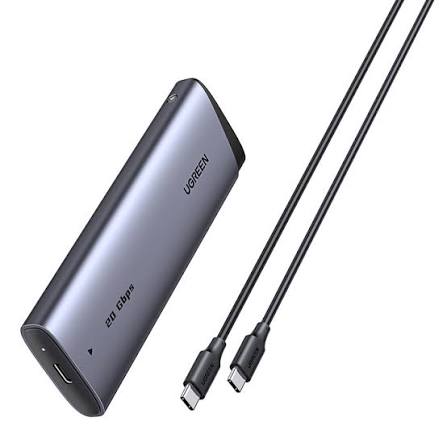
UGREEN CM767 55150 20Gbps M.2 NVMe/SATA SSD Enclosure – USB-C
UGREEN CM767 55150 20Gbps M.2 NVMe/SATA SSD Enclosure – USB-C
Couldn't load pickup availability
The UGREEN CM767 55150 20Gbps M.2 NVMe/SATA SSD Enclosure is a high-speed external SSD enclosure designed to transform a compatible internal M.2 SSD into a portable USB-C storage drive. It supports both PCIe NVMe and M.2 SATA SSDs in 2230, 2242, 2260 and 2280 sizes, making it a flexible option for reusing SSDs, upgrading storage and transferring large files.
Its USB 3.2 Gen 2x2 interface supports theoretical data transfer speeds of up to 20Gbps when connected to a compatible 20Gbps host port. The enclosure also supports UASP and TRIM, uses an aluminum-alloy body with a thermal pad for heat management, and works without a separate power adapter.
A key point for buyers is that 20Gbps is only achievable when the host computer has USB 3.2 Gen 2x2 support. Connecting the enclosure to a 10Gbps USB port will limit performance accordingly. The enclosure is also compatible with Thunderbolt systems, but the available USB mode can limit the connection to 10Gbps.
SSD is not included.
Detailed Description
Turn Your M.2 SSD Into a High-Speed External Drive
The UGREEN CM767 55150 provides a convenient way to reuse an existing M.2 SSD as portable external storage.
Instead of leaving an old SSD unused after upgrading your computer, you can install it inside the CM767 and connect it to a laptop, desktop or compatible mobile device through USB-C.
It is useful for:
- Portable file storage
- Data migration
- Computer upgrades
- Backup drives
- Large file transfers
- Video editing storage
- Photography workflows
- Game storage
- Reusing an old M.2 SSD
- Expanding computer storage
The enclosure supports both M.2 NVMe and M.2 SATA SSDs, making it considerably more versatile than an NVMe-only enclosure.
20Gbps USB 3.2 Gen 2x2 Performance
The CM767's biggest advantage is its USB 3.2 Gen 2x2 interface, which supports a theoretical maximum transfer rate of 20Gbps.
This is particularly useful when transferring large files such as:
- 4K video
- RAW photographs
- Large project folders
- Disk images
- Games
- Software libraries
- Backup archives
However, the full 20Gbps link requires a compatible USB 3.2 Gen 2x2 20Gbps port on the host device.
The actual file-transfer speed will also depend on the SSD, host computer, file system, workload and other hardware limitations.
Compatible With NVMe and SATA M.2 SSDs
The CM767 is a dual-protocol M.2 enclosure.
It supports:
- M.2 NVMe PCIe SSDs
- M.2 SATA/NGFF SSDs
Supported physical sizes include:
- 2230
- 2242
- 2260
- 2280
This makes the enclosure useful when you have different types of M.2 SSDs and want one external enclosure rather than purchasing separate NVMe and SATA cases.
Important: mSATA drives are not supported.
M-Key and B+M-Key Compatibility
The CM767 supports compatible M.2 drives using M-Key and B+M-Key configurations.
The physical keying and protocol still matter, so buyers should verify their SSD before installation.
This enclosure is not designed for every M.2 drive simply because the drive is physically M.2.
Supports 2230, 2242, 2260 and 2280
Whether you have a short M.2 2230 drive or the common 2280 format, the CM767 accommodates the supported lengths.
| M.2 Size | Supported |
|---|---|
| 2230 | Yes |
| 2242 | Yes |
| 2260 | Yes |
| 2280 | Yes |
The supported dimensions are confirmed in UGREEN's product information.
Aluminum Alloy Construction
The enclosure uses an aluminum-alloy housing designed to provide both durability and heat dissipation.
M.2 SSDs can generate significant heat during sustained transfers, particularly high-performance NVMe drives. The metal enclosure works together with the included thermal pad to transfer heat away from the SSD.
UGREEN specifically highlights the aluminum body and thermal pad as part of the CM767's thermal-management design.
Thermal Pad for Better Heat Dissipation
The included silicone thermal pad sits between the SSD and enclosure to help transfer heat from the SSD to the aluminum housing.
This is especially useful during:
- Large file transfers
- SSD cloning
- Video editing
- Backup operations
- Extended storage workloads
Good thermal management can help reduce performance degradation caused by excessive SSD temperatures.
UASP and TRIM Support
The CM767 supports both UASP and TRIM.
UASP (USB Attached SCSI Protocol) improves the way compatible USB storage devices handle commands and can reduce protocol overhead compared with traditional USB mass-storage operation.
TRIM allows supported operating systems to communicate information about unused SSD blocks, helping maintain SSD performance over time.
Both features require compatible SSDs, operating systems and host hardware.
RTL9220 Controller
The CM767 uses the Realtek RTL9220 controller according to model-specific documentation.
This controller enables the enclosure's dual-protocol M.2 support and USB connectivity.
Tool-Free and Simple Installation
The CM767 is designed for straightforward SSD installation.
The SSD is secured inside the enclosure and the assembly slides into the aluminum housing.
UGREEN describes the installation as simple, requiring no external power supply or dedicated driver for normal operation.
This makes it convenient when switching between internal and external storage configurations.
USB-C Connectivity
The enclosure uses USB-C for its external connection.
A USB-C to USB-C cable is included with the documented package, making it easy to connect to compatible USB-C laptops and computers.
For the best performance, the host USB-C port should specifically support USB 3.2 Gen 2x2 at 20Gbps.
No Separate Power Adapter Required
The CM767 draws power through USB-C, so it does not require a separate wall adapter for normal operation.
The model documentation specifies a power input of up to 5V/3A.
This makes the enclosure convenient for mobile and laptop use.
Broad Operating System Compatibility
The CM767 supports major desktop operating systems, including:
- Windows
- macOS
- Linux
Model-specific UGREEN documentation also identifies Android and iOS compatibility.
Actual mobile-device compatibility can depend on the phone/tablet's USB-C functionality and available power.
Excellent for SSD Upgrades
The CM767 can be especially useful after upgrading a laptop or desktop.
For example:
Old M.2 SSD → UGREEN CM767 → USB-C → New Computer
This lets you continue using a previous SSD as external storage instead of leaving it unused.
It can also be used during data migration when moving files between systems.
Great for Content Creators
Photographers, videographers and editors often work with large files.
A fast NVMe SSD installed in the CM767 can provide a portable workspace for:
- RAW photos
- 4K footage
- Video projects
- Lightroom libraries
- Editing assets
- Project backups
For the best results, use an SSD and host computer that can actually take advantage of the enclosure's 20Gbps interface.
Important: 20Gbps Requires USB 3.2 Gen 2x2
This is one of the most important things to understand before purchasing.
The enclosure is capable of 20Gbps, but the computer must also provide a compatible USB 3.2 Gen 2x2 20Gbps port.
If connected to:
- USB 3.2 Gen 2 10Gbps → up to 10Gbps class
- Thunderbolt 3/4 USB compatibility → commonly up to 10Gbps for this enclosure
- USB 3.0/USB 3.2 Gen 1 → up to 5Gbps class
UGREEN explicitly notes that Thunderbolt 4 and lower Thunderbolt ports can limit this enclosure to 10Gbps.
Key Features
- UGREEN CM767
- Model/SKU 55150
- M.2 NVMe + SATA SSD enclosure
- USB-C interface
- USB 3.2 Gen 2x2
- Up to 20Gbps theoretical transfer speed
- Supports NVMe PCIe SSDs
- Supports M.2 SATA/NGFF SSDs
- Supports M-Key
- Supports compatible B+M-Key drives
- Supports 2230 / 2242 / 2260 / 2280
- Supports up to 8TB
- UASP support
- TRIM support
- Realtek RTL9220 controller
- Aluminum-alloy housing
- Silicone thermal pad
- Heat-dissipation design
- USB powered
- No separate power adapter
- Plug-and-play operation
- Windows compatible
- macOS compatible
- Linux compatible
- Android compatible
- iOS compatible
- Portable design
- SSD not included
Specifications Chart
| Specification | Details |
|---|---|
| Brand | UGREEN |
| Model | CM767 |
| SKU | 55150 |
| Product Type | M.2 NVMe/SATA SSD Enclosure |
| External Interface | USB-C |
| USB Standard | USB 3.2 Gen 2x2 |
| Maximum Transfer Rate | 20Gbps |
| Internal Interface | M.2 |
| Supported Protocols | NVMe / SATA |
| Compatible Key | M-Key / B+M Key |
| Supported Sizes | 2230 / 2242 / 2260 / 2280 |
| Maximum Capacity | Up to 8TB |
| UASP | Yes |
| TRIM | Yes |
| Controller | Realtek RTL9220 |
| Material | Aluminum Alloy + ABS |
| Thermal Pad | Yes |
| Power Input | 5V / 3A Max |
| Power Source | USB-C |
| Separate Adapter | Not Required |
| Operating Systems | Windows / macOS / Linux |
| Mobile Compatibility | Android / iOS |
| Color | Silver/Grey |
| SSD Included | No |
Specifications are based primarily on UGREEN's official CM767/55150 listing and model-specific documentation.
M.2 SSD Compatibility Chart
| SSD Type / Size | Compatibility |
|---|---|
| M.2 NVMe 2230 | Yes |
| M.2 NVMe 2242 | Yes |
| M.2 NVMe 2260 | Yes |
| M.2 NVMe 2280 | Yes |
| M.2 SATA 2230 | Yes, where compatible key/protocol applies |
| M.2 SATA 2242 | Yes |
| M.2 SATA 2260 | Yes |
| M.2 SATA 2280 | Yes |
| M-Key NVMe | Yes |
| B+M Key Compatible Drive | Yes |
| mSATA | No |
| 2.5-inch SATA | No |
| 3.5-inch SATA | No |
| SSD With Large Integrated Heatsink | Generally not suitable |
UGREEN identifies 2230/2242/2260/2280 NVMe/SATA support and specifically excludes mSATA.
Speed Comparison
| Connection | Theoretical Maximum |
|---|---|
| USB 3.0 / USB 3.2 Gen 1 | 5Gbps |
| USB 3.2 Gen 2 | 10Gbps |
| USB 3.2 Gen 2x2 | 20Gbps |
| SATA III | 6Gbps |
| CM767 USB Interface | 20Gbps |
The CM767's 20Gbps rating refers to its USB 3.2 Gen 2x2 interface. Actual storage performance depends on the SSD and host system.
UGREEN CM767 vs 10Gbps M.2 Enclosure
| Feature | UGREEN CM767 55150 | Typical 10Gbps Enclosure |
|---|---|---|
| USB Interface | USB 3.2 Gen 2x2 | USB 3.2 Gen 2 |
| Maximum Link Speed | 20Gbps | 10Gbps |
| NVMe Support | Yes | Usually |
| SATA M.2 Support | Yes | Varies |
| UASP | Yes | Usually |
| TRIM | Yes | Varies |
| Thermal Pad | Yes | Varies |
| Aluminum Housing | Yes | Usually |
| Max Capacity | Up to 8TB | Varies |
| Best For | High-speed storage | General external SSD use |
UGREEN CM767 vs 2.5-Inch SATA Enclosure
| Feature | CM767 55150 | 2.5-Inch SATA Enclosure |
|---|---|---|
| Drive Type | M.2 NVMe/SATA | 2.5" SATA |
| NVMe | Yes | No |
| M.2 SATA | Yes | No |
| USB Interface | 20Gbps | Usually 5Gbps/10Gbps |
| Compactness | Excellent | Larger |
| UASP | Yes | Often |
| TRIM | Yes | Depends |
| Best For | M.2 SSDs | 2.5" HDD/SSD |
Who Should Buy UGREEN CM767 55150?
PC & Laptop Users
Ideal for anyone who wants to turn an internal M.2 SSD into portable USB-C storage.
Users Upgrading Their SSD
If you replace your laptop's M.2 SSD, the old drive can be reused as an external drive with the CM767.
Content Creators
Excellent for photographers, video editors and designers working with large files.
Gamers
A fast external SSD can be useful for game storage and file transfers, provided the specific gaming platform supports the enclosure and drive configuration.
IT Professionals
Useful for cloning, data migration, diagnostics and moving storage between systems.
Backup Users
An M.2 SSD installed in the CM767 can serve as a compact backup drive.
Professionals With Large Files
Architects, engineers, developers and other professionals can benefit from fast portable storage.
Frequently Asked Questions
1. What is UGREEN CM767 55150?
It is a USB-C M.2 SSD enclosure supporting both NVMe and SATA M.2 SSDs.
2. What is the maximum speed?
The enclosure supports up to 20Gbps through USB 3.2 Gen 2x2.
3. Does it support NVMe SSDs?
Yes.
4. Does it support M.2 SATA SSDs?
Yes. The CM767 supports M.2 SATA/NGFF as well as NVMe SSDs.
5. Does it support 2280 SSDs?
Yes.
6. Does it support 2230 SSDs?
Yes.
7. Does it support 2242 SSDs?
Yes.
8. Does it support 2260 SSDs?
Yes.
9. Does it support M-Key SSDs?
Yes.
10. Does it support B+M-Key SSDs?
Compatible B+M-Key M.2 drives are supported according to the model specifications.
11. Does it support mSATA?
No. mSATA is not supported.
12. Does it support 2.5-inch SATA HDDs?
No. It is designed for M.2 SSDs.
13. Does it support an M.2 NVMe SSD with a heatsink?
Large integrated heatsinks may prevent the SSD from fitting inside the enclosure. The enclosure is designed for standard bare M.2 SSDs.
14. Is the SSD included?
No. SSD is not included.
15. Does it require a power adapter?
No. It is powered through USB-C.
16. Does it support UASP?
Yes.
17. Does it support TRIM?
Yes.
18. What controller does it use?
The model documentation identifies the Realtek RTL9220 controller.
19. Does it work with Windows?
Yes.
20. Does it work with macOS?
Yes.
21. Does it work with Linux?
Yes.
22. Can I use it with Android?
Model-specific UGREEN documentation lists Android compatibility, although actual support depends on the Android device's USB-C/OTG capabilities and power availability.
23. Can I use it with an iPhone?
UGREEN documentation lists iOS compatibility, but the exact experience depends on the iPhone model, USB interface and power requirements.
24. Why am I not getting 20Gbps?
Your computer must have a USB 3.2 Gen 2x2 20Gbps port. A normal 10Gbps USB-C port will limit the enclosure to the lower interface speed.
25. Does Thunderbolt 4 provide 20Gbps with this enclosure?
Not necessarily. UGREEN notes that Thunderbolt 4 and lower Thunderbolt interfaces can limit this enclosure to 10Gbps USB operation.
26. Is USB-C the same as 20Gbps?
No. USB-C describes the physical connector. The actual speed depends on the USB protocol supported by the port.
27. Can I use a USB-C to USB-A cable?
Potentially, if the cable and host support the required USB standard, but you will not necessarily achieve 20Gbps. For maximum performance, use the appropriate USB-C connection on a USB 3.2 Gen 2x2 host.
28. Is the enclosure good for video editing?
Yes, particularly when paired with a fast NVMe SSD and a computer with a 20Gbps USB 3.2 Gen 2x2 port.
29. Can I use it for SSD cloning?
Yes, it can be used as the external storage connection during software-based cloning, provided your cloning software and operating system support the drives involved.
30. Can I use an old laptop M.2 SSD in it?
Yes, if the SSD is a supported M.2 NVMe or SATA model and uses a supported size/key configuration.
31. Does it get hot?
M.2 SSDs can generate heat during sustained workloads. The CM767 uses an aluminum housing and thermal pad to improve heat dissipation.
32. What capacity does it support?
The model is specified for SSDs up to 8TB.
33. Is the enclosure portable?
Yes. Its compact M.2 form factor makes it suitable for carrying with a laptop or storing in a computer bag.
34. Does it require drivers?
UGREEN describes it as plug-and-play and states that no additional drivers are required for normal use.
35. Is UGREEN CM767 55150 worth buying?
Yes, particularly if you need a versatile enclosure that supports both NVMe and SATA M.2 SSDs and can take advantage of 20Gbps USB 3.2 Gen 2x2 connectivity.
Important Buying Note
Before purchasing the UGREEN CM767 55150, check three things:
1. SSD protocol:
Your drive must be a compatible M.2 NVMe or M.2 SATA/NGFF SSD.
2. SSD size:
Supported sizes are 2230, 2242, 2260 and 2280.
3. Computer USB port:
For the advertised 20Gbps, your computer needs USB 3.2 Gen 2x2. A USB-C connector alone does not guarantee 20Gbps.
Also, mSATA SSDs are not supported, and the enclosure is not intended for 2.5-inch SATA drives.
Conclusion
The UGREEN CM767 55150 20Gbps M.2 NVMe/SATA SSD Enclosure is a versatile and high-performance storage accessory for users who want to turn an M.2 SSD into a portable external drive.
Its combination of NVMe + SATA compatibility, USB 3.2 Gen 2x2 20Gbps connectivity, UASP, TRIM, aluminum construction and thermal-pad cooling makes it suitable for demanding storage applications ranging from everyday backups to professional file transfers and content-creation workflows.
For customers searching for UGREEN CM767 55150 Price in Pakistan, this is an especially attractive option if they already own a compatible M.2 SSD and have a computer with a 20Gbps USB 3.2 Gen 2x2 port.
SSD is not included.
Share
You may also like
Customers also bought these products
No recommendations available at this time.