


Ugreen
UGREEN CM475 15623 5-in-1 USB-C/USB-A Hub with Gigabit Ethernet
UGREEN CM475 15623 5-in-1 USB-C/USB-A Hub with Gigabit Ethernet
Couldn't load pickup availability
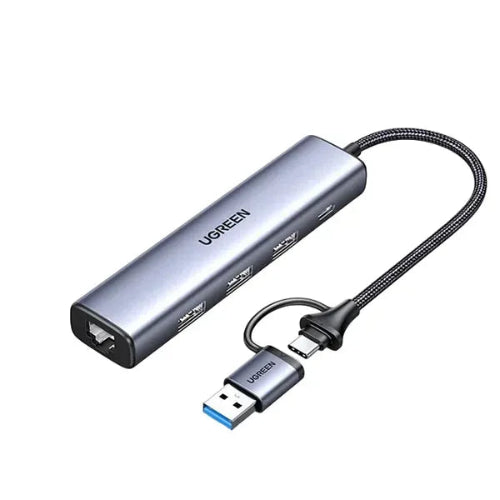
The UGREEN CM475 15623 5-in-1 USB-C/USB-A Hub with Gigabit Ethernet is a versatile connectivity hub designed for laptops, tablets and computers that need additional USB ports and reliable wired networking. Its standout feature is the dual USB-C and USB-A host connection, allowing the same hub to work with both newer USB-C devices and computers equipped with traditional USB-A ports.
The hub provides three USB 3.0 ports, a Gigabit RJ45 Ethernet port, and an additional USB-C power input, giving you a practical combination of high-speed data connectivity and stable wired internet in a compact desktop-friendly design. The USB 3.0 ports support theoretical speeds of up to 5Gbps, while the Ethernet port automatically negotiates between 10/100/1000Mbps.
The CM475 is particularly useful for users who want to connect external storage, keyboards, mice, printers and other USB peripherals while also using a wired Ethernet connection. Its integrated cable is approximately 20cm long, and the aluminum-alloy housing makes it suitable for office, home, travel and workstation use.
Detailed Description
5-in-1 Connectivity for Modern and Older Computers
One of the biggest advantages of the UGREEN CM475 is its flexible host connection.
Unlike hubs designed exclusively for USB-C laptops, the CM475 can connect through USB-C or USB-A, making it useful across a wider range of computers.
Once connected, you gain access to:
- 3 × USB 3.0 ports
- 1 × Gigabit Ethernet port
- 1 × USB-C power input
This makes it an excellent solution for users who want to expand connectivity without purchasing separate USB and Ethernet adapters.
Dual USB-C + USB-A Connectivity
The UGREEN CM475 is designed with a dual-interface approach, allowing it to work with both newer and older computers.
You can use it with:
- USB-C laptops
- USB-C tablets
- USB-A laptops
- Desktop PCs
- Older computers
- Compatible Mac systems
- Windows computers
- Chromebook devices
This flexibility is particularly useful in offices where different computers may use different USB standards.
Three USB 3.0 Ports with 5Gbps Transfer Speeds
The CM475 includes three USB 3.0 ports, each designed for high-speed USB connectivity.
USB 3.0 provides a theoretical transfer rate of up to 5Gbps, making the hub suitable for transferring files between your computer and compatible USB devices.
You can connect devices such as:
- USB flash drives
- External SSDs
- External hard drives
- Keyboards
- Mice
- Printers
- Card readers
- USB controllers
- Cameras
- Other USB peripherals
For maximum performance, connect high-speed storage devices to the USB 3.0 ports and use compatible USB 3.0 cables.
Gigabit Ethernet for Stable Wired Internet
The integrated RJ45 Gigabit Ethernet port is one of the CM475's most useful features.
It supports automatic negotiation at:
10Mbps / 100Mbps / 1000Mbps
This allows compatible computers to access a wired network without requiring a separate Ethernet adapter.
A wired Ethernet connection can be particularly useful for:
- Online gaming
- Video conferencing
- Large file transfers
- Office networks
- NAS access
- Streaming
- Remote work
- Stable internet connectivity
Compared with Wi-Fi, wired Ethernet can provide a more consistent connection in environments where wireless interference or weak Wi-Fi coverage is an issue.
1000Mbps Gigabit Networking
When connected to a compatible Gigabit Ethernet network, the CM475 can operate at up to 1000Mbps.
This makes it suitable for modern home and office networks where Gigabit Ethernet infrastructure is available.
Keep in mind that actual internet speeds depend on your ISP, router, network infrastructure and connected device. The 1000Mbps specification refers to the Ethernet interface's supported link speed rather than a guarantee of internet throughput.
USB-C Power Input
The CM475 includes an additional USB-C female power port for external power input.
The manual specifies a 5V/2A power input for the hub.
This can be useful when connecting multiple USB peripherals or devices that require additional power.
It is important to distinguish this from a modern 100W USB-C Power Delivery hub. The CM475's documentation specifies 5V/2A power input, so it should not be marketed as a 100W laptop charging dock.
Designed for Multi-Device Workstations
The UGREEN CM475 is particularly useful for users who have several peripherals but limited ports on their computer.
For example, a laptop workstation can use the hub for:
Laptop → CM475 → External SSD + Keyboard + Mouse + Gigabit Ethernet
This allows you to keep essential accessories connected without repeatedly switching cables.
Compact Aluminum Construction
The CM475 uses an aluminum-alloy housing designed for durability and heat dissipation.
Its compact design makes it easy to carry in a laptop bag or backpack.
The approximately 20cm cable provides enough flexibility to position the hub comfortably beside a laptop or desktop setup.
Plug-and-Play Convenience
The CM475 is designed for straightforward installation.
According to the product manual, its RJ45 Ethernet adapter is driver-free on Windows 8/8.1/10 and macOS, while Windows 7 may require the appropriate driver. The manual also lists Windows, macOS and Linux among supported operating systems.
Other operating systems such as iPadOS and Chrome OS are also listed by product retailers for this model.
Broad Device Compatibility
The UGREEN CM475 can be used with a broad range of computers and operating systems.
Compatibility listings include:
- Windows
- macOS
- Linux
- iPadOS
- Chrome OS
Compatible host devices may include laptops, desktop computers, tablets and other systems with the required USB-A or USB-C connectivity.
Key Features
- UGREEN CM475
- Product number 15623
- 5-in-1 USB hub
- Dual USB-C + USB-A host connectivity
- 3 × USB 3.0 ports
- USB 3.0 speeds up to 5Gbps
- 1 × Gigabit RJ45 Ethernet
- Ethernet supports 10/100/1000Mbps
- Additional USB-C power input
- 5V/2A power input specification
- Approximately 20cm cable
- Aluminum-alloy housing
- Compact and portable
- Plug-and-play operation
- Supports Windows
- Supports macOS
- Supports Linux
- Compatible with Chrome OS
- Compatible with iPadOS
- Suitable for external storage
- Suitable for keyboards and mice
- Suitable for printers
- Suitable for office workstations
- Suitable for gaming and wired networking
- Suitable for remote work and travel
Specifications Chart
| Specification | Details |
|---|---|
| Brand | UGREEN |
| Model | CM475 |
| Product Number | 15623 |
| Product Type | 5-in-1 USB Hub |
| Host Interface | USB-C + USB-A |
| USB Ports | 3 × USB 3.0 |
| USB Data Speed | Up to 5Gbps |
| Ethernet | 1 × RJ45 Gigabit |
| Ethernet Speed | 10/100/1000Mbps |
| Power Input | USB-C |
| Power Specification | 5V/2A |
| Cable Length | Approx. 20cm |
| Housing | Aluminum Alloy |
| Color | Gray / Dark Gray |
| Operating Systems | Windows / macOS / Linux |
| Additional Compatibility | Chrome OS / iPadOS |
| Installation | Plug & Play |
| Ethernet Auto-Negotiation | Yes |
| Intended Use | Data + Networking |
| HDMI | No |
| DisplayPort | No |
| SD Card Reader | No |
| microSD Reader | No |
| Audio Port | No |
Specifications are based on the CM475 user manual and model-specific listings.
Port Configuration
| Port | Function | Specification |
|---|---|---|
| USB-A 3.0 | Data | Up to 5Gbps |
| USB-A 3.0 | Data | Up to 5Gbps |
| USB-A 3.0 | Data | Up to 5Gbps |
| RJ45 | Wired Network | 10/100/1000Mbps |
| USB-C | Power Input | 5V/2A |
UGREEN CM475 vs Basic USB-C Hub
| Feature | UGREEN CM475 | Basic USB-C Hub |
|---|---|---|
| USB-A Host | Yes | Usually No |
| USB-C Host | Yes | Yes |
| USB 3.0 Ports | 3 | Varies |
| Data Speed | 5Gbps | Varies |
| Gigabit Ethernet | Yes | Often No |
| External Power Input | Yes | Varies |
| Aluminum Housing | Yes | Varies |
| Portable | Yes | Yes |
| Multi-OS Support | Yes | Varies |
| Best Feature | USB + Ethernet versatility | USB expansion |
UGREEN CM475 vs USB Ethernet Adapter
| Feature | UGREEN CM475 | USB Ethernet Adapter |
|---|---|---|
| Gigabit Ethernet | Yes | Yes |
| USB Expansion | 3 × USB 3.0 | Usually No |
| USB-C/USB-A Host | Both | Usually One |
| 5Gbps USB Ports | Yes | No |
| External Power | Yes | Usually No |
| Workstation Use | Excellent | Limited |
| Port Expansion | Yes | No |
| Networking | Gigabit | Usually Gigabit |
| Best For | Networking + USB expansion | Ethernet only |
UGREEN CM475 vs USB-C Docking Station
| Feature | CM475 15623 | Full USB-C Dock |
|---|---|---|
| USB Ports | 3 × USB 3.0 | Usually More |
| Gigabit Ethernet | Yes | Usually |
| HDMI | No | Usually |
| DisplayPort | No | Often |
| SD Card | No | Often |
| USB-C PD | No* | Usually |
| Portability | Excellent | Moderate |
| Size | Compact | Larger |
| Host Flexibility | USB-C + USB-A | Usually USB-C |
| Best For | USB + Ethernet | Full workstation expansion |
*The CM475 has a USB-C power input, but the model documentation specifies 5V/2A rather than a 100W USB-C PD laptop charging implementation.
Who Should Buy UGREEN CM475 15623?
Laptop Users with Limited Ports
If your laptop only has one or two USB ports, the CM475 gives you three USB 3.0 ports plus Gigabit Ethernet.
Users Who Need Wired Ethernet
For laptops without an RJ45 port, the CM475 provides a convenient way to add wired networking.
Office Professionals
Connect your keyboard, mouse, external drive and Ethernet cable through one compact hub.
Remote Workers
The hub is useful for creating a stable work-from-home setup with wired networking and multiple USB peripherals.
Gamers
A wired Gigabit Ethernet connection can be useful for online gaming, while the USB ports can accommodate gaming peripherals.
Content Creators
Connect external SSDs, cameras, card readers and other USB devices while maintaining wired network connectivity.
Students
The compact design makes it easy to carry between home, university and other workspaces.
Users with Both USB-A and USB-C Computers
The dual host interface makes the CM475 particularly useful for people who switch between older USB-A systems and newer USB-C laptops.
Frequently Asked Questions
1. What is UGREEN CM475 15623?
The UGREEN CM475 15623 is a 5-in-1 USB hub with USB-A/USB-C host connectivity, three USB 3.0 ports and Gigabit Ethernet.
2. How many USB ports does it have?
It has three USB 3.0 ports for connecting compatible peripherals.
3. What is the maximum USB data speed?
The USB 3.0 ports have a theoretical maximum transfer rate of 5Gbps.
4. Does it support Gigabit Ethernet?
Yes. Its RJ45 Ethernet port supports 10/100/1000Mbps.
5. Can it connect to both USB-C and USB-A computers?
Yes. The CM475 is designed for dual USB-C and USB-A host connectivity.
6. Can I connect an external SSD?
Yes. Compatible USB 3.0 external SSDs can be connected through the hub.
7. Can I connect an external hard drive?
Yes. Compatible external hard drives can be connected through the USB 3.0 ports.
8. Can I connect a keyboard and mouse?
Yes. You can connect compatible USB keyboards and mice.
9. Can I use it with a printer?
Yes. Compatible USB printers can be connected.
10. Does it support Ethernet at 1000Mbps?
Yes. The RJ45 port supports Gigabit Ethernet with automatic 10/100/1000Mbps negotiation.
11. Does it support 5Gbps Ethernet?
No. The Ethernet interface is Gigabit Ethernet, with a maximum link speed of 1000Mbps.
12. Does it have HDMI?
No. The CM475 does not provide HDMI video output.
13. Does it support external monitors?
Not through the CM475 itself. There is no HDMI or DisplayPort output on this model.
14. Does it have an SD card reader?
No. SD and microSD card slots are not included.
15. Does it have a USB-C data port?
The USB-C connection is used as the host interface and the additional USB-C port is specified as a power input. The three dedicated peripheral ports are USB-A 3.0.
16. Can I charge my laptop through the hub?
The CM475 has a USB-C power input, but its documentation specifies 5V/2A. It should therefore not be treated as a 100W USB-C PD charging dock.
17. Does it require a separate power adapter?
The hub supports additional power through its USB-C power input. The manual specifies a 5V/2A power input.
18. Does it work with Windows?
Yes.
19. Does it work with macOS?
Yes. The manual specifically lists macOS support.
20. Does it work with Linux?
Yes, Linux is listed among the supported operating systems.
21. Does it work with Chrome OS?
Model-specific product listings identify Chrome OS compatibility.
22. Does it work with iPadOS?
Compatible iPadOS devices can use the hub where the required USB functionality is supported. Model-specific listings include iPadOS compatibility.
23. Is the Ethernet connection plug and play?
The manual states that the RJ45 adapter is driver-free on Windows 8/8.1/10 and macOS.
24. Does Windows 7 support it?
Windows 7 may require the appropriate UGREEN driver according to the CM475 manual.
25. What is the cable length?
The integrated cable is approximately 20cm.
26. Is the housing aluminum?
Yes. The CM475 uses an aluminum-alloy housing.
27. Can I use it for gaming?
Yes. You can use the USB ports for compatible gaming peripherals and the Gigabit Ethernet port for wired networking.
28. Can I use it for remote work?
Yes. It is well suited to remote work because it combines USB expansion and wired Ethernet in one compact device.
29. Can all three USB ports be used simultaneously?
Yes, the hub is designed to provide three USB 3.0 peripheral connections simultaneously, subject to available host bandwidth and power.
30. Is UGREEN CM475 worth buying?
Yes, especially if you need both USB expansion and Gigabit Ethernet and want the flexibility of connecting the hub to either USB-C or USB-A computers.
Important Compatibility & Charging Note
The UGREEN CM475 15623 should not be confused with UGREEN's newer USB-C docking stations that support 100W Power Delivery.
The CM475's additional USB-C port is documented as a 5V/2A power input, while its primary strengths are USB 3.0 expansion and Gigabit Ethernet.
Similarly, the hub does not provide HDMI, DisplayPort, SD card or microSD connectivity.
If your priority is USB ports + wired Ethernet, the CM475 is a strong fit. If you need HDMI, high-wattage laptop charging or memory-card readers, a larger multiport docking station would be more appropriate.
Conclusion
The UGREEN CM475 15623 5-in-1 USB-C/USB-A Hub with Gigabit Ethernet is a practical connectivity solution for users who need more USB ports and stable wired networking without carrying multiple adapters.
Its three USB 3.0 ports provide up to 5Gbps theoretical data transfer, while the Gigabit RJ45 port supports 10/100/1000Mbps Ethernet. The dual USB-C/USB-A host design also makes it more versatile than many USB-C-only hubs.
With its compact aluminum construction and approximately 20cm cable, the CM475 is suitable for office work, remote work, gaming, external storage, travel and everyday laptop use.
For customers in Pakistan searching for a UGREEN CM475 15623 5-in-1 USB Hub with Gigabit Ethernet Price in Pakistan, this model is an excellent choice when USB expansion and wired networking are the primary requirements.
Share
You may also like
Customers also bought these products
No recommendations available at this time.