


Ugreen
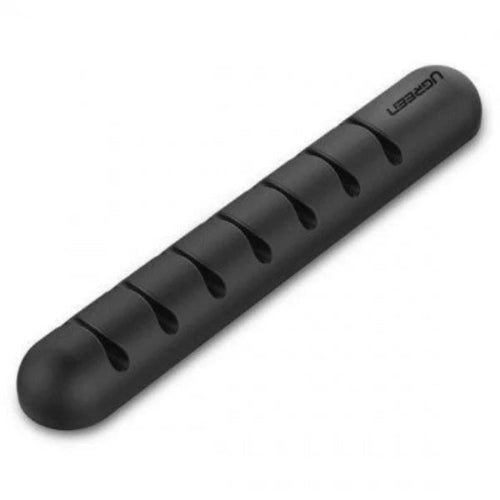
UGREEN 50320 Cable Organizer Clips
UGREEN 50320 Cable Organizer Clips
Couldn't load pickup availability
The UGREEN 50320 Cable Organizer Clips are a simple and practical cable-management solution for keeping charging cables, USB cables, data cables and other wires neatly arranged and within easy reach. Designed for desks, workstations, bedside tables, TV units and office setups, these compact cable clips help prevent cables from falling behind furniture, becoming tangled or creating unnecessary clutter.
Instead of repeatedly searching for a charging cable that has slipped behind your desk, the UGREEN 50320 lets you keep frequently used cables positioned exactly where you need them. The compact adhesive cable clips can be attached to suitable smooth surfaces and used to route individual cables in a cleaner and more organized manner.
For a modern workstation with multiple devices such as a laptop, smartphone, keyboard, mouse, headphones, USB hub and charging accessories, proper cable organization can make a noticeable difference. The UGREEN 50320 Cable Organizer Clips provide an easy way to improve cable management without requiring a complicated cable tray or permanent installation.
Detailed Description
Keep Your Cables Organized
Cable clutter is one of the most common problems on computer desks and home workstations. Charging cables can slide behind the desk, USB cables can become tangled, and frequently used wires can be difficult to locate.
The UGREEN 50320 Cable Organizer Clips are designed to solve these everyday problems.
Simply position the clips where you want your cables to stay and route your cables through them. This keeps cables neatly positioned instead of allowing them to move freely across your desk.
The clips are particularly useful for cables that you connect and disconnect frequently, such as:
- USB-C charging cables
- Lightning cables
- Micro-USB cables
- USB-A cables
- Headphone cables
- Mouse cables
- Keyboard cables
- Power cables
- Audio cables
- Data cables
Ideal for Desk Cable Management
A computer desk can quickly become cluttered when several cables are connected at once.
You may have:
Laptop + Monitor + Keyboard + Mouse + Phone Charger + USB Hub + Headphones
Without proper organization, these cables can overlap and become difficult to manage.
The UGREEN 50320 clips help create designated cable paths, keeping frequently used wires organized and easier to access.
They can be positioned near the edge of a desk, behind a monitor, beside a bedside table or wherever cables need to remain in place.
Prevent Cables from Falling
One of the most useful applications of cable clips is preventing cables from falling behind furniture.
For example, you can place a clip near the edge of your desk and keep your phone charging cable secured in it. When you unplug your phone, the cable remains accessible instead of falling onto the floor.
This is especially convenient for:
- Phone charging cables
- Earphone cables
- USB cables
- Desk accessories
- Frequently used charging leads
Key Features
- Genuine UGREEN cable-management accessory
- Model 50320
- Compact cable organizer clips
- Designed for everyday cable management
- Helps reduce cable clutter
- Keeps cables organized and accessible
- Helps prevent cables from falling behind desks
- Suitable for home and office use
- Excellent for computer desks
- Useful for bedside tables
- Suitable for TV cabinets and entertainment centers
- Suitable for workstations
- Suitable for charging cables
- Suitable for USB cables
- Suitable for audio cables
- Easy to install
- Compact and discreet design
- Space-saving cable organization
- Suitable for organizing individual cables
- Helps create cleaner-looking workspaces
- Lightweight design
- Convenient for frequently used cables
Clean Up Your Workstation
A well-organized desk is easier to use and maintain.
Instead of letting cables spread across the workspace, the UGREEN 50320 clips allow you to keep important cables in defined positions.
You can use them to organize:
Laptop Desk
Keep your USB-C charger, mouse cable and other frequently used connections routed neatly around your laptop.
Gaming Setup
Organize mouse, keyboard, headset and charging cables around a gaming desk.
Home Office
Keep phone and laptop charging cables accessible while reducing unnecessary clutter.
Bedside Table
Prevent smartphone charging cables from falling behind the nightstand.
TV Console
Keep USB and other small cables organized around entertainment equipment.
Easy Cable Access
Cable management should not make your cables difficult to use.
The UGREEN 50320 is useful because cables can remain positioned close to where they are needed.
For example, a charging cable can be secured near the front edge of a desk. When you need to charge your phone, simply pull the cable toward the device and connect it.
When you're finished, the cable stays in its organized position.
Compact Design
Unlike large cable-management boxes and trays, cable clips take up very little space.
This makes them particularly useful for smaller desks, bedside tables and compact workstations.
Their small footprint allows them to organize cables without becoming another large object on your desk.
Versatile Cable Management
The UGREEN 50320 can be used for many different types of cables.
| Cable Type | Suitable Use |
|---|---|
| USB-C Cable | Yes |
| Lightning Cable | Yes |
| Micro-USB Cable | Yes |
| USB-A Cable | Yes |
| Mouse Cable | Yes |
| Keyboard Cable | Yes |
| Headphone Cable | Yes |
| AUX Cable | Yes |
| Charging Cable | Yes |
| Data Cable | Yes |
| Small Power Cable | Depending on cable thickness |
The clips are best suited to cables that fit comfortably within the clip opening. Very thick power cords may require a larger cable-management solution.
Specifications Chart
| Specification | Details |
|---|---|
| Brand | UGREEN |
| Model | 50320 |
| Product Type | Cable Organizer Clips |
| Category | Cable Management |
| Main Function | Cable Organization |
| Installation | Adhesive / Surface Mount |
| Design | Compact Cable Clip |
| Recommended Use | Desk, Office, Home, Bedside |
| Cable Compatibility | Small & Medium Cables |
| Application | Charging & Data Cables |
| Color | Black |
| Construction | Durable Plastic |
| Power Required | No |
| Tools Required | No |
| Reusable Electronics | No |
| Installation Type | Peel & Stick |
| Suitable Surfaces | Smooth, Clean Surfaces |
| Use Environment | Indoor |
| Brand | UGREEN |
Note: Exact pack quantity and dimensions can vary according to the regional packaging/version supplied by the seller. Customers should verify the package contents listed for the specific TechShek stock.
How to Install UGREEN Cable Clips
Installing cable clips is straightforward.
Step 1: Clean the Surface
Clean the area where you want to install the clip. Remove dust, grease and moisture.
Step 2: Choose the Position
Select a convenient position based on the cable's normal route.
Step 3: Attach the Clip
Remove the protective backing from the adhesive surface and firmly attach the clip.
Step 4: Allow the Adhesive to Set
Give the adhesive sufficient time to bond with the surface before placing tension on the cable.
Step 5: Insert the Cable
Place the cable inside the clip and route it toward the required location.
This creates a simple and tidy cable-management system without drilling holes or installing permanent fixtures.
UGREEN 50320 vs Basic Cable Management
| Feature | UGREEN 50320 | Loose Cables | Large Cable Box |
|---|---|---|---|
| Cable Organization | Excellent | Poor | Excellent |
| Space Required | Very Low | None | Medium/High |
| Installation | Simple | None | More involved |
| Cable Access | Easy | Easy | Moderate |
| Prevents Cable Falling | Yes | No | No |
| Desk Friendly | Yes | No | Depends |
| Portable | Yes | Yes | Less convenient |
| Best For | Individual cables | Minimal setups | Multiple power cables |
| Appearance | Clean | Messy | Clean |
Who Should Buy UGREEN 50320 Cable Organizer Clips?
Students
Students using laptops, chargers and USB accessories can keep their desk cables organized.
Office Workers
Ideal for keeping charging and peripheral cables neatly arranged around an office workstation.
Gamers
Gaming desks often have several cables connected simultaneously. Cable clips can help route smaller peripheral cables.
Remote Workers
Useful for maintaining a clean home-office setup.
Laptop Users
Perfect for keeping frequently used USB-C and charging cables within reach.
Home Users
A simple solution for organizing charging cables around desks, tables and entertainment units.
Minimalist Workstations
If you prefer a clean, uncluttered desk, compact cable clips can make a noticeable difference without taking up additional desk space.
Frequently Asked Questions
1. What is UGREEN 50320?
UGREEN 50320 is a cable organizer clip designed to keep cables neatly positioned and reduce cable clutter.
2. What is the main purpose of the UGREEN 50320?
Its primary purpose is to organize cables and prevent them from moving around or falling behind furniture.
3. Can I use it for a USB-C cable?
Yes. USB-C charging and data cables are suitable applications as long as the cable fits the clip.
4. Can it hold a phone charging cable?
Yes. It is particularly useful for keeping frequently used phone charging cables accessible.
5. Can I use it on my computer desk?
Yes. A computer desk is one of the most practical places to use cable organizer clips.
6. Can I use it for a mouse cable?
Yes, provided the cable fits securely within the clip.
7. Can I use it for keyboard cables?
Yes. It can help route compatible keyboard cables around a workstation.
8. Can it prevent my charging cable from falling?
Yes. One of its main purposes is keeping cables positioned instead of allowing them to fall behind a desk or table.
9. Does it require electricity?
No. The UGREEN 50320 is a completely passive cable-management accessory.
10. Does it require drilling?
No. It is designed for simple surface installation.
11. Is it suitable for a bedside table?
Yes. It is useful for keeping smartphone charging cables accessible beside a bed.
12. Can I use it in my car?
It may be useful for organizing compatible small cables in suitable interior locations, although adhesive performance depends heavily on the surface and temperature conditions.
13. Can it organize multiple cables?
It can be used to organize cables individually or route multiple compatible cables, depending on the clip's capacity.
14. Can it hold thick power cables?
It is primarily intended for smaller and medium-sized cables. Very thick power cords may require larger cable clips.
15. Can I remove the clips?
They can generally be removed from suitable surfaces, but adhesive products should be removed carefully to reduce the risk of surface damage.
16. Will the adhesive work on every surface?
No. Adhesive performance depends on the surface condition. Clean, smooth and dry surfaces generally provide better adhesion.
17. Can I install it on glass?
Suitable smooth glass surfaces can generally provide a good mounting surface, provided the adhesive is appropriate and the surface is clean.
18. Is it good for gaming setups?
Yes. It can help organize compatible mouse, keyboard, headset and charging cables around a gaming desk.
19. Is UGREEN 50320 portable?
Yes. Its compact design makes it convenient to use in different desk and workspace environments.
20. Is UGREEN 50320 worth buying?
Yes, especially if you want a simple, inexpensive and space-saving way to keep frequently used cables organized and within reach.
Conclusion
The UGREEN 50320 Cable Organizer Clips offer a straightforward solution to one of the most common problems in modern workspaces: messy and constantly falling cables.
Whether you're organizing a laptop desk, gaming setup, home office, bedside table or entertainment center, these compact clips help keep compatible cables in place and make frequently used connections easier to access.
For users in Pakistan looking for a practical UGREEN cable management solution, the 50320 is an excellent accessory for creating a cleaner, more organized and more functional workspace.
Share
You may also like
Customers also bought these products
No recommendations available at this time.