


Tronsmart
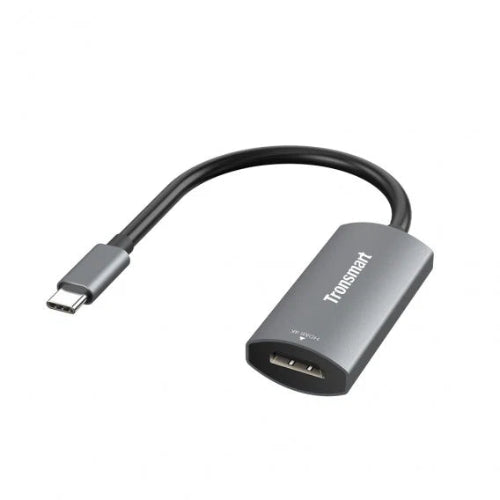
Tronsmart CTH01 USB-C Male to HDMI 4K Female Adapter
Tronsmart CTH01 USB-C Male to HDMI 4K Female Adapter
Couldn't load pickup availability
The Tronsmart CTH01 USB-C Male to HDMI 4K Female Adapter is a compact display adapter designed to connect compatible USB-C devices to HDMI-equipped TVs, monitors, projectors and other displays. It provides HDMI video output of up to 4K at 30Hz, making it a practical solution for extending or mirroring a compatible laptop, tablet or smartphone screen on a larger display.
The CTH01 uses a reversible USB-C male connector and a full-size HDMI female port. Its plug-and-play design means there is no separate driver installation for supported devices. It also supports HDCP and 3D video output, along with features such as Samsung DeX and Huawei EMUI desktop mode on compatible devices.
Whether you want to connect a laptop to a 4K monitor, display presentations from a notebook, watch content from a compatible smartphone on a TV, or use a projector for work, the CTH01 provides a simple USB-C-to-HDMI connection.
Key Features
- Tronsmart CTH01 USB-C to HDMI Adapter
- USB-C Male to HDMI Female
- HDMI Video Output up to 4K@30Hz
- Supports 3D Video Output
- HDCP Support
- Supports Samsung DeX on compatible devices
- Supports Huawei EMUI Desktop Mode on compatible devices
- Reversible USB-C Connector
- Plug-and-Play Operation
- Compact Design
- Supports HDMI Connectivity up to 2.25Gbps according to published specifications
- Designed for Compatible USB-C Devices
- Suitable for TVs, Monitors and Projectors
- No Separate Power Adapter Required for Normal Operation
- Useful for Work, Presentations and Entertainment
Connect USB-C Devices to HDMI Displays
Many modern laptops, tablets and smartphones use USB-C instead of a dedicated HDMI output.
The Tronsmart CTH01 provides a straightforward way to connect such a device to an HDMI display.
Simply connect:
USB-C device → CTH01 → HDMI cable → TV/Monitor/Projector
The adapter's USB-C male connector goes into the compatible source device, while the HDMI female port accepts a standard HDMI cable connected to your display.
This makes the CTH01 particularly useful when your laptop or mobile device does not have a traditional HDMI port.
4K@30Hz Video Output
The CTH01 supports HDMI video output up to 3840 × 2160 at 30Hz, commonly referred to as 4K@30Hz.
This allows compatible devices to output high-resolution content to a supported 4K television, monitor or projector.
4K output is useful for:
- Movies and videos
- Presentations
- Desktop work
- Photos
- Web browsing
- Digital signage
- General productivity
- Compatible gaming applications
Keep in mind that achieving 4K@30Hz requires the source device, HDMI cable and display to support the required resolution and signal.
HDCP Support
The Tronsmart CTH01 supports HDCP, helping compatible protected video content pass through the HDMI connection.
This can be important when using compatible streaming and media applications with external displays.
Actual content playback depends on the source device, operating system, application and display.
3D Video Support
The adapter also supports 3D video output according to published specifications.
When the connected USB-C source, HDMI cable, display and content are all compatible, the adapter can be used for supported 3D video applications.
Reversible USB-C Connector
The USB-C connector is reversible, meaning you can insert it into a compatible USB-C port in either orientation.
This is one of the everyday advantages of USB-C compared with older connectors that required a particular orientation.
The CTH01 is therefore easy to connect when working at a desk, in a meeting room or while setting up a TV.
Plug-and-Play Convenience
The CTH01 is designed for straightforward plug-and-play operation.
There is no separate driver installation required for normal operation on compatible systems.
Connect the adapter to your USB-C device, connect an HDMI cable between the adapter and display, select the appropriate HDMI input on the display, and the compatible device can begin outputting video.
The exact display behavior depends on the operating system and device.
Samsung DeX Support
The CTH01 supports Samsung DeX mode on compatible Samsung devices.
This can allow a compatible Samsung smartphone to provide a desktop-style experience on an external monitor or television.
For users with a compatible Galaxy device, this can turn a large screen into a useful productivity or entertainment display without requiring a dedicated desktop computer.
Device compatibility should always be checked because not every Samsung USB-C device supports external video output or DeX.
Huawei EMUI Desktop Mode
The CTH01 also supports Huawei EMUI desktop mode on compatible devices.
This allows supported Huawei smartphones or tablets to connect to an external display and provide a desktop-oriented interface.
Again, the USB-C port must support external video output for the adapter to work.
Ideal for Laptops
The CTH01 is particularly useful for laptops that use USB-C for display output but do not include a dedicated HDMI port.
Published compatibility information includes several MacBook, Dell, HP, Huawei, Lenovo, Samsung, Xiaomi and other laptop models.
Potential applications include:
- Connecting a laptop to a monitor
- Presenting through a projector
- Extending the desktop
- Mirroring the laptop screen
- Watching content on a television
- Connecting to a meeting-room display
The actual display modes available depend on the laptop's operating system and hardware.
Useful for Presentations
The CTH01 can be a convenient accessory for business users, teachers, students and presenters.
A USB-C laptop can be connected to an HDMI projector or conference-room display using the adapter and a standard HDMI cable.
This is especially useful when meeting rooms provide HDMI inputs but your laptop only provides USB-C connectivity.
Connect to a 4K Monitor
For users working with a compatible laptop or tablet, the CTH01 can provide a connection to a 4K monitor.
A larger external display can make it easier to work with:
- Spreadsheets
- Documents
- Web applications
- Design software
- Presentations
- Photo libraries
- Video content
The adapter supports up to 4K@30Hz rather than 4K@60Hz, so customers who specifically require 4K at 60Hz should select an adapter with an explicit 4K@60Hz specification.
Connect to a TV
The CTH01 can also be used to connect a compatible USB-C device to an HDMI television.
For example, a compatible laptop or smartphone can output supported content to a TV for:
- Video playback
- Photo viewing
- Presentations
- Browsing
- Desktop applications
- Compatible games
Simply connect an HDMI cable from the CTH01 to an available HDMI input on the television.
Connect to a Projector
For classrooms, offices and conference rooms, the CTH01 can provide a simple connection between a compatible USB-C source and an HDMI projector.
This makes it useful for:
- Business presentations
- Classroom lessons
- Training sessions
- Meetings
- Workshops
- Demonstrations
Compact and Portable
The CTH01 is a small adapter designed to be carried alongside a laptop or tablet.
Published specifications list its dimensions at approximately 213 × 26mm and net weight at around 21 ± 5g.
Its compact form makes it easy to keep inside:
- Laptop bags
- Backpacks
- Travel cases
- Desk drawers
- Presentation kits
Having a dedicated USB-C-to-HDMI adapter can be particularly useful for people who frequently work from different locations.
Broad Device Compatibility
Published compatibility information includes a wide range of USB-C laptops, tablets and smartphones.
Examples include selected:
- MacBook models
- MacBook Pro models
- iPad Pro models
- Dell XPS models
- Microsoft Surface devices
- HP Spectre devices
- Huawei MateBook models
- Lenovo Yoga models
- Samsung Galaxy Book devices
- Xiaomi laptops
- Razer Blade Stealth
- Intel NUC
- Samsung Galaxy smartphones
- Huawei smartphones
- LG devices
- OPPO devices
- Microsoft Lumia devices
- Razer Phone
These are examples from published compatibility lists rather than a guarantee that every model in a product family will work.
Important: USB-C Does Not Automatically Mean Video Output
One of the most important things to understand before buying the CTH01 is that not every USB-C port supports video output.
The USB-C port on the source device needs to support an appropriate display-output capability, such as DisplayPort Alternate Mode (DP Alt Mode).
A USB-C port that is intended only for charging or basic USB data cannot necessarily output HDMI video through this adapter.
Therefore, always check your device's specifications before purchasing.
Compatibility Limitations
Published compatibility information identifies several devices that are not supported, including examples such as certain Google Pixel/Nexus devices, some LG models, Motorola devices, Samsung Tab S3, some Dell Inspiron tablets, Asus ZenPad models and Nintendo Switch.
Compatibility can vary between device generations and firmware versions.
For this reason, the most reliable approach is to verify that your specific device supports USB-C video output before ordering.
HDMI Cable Required
The CTH01 has an HDMI female port, meaning you will need a separate HDMI cable to connect it to your TV, monitor or projector.
The basic setup is:
USB-C Device → CTH01 Adapter → HDMI Cable → Display
The adapter itself is not a complete HDMI cable.
No External Power Adapter Required
The CTH01 is designed as a bus-powered display adapter, so it does not require a separate power brick for normal operation.
This keeps the setup simple and portable.
However, power behavior can vary depending on the connected USB-C source and device configuration.
Tronsmart CTH01 Specifications
| Specification | Details |
|---|---|
| Brand | Tronsmart |
| Model | CTH01 |
| Product Type | USB-C to HDMI Adapter |
| Input | USB-C Male |
| Output | HDMI Female |
| Maximum Video Resolution | Up to 4K |
| Maximum 4K Refresh Rate | 30Hz |
| 4K Resolution | 3840 × 2160 |
| Video Output | HDMI |
| HDCP | Supported |
| 3D Video | Supported |
| Samsung DeX | Supported on compatible devices |
| Huawei EMUI Desktop Mode | Supported on compatible devices |
| USB-C Connector | Reversible |
| Operation | Plug and Play |
| HDMI Bandwidth | Up to 2.25Gbps according to published listings |
| Material | PVC |
| Dimensions | Approx. 213 × 26mm |
| Weight | Approx. 21 ± 5g |
| Power | Bus Powered |
| Package | 1 × CTH01 Adapter |
Published specifications from Pakistani listings identify the CTH01 as a USB-C male to HDMI female adapter supporting up to 4K@30Hz, HDCP and 3D video, with Samsung DeX and Huawei EMUI desktop support on compatible devices.
Tronsmart CTH01 vs Basic USB-C to HDMI Adapter
| Feature | Tronsmart CTH01 | Basic USB-C to HDMI Adapter |
| USB-C Input | Yes | Yes |
| HDMI Output | Yes | Yes |
| HDMI Female | Yes | Yes |
| 4K Support | Yes | Depends |
| 4K@30Hz | Yes | Depends |
| HDCP | Yes | Depends |
| 3D Video | Yes | Depends |
| Samsung DeX | Yes | Depends |
| Huawei EMUI Desktop | Yes | Depends |
| Reversible USB-C | Yes | Yes |
| Plug and Play | Yes | Usually |
| Portable | Yes | Yes |
Who Should Buy Tronsmart CTH01?
USB-C Laptop Users
Ideal for users whose laptops use USB-C for display output but provide no dedicated HDMI port.
Samsung DeX Users
Compatible Samsung DeX devices can use the adapter to connect to an external HDMI display.
Huawei Desktop Mode Users
Compatible Huawei devices can take advantage of EMUI desktop functionality.
Students
Useful for connecting USB-C laptops to classroom projectors and external displays.
Office Professionals
A useful addition to a laptop bag for conference rooms and presentation setups.
Content Consumers
Connect compatible USB-C devices to HDMI televisions for supported video playback.
Travelers
Its compact design makes it easy to carry as part of a laptop accessory kit.
Why Buy Tronsmart CTH01 from TechShek.pk?
4K Display Support
Get high-resolution HDMI output up to 4K@30Hz on compatible equipment.
Compact Solution
The adapter provides a simple way to connect a USB-C source to an HDMI display without carrying a larger docking station.
USB-C Convenience
The reversible USB-C connector makes setup quick and easy.
DeX and EMUI Support
Compatible Samsung and Huawei devices can benefit from supported desktop modes.
Plug-and-Play Design
No dedicated driver installation is required for normal operation on supported systems.
Multiple Applications
Use it with TVs, monitors, projectors and compatible HDMI displays.
Frequently Asked Questions
1. What is the Tronsmart CTH01?
The Tronsmart CTH01 is a USB-C male to HDMI female adapter designed to connect compatible USB-C devices to HDMI displays.
2. Does CTH01 support 4K?
Yes. It supports HDMI video output up to 4K@30Hz on compatible equipment.
3. Does CTH01 support 4K at 60Hz?
No. The published specification is 4K at up to 30Hz.
4. Can I connect my USB-C laptop to an HDMI monitor?
Yes, provided the laptop's USB-C port supports video output.
5. Can I use CTH01 with a TV?
Yes. A compatible USB-C device can be connected to an HDMI TV using the adapter and a separate HDMI cable.
6. Does CTH01 work with projectors?
Yes, it can be used with compatible HDMI projectors.
7. Does it support Samsung DeX?
Yes. Samsung DeX is supported on compatible Samsung devices.
8. Does it support Huawei desktop mode?
Yes. The CTH01 supports Huawei EMUI desktop mode on compatible devices.
9. Does the CTH01 require drivers?
It is designed for plug-and-play operation and does not require a separate driver installation on supported systems.
10. Does it require external power?
The adapter is designed to operate without a separate power adapter under normal supported conditions.
11. Does the package include an HDMI cable?
No. The CTH01 provides an HDMI female port, so a separate HDMI cable is required to connect it to your display.
12. Will it work with every USB-C phone?
No. The phone must support external video output through its USB-C port. USB-C alone does not guarantee HDMI output.
13. Can I use it with an iPhone?
Compatibility depends on the specific iPhone and required adapter ecosystem. The CTH01 should not be assumed to support iPhone video output simply because the phone uses USB-C.
14. Can I use CTH01 with Nintendo Switch?
Published Tronsmart compatibility information lists Nintendo Switch among unsupported devices.
15. What is the difference between USB-C and HDMI?
USB-C is the connector/interface used on the source device, while HDMI is the display interface used by many TVs, monitors and projectors. The CTH01 converts compatible USB-C video output into an HDMI connection.
16. Why is my monitor not displaying anything?
First, make sure your USB-C source supports DisplayPort Alternate Mode or another compatible video-output function. Then check the HDMI cable, selected display input and display resolution settings.
17. Can it transfer audio?
Compatible HDMI display connections can carry digital audio along with video, depending on the source device, operating system and display.
Conclusion
The Tronsmart CTH01 USB-C Male to HDMI 4K Female Adapter is a convenient solution for connecting compatible USB-C laptops, tablets and smartphones to HDMI televisions, monitors and projectors.
With up to 4K@30Hz video output, HDCP support, 3D video support, reversible USB-C connectivity, plug-and-play operation, Samsung DeX support and Huawei EMUI desktop support, it provides useful display connectivity in a compact form factor.
Its main advantage is simplicity: connect the USB-C end to a compatible device, connect an HDMI cable to the adapter, select the correct HDMI input on the display, and you can use the larger screen for compatible video and desktop applications.
For customers searching for Tronsmart CTH01 price in Pakistan, Tronsmart CTH01 USB-C to HDMI adapter, Tronsmart Type-C to HDMI adapter, USB-C to HDMI 4K adapter Pakistan, Type-C HDMI adapter, USB-C HDMI converter, Samsung DeX HDMI adapter or Tronsmart 4K HDMI adapter, the CTH01 is a compact and practical option.
Share
You may also like
Customers also bought these products
No recommendations available at this time.