


Samsung
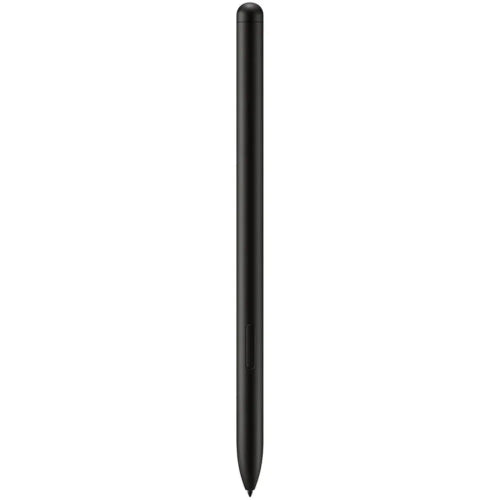
Samsung S Pen for Galaxy Tab
Samsung S Pen for Galaxy Tab
Couldn't load pickup availability
The Samsung S Pen for Galaxy Tab is a precision digital stylus designed for compatible Samsung Galaxy Tab tablets. It provides a natural writing and drawing experience with pressure-sensitive input, allowing users to take handwritten notes, sketch, annotate documents, edit photos and interact with supported S Pen features.
Unlike a standard capacitive stylus, the S Pen is designed specifically for Samsung Galaxy Tab devices and works with the tablet's dedicated S Pen technology for accurate, responsive input. It is especially useful for students, professionals, artists and anyone who prefers handwriting or drawing directly on their tablet.
Brand: Samsung
Product: S Pen for Galaxy Tab
Type: Digital Stylus / Tablet Pen
Compatibility: Selected Samsung Galaxy Tab models
Input: Pressure-sensitive pen input
Primary Uses: Writing, drawing, notes, annotations and navigation
Color: Model/variant dependent
Compatibility note: Samsung has released different S Pen generations for different Galaxy Tab series. Compatibility, Bluetooth/Air Actions, charging and button functionality can vary by S Pen model and tablet. Please match the S Pen to your exact Galaxy Tab model before purchasing.
Key Features
- Genuine Samsung S Pen designed for Galaxy Tab
- Precise digital handwriting
- Natural pen-like writing experience
- Pressure-sensitive input
- Suitable for drawing and sketching
- Excellent for handwritten notes
- Useful for PDF and document annotations
- Easy on-screen navigation
- Palm rejection on compatible Galaxy Tab devices
- S Pen button on supported models
- Bluetooth/Air Actions on supported S Pen versions
- Magnetic attachment on compatible Galaxy Tab models
- Automatic pairing on supported devices
- Lightweight and portable
- No traditional ink or replacement refills required
- Designed for Samsung Galaxy Tab users
Natural Writing Experience
The S Pen is designed to make writing on a Galaxy Tab feel more like using a traditional pen on paper.
You can use it for handwritten notes, quick ideas, signatures, diagrams and annotations without relying on a keyboard.
The precise stylus input makes it particularly useful when you need to write smaller text or select specific elements on the screen.
Pressure-Sensitive Drawing
For creative users, the S Pen provides pressure-sensitive input on compatible Galaxy Tab devices.
This allows supported drawing applications to respond differently depending on how firmly you press the pen against the display.
It can be useful for:
- Digital artwork
- Sketching
- Illustration
- Hand lettering
- Photo editing
- Diagram creation
- Note-taking
The exact pressure response and supported features depend on the Galaxy Tab model and application being used.
Take Handwritten Notes
One of the biggest advantages of the S Pen is the ability to write directly on your Galaxy Tab.
Students can use it for lecture notes, mathematical working and study material, while professionals can use it for meeting notes, annotations and quick diagrams.
Samsung Notes and other compatible applications can provide additional S Pen functionality such as handwriting recognition, editing and organization.
Palm Rejection
On compatible Galaxy Tab devices, the display can distinguish S Pen input from unwanted touches from your palm.
This allows you to rest your hand naturally on the tablet while writing or drawing.
Palm rejection is particularly valuable during longer writing sessions because you don't need to hold your hand awkwardly above the screen.
S Pen Button
Compatible S Pen models include a physical button that can provide additional functions.
Depending on the tablet and S Pen generation, the button can be used for shortcuts or other supported S Pen actions.
Some newer S Pen versions also support Bluetooth-based functions and Air Actions, while simpler S Pen models may not.
Therefore, functionality depends on the specific Galaxy Tab and S Pen version.
Air Actions on Supported Models
Some Samsung S Pen models include Bluetooth connectivity and support Air Actions.
These features can allow gestures or button presses to control supported functions without directly touching the display.
For example, supported applications may allow the S Pen button to perform functions such as:
- Remote camera shutter
- Presentation control
- Media control
- Application shortcuts
- Navigation gestures
Important: Air Actions are not available on every Galaxy Tab S Pen. Always check compatibility with the exact S Pen model.
Magnetic Attachment
Compatible Galaxy Tab models provide a dedicated magnetic area where the S Pen can attach to the tablet.
This makes it convenient to keep the pen with your tablet when you're not using it.
Depending on the tablet and S Pen generation, magnetic attachment can also provide a method of charging the S Pen when the model supports rechargeable Bluetooth functionality.
Perfect for Students
The S Pen can turn a compatible Galaxy Tab into a highly capable digital notebook.
Students can use it to:
- Write class notes
- Highlight textbooks
- Annotate PDFs
- Draw diagrams
- Solve mathematical problems
- Organize handwritten notes
- Mark up presentations
- Create study notes
Digital handwriting also makes it easier to keep notes organized without carrying multiple physical notebooks.
Useful for Professionals
Professionals can use the S Pen for productivity as well.
It can be useful for:
- Signing documents
- Reviewing PDFs
- Marking presentations
- Taking meeting notes
- Creating diagrams
- Editing images
- Making quick annotations
- Sketching ideas
For people who regularly work with documents or visual information, a precise stylus can be considerably more convenient than using a finger.
Great for Artists and Creators
The S Pen is also well suited to digital artists using compatible Galaxy Tab tablets.
Its pressure-sensitive input can provide more control over brush strokes and drawing applications.
Artists can use it for:
- Sketching
- Digital painting
- Illustration
- Concept design
- Handwriting
- Photo retouching
- Graphic design
The experience will depend on the Galaxy Tab display, S Pen generation and application being used.
S Pen vs Standard Capacitive Stylus
| Feature | Samsung S Pen | Basic Capacitive Stylus |
|---|---|---|
| Designed for Galaxy Tab | Yes | No |
| Precision | High | Basic |
| Pressure Sensitivity | Yes, on compatible devices | Usually No |
| Palm Rejection | Yes, on compatible Tab | Usually No |
| Handwriting | Excellent | Basic |
| Drawing | Excellent | Limited |
| S Pen Features | Yes | No |
| Air Actions | Selected models | No |
| Magnetic Attachment | Compatible models | Usually No |
| Samsung Notes Integration | Yes | Limited |
| Best For | Notes, drawing & productivity | Basic touch input |
Compatibility Matters
Samsung has released several Galaxy Tab S Pen versions, and they are not universally interchangeable in terms of every feature.
Before purchasing, check the exact tablet model, such as:
- Galaxy Tab S9
- Galaxy Tab S9+
- Galaxy Tab S9 Ultra
- Galaxy Tab S8 Series
- Galaxy Tab S7 Series
- Galaxy Tab S6 Series
- Galaxy Tab S10 Series
- Other compatible Galaxy Tab models
Some tablets include an S Pen in the box, while replacement or additional pens can be purchased separately.
If your product listing is intended for a specific Galaxy Tab model, the exact model should be mentioned in the product title or compatibility section.
Samsung S Pen Specifications
| Specification | Details |
|---|---|
| Brand | Samsung |
| Product Type | Digital Stylus |
| Product Family | S Pen |
| Designed For | Compatible Galaxy Tab Devices |
| Input Technology | Samsung S Pen |
| Pressure Sensitivity | Supported on compatible devices |
| Palm Rejection | Supported on compatible devices |
| S Pen Button | Supported depending on model |
| Bluetooth | Selected models |
| Air Actions | Selected models |
| Magnetic Attachment | Compatible Galaxy Tab models |
| Charging | Model dependent |
| Battery | Model dependent |
| Writing | Yes |
| Drawing | Yes |
| Notes | Yes |
| PDF Annotation | Yes, with compatible apps |
| Color | Model dependent |
Why Buy Samsung S Pen from TechShek.pk?
Genuine Samsung Accessory
The Samsung S Pen is designed specifically for compatible Galaxy Tab devices rather than relying on generic touchscreen technology.
Accurate Writing
It provides precise input for handwriting, notes and detailed on-screen work.
Excellent for Students
Take handwritten notes, annotate PDFs and organize study material directly on your Galaxy Tab.
Ideal for Creativity
Pressure-sensitive input makes it suitable for sketching, drawing and supported creative applications.
Better Productivity
Use the S Pen for document annotation, signatures, diagrams and quick notes.
Easy to Carry
Its slim and lightweight design makes it convenient to keep with your Galaxy Tab.
Frequently Asked Questions
1. What is the Samsung S Pen used for?
The S Pen is used for handwriting, drawing, note-taking, document annotation, navigation and other stylus functions on compatible Samsung Galaxy Tab devices.
2. Does Samsung S Pen work with every Galaxy Tab?
No. S Pen compatibility varies between Galaxy Tab generations. Always check compatibility with your exact tablet model before purchasing.
3. Does the S Pen need Bluetooth?
Not always. Basic writing and drawing functions can work without Bluetooth on compatible models. Bluetooth is required for additional features such as Air Actions on supported S Pens.
4. Does the S Pen support pressure sensitivity?
Yes, compatible Samsung Galaxy Tab devices support pressure-sensitive S Pen input for supported applications.
5. Can I use the S Pen for drawing?
Yes. It is particularly useful for drawing, sketching and digital artwork on compatible Galaxy Tab tablets.
6. Can I take handwritten notes with the S Pen?
Yes. You can use it with Samsung Notes and other compatible applications to create handwritten notes.
7. Does the S Pen support palm rejection?
Yes, compatible Galaxy Tab devices support palm rejection when using the S Pen.
8. Does the S Pen charge?
This depends on the S Pen model. Some Bluetooth-enabled S Pens recharge when attached to a compatible Galaxy Tab, while other S Pen models do not require charging for basic writing functionality.
Conclusion
The Samsung S Pen for Galaxy Tab is an excellent accessory for users who want to get more from their compatible Samsung tablet. It combines precise stylus input with pressure-sensitive writing and drawing, making it useful for students, professionals, artists and everyday Galaxy Tab users.
Whether you're taking handwritten notes, annotating PDFs, sketching an idea, editing photos or simply navigating your tablet more precisely, the S Pen offers a significantly more capable experience than a standard touchscreen stylus.
For customers searching for Samsung S Pen price in Pakistan, Samsung Galaxy Tab S Pen, Samsung Tab S Pen, original Samsung S Pen, Samsung S Pen replacement, Galaxy Tab stylus, Samsung tablet pen or Samsung S Pen Pakistan, TechShek.pk offers a convenient option for compatible Galaxy Tab users.
Share
You may also like
Customers also bought these products
No recommendations available at this time.