


Rapoo
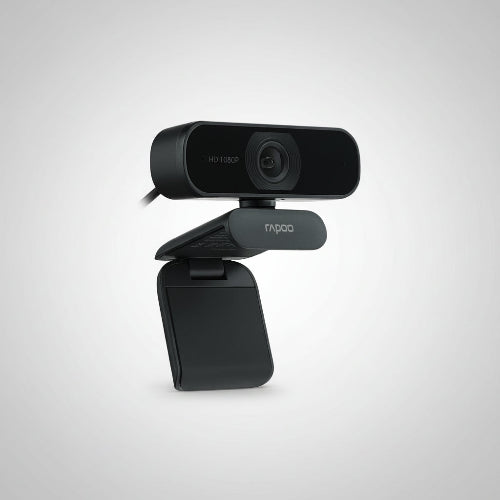
Rapoo C260 Full HD 1080P Webcam
Rapoo C260 Full HD 1080P Webcam
Couldn't load pickup availability
The Rapoo C260 Webcam is a versatile Full HD USB webcam designed for video conferencing, online classes, remote work, streaming, interviews, video calls and everyday computer use. It combines 1920 × 1080 Full HD video, a wide-angle lens, dual noise-reduction microphones, automatic light correction and 360° horizontal rotation in a compact design. Rapoo officially lists the C260 as a 1080P webcam with a 95° wide-angle lens, dual noise-reduction microphones and plug-and-play USB connectivity.
The C260 is particularly useful for users who need a wider view than a conventional laptop webcam. Its wide-angle lens can capture more of the surrounding area, making it suitable for presentations, small-group meetings and situations where you do not want to sit directly against the camera.
The webcam also features automatic light correction, allowing it to adjust image performance according to ambient lighting conditions. This makes the C260 a practical choice for home offices, bedrooms, classrooms and other environments where lighting may not always be ideal.
For customers searching for the Rapoo C260 Price in Pakistan, the C260 offers a strong balance between Full HD image quality, wide-angle coverage, built-in audio and simple USB operation.
Key Features
- Rapoo C260 Full HD Webcam
- Full HD 1080P video
- 1920 × 1080 maximum resolution
- CMOS image sensor
- 2MP sensor
- Wide-angle lens
- Up to 95° advertised wide-angle field of view
- Dual built-in noise-reduction microphones
- Omnidirectional microphone design
- Automatic light correction
- 360° horizontal rotation
- Adjustable silicone mounting base
- Monitor and laptop mounting
- Desktop placement
- Tripod compatibility
- USB 2.0 connectivity
- Plug-and-play operation
- No additional drivers required
- 1.5m–1.56m USB cable depending on regional specification
- Five-layer coated lens
- Protective magnetic ring
- Windows compatibility
- macOS compatibility
- Chrome OS compatibility
- Android compatibility
- Suitable for Zoom
- Suitable for Skype
- Suitable for Microsoft Teams
- Suitable for Google Meet
- Suitable for online classes
- Suitable for remote work
- Suitable for streaming
- Suitable for video calls
- Black color
Rapoo's official specification page lists the C260 with 1080P video, 95° FOV, dual noise-reduction microphones, automatic light correction, USB 2.0 and 360° horizontal rotation.
Key Features in Detail
1. Full HD 1080P Video
The Rapoo C260 delivers 1920 × 1080 Full HD video, providing considerably more detail than standard 720p webcams. Its 2MP CMOS sensor is designed for everyday video communication and computer-camera applications.
1080P is suitable for:
- Zoom meetings
- Microsoft Teams calls
- Online classes
- YouTube content
- Video interviews
- Remote work
- Freelancing
- Business meetings
- Video calls
- Presentations
For users upgrading from an integrated laptop webcam, the C260 provides the advantage of a dedicated Full HD camera that can be repositioned independently.
2. Wide-Angle Lens
One of the C260's main selling points is its wide-angle lens. Rapoo advertises a 95° super-wide-angle view, allowing the camera to capture more of the scene.
This is useful for:
- Group video calls
- Online teaching
- Presentations
- Small meetings
- Demonstrations
- Wider desk setups
- Multiple people in the frame
Specification note: Some international retailer listings report the FOV as 80°, while Rapoo's current official C260 page specifies 95°. For TechShek.pk, it is safest to use the manufacturer's 95° advertised figure while noting that field-of-view measurements can vary by measurement method or regional specification.
3. Dual Noise-Reduction Microphones
The C260 includes dual built-in noise-reduction microphones designed to provide clearer voice capture during video calls. Rapoo identifies them as omnidirectional microphones.
The integrated microphone means you can start a video call without connecting a separate microphone.
It is suitable for:
- Video conferencing
- Online classes
- Voice calls
- Interviews
- Remote meetings
- Streaming
- Casual content creation
For professional studio recording, a dedicated microphone will still provide better control and audio quality.
4. Automatic Light Correction
The C260 supports automatic light correction, helping the webcam adjust to different ambient lighting conditions.
This is particularly useful in:
- Home offices
- Bedrooms
- Classrooms
- Rooms with windows
- Evening video calls
- Monitor-lit workstations
Automatic correction does not replace good lighting, but it can help maintain a more usable image when lighting conditions change.
5. 360° Horizontal Rotation
The C260 can rotate 360° horizontally, making it easy to change the direction of the camera without constantly moving its base.
This flexibility is useful when switching between:
- Different seating positions
- Multiple people
- Presentation areas
- Whiteboards
- Product demonstrations
- Desk setups
The camera can be repositioned quickly without disconnecting the webcam.
6. Adjustable Silicone Base
Rapoo equips the C260 with an adjustable silicone base designed for flexible placement on compatible monitors and desks.
It can be:
- Mounted on a monitor
- Mounted on a laptop display
- Placed on a desk
- Used with a compatible tripod
This makes the C260 suitable for both permanent and temporary setups.
7. Plug-and-Play USB Connectivity
The C260 uses USB 2.0 connectivity and is designed for plug-and-play operation without requiring dedicated webcam drivers.
Simply connect it to a compatible computer and select the Rapoo C260 as your camera and microphone in the application you are using.
This is especially convenient for users who do not want to install additional webcam software.
8. Five-Layer Coated Lens
Rapoo's official specification page identifies the C260 as using a five-layer coated lens.
The coated lens construction is designed to support the camera's optical performance and image clarity.
9. Multiple Operating Systems
The C260 supports a range of operating systems, including:
- Windows 7/8/10 or later
- macOS X 10.6 or later
- Chrome OS
- Android 5.0 or later
These operating-system specifications are listed by Rapoo.
Specifications Chart
| Specification | Rapoo C260 |
|---|---|
| Brand | Rapoo |
| Model | C260 |
| Product Type | USB Webcam |
| Video Resolution | Full HD 1920 × 1080 |
| Maximum Resolution | 1080P |
| Sensor | CMOS |
| Sensor Resolution | 2MP |
| Lens | Hybrid / HD Lens |
| Focus | Fixed focus in Rapoo's official specification |
| Field of View | 95° advertised |
| Microphones | Dual |
| Microphone Type | Omnidirectional |
| Noise Reduction | Yes |
| Auto Light Correction | Yes |
| Horizontal Rotation | 360° |
| Connection | USB 2.0 |
| Plug & Play | Yes |
| Drivers Required | No |
| Cable Length | Approx. 1.5–1.56m |
| Mounting | Adjustable base / Monitor / Desktop / Tripod |
| Lens Coating | Five-layer coating |
| Color | Black |
| Windows Support | Windows 7/8/10 or later |
| macOS Support | OS X 10.6 or later |
| Chrome OS | Yes |
| Android | Android 5.0 or later |
| Suitable Applications | Zoom, Skype, Teams, Google Meet and compatible apps |
Important specification note: Rapoo's official page currently lists the C260's focus type as fixed, while some third-party listings describe it as autofocus. For an accurate TechShek.pk product listing, I recommend not advertising autofocus as a confirmed C260 feature unless the exact retail batch/package you stock explicitly confirms it.
Rapoo C260 vs Logitech C922 Pro
| Feature | Rapoo C260 | Logitech C922 Pro |
|---|---|---|
| Maximum Resolution | 1080P | 1080P |
| 1080P Frame Rate | 30fps class | 30fps |
| 720P/60fps | Not listed | Yes |
| Sensor | 2MP CMOS | HD sensor |
| FOV | 95° advertised | More focused streaming view |
| Microphones | Dual noise-reduction | Dual stereo microphones |
| Auto Light Correction | Yes | Yes |
| Autofocus | Official C260 spec: fixed | Yes |
| Rotation | 360° | Flexible mounting |
| USB | USB 2.0 | USB |
| Tripod Support | Yes | Yes |
| Streaming | Good | Excellent |
| Gaming | Good | Excellent |
| Online Meetings | Excellent | Excellent |
| Wide Group View | Better suited | More focused |
| Best For | Meetings, classes, group calls | Gaming & streaming |
Choose Rapoo C260 if you want a wide-angle Full HD webcam for meetings, teaching, group calls and general use.
Choose Logitech C922 Pro if your priority is gaming and streaming, particularly because of its 720p/60fps mode.
Rapoo C260 vs Rapoo C200
| Feature | Rapoo C260 | Rapoo C200 |
|---|---|---|
| Resolution | 1080P | 720P |
| Sensor | 2MP CMOS | HD sensor |
| Wide Angle | 95° advertised | More standard view |
| Microphone | Dual noise-reduction | Built-in |
| Auto Light Correction | Yes | Yes |
| Rotation | 360° | Adjustable |
| USB | USB 2.0 | USB |
| Plug & Play | Yes | Yes |
| Best For | Professional Full HD calls | Basic video calls |
| Overall Video Quality | Higher | Basic |
The C260 is the better choice if Full HD video and a wider viewing area are important.
Who Should Buy Rapoo C260?
1. Remote Workers
The C260 is a practical upgrade for anyone working from home who needs a dedicated Full HD camera.
2. Online Teachers
Its wide-angle view can be useful for teachers who want to show themselves and part of their teaching environment.
3. Students
It works well for online classes, university presentations, interviews and group discussions.
4. Business Professionals
The Full HD camera and integrated microphones make it suitable for regular video conferencing.
5. Freelancers
Freelancers can use it for client meetings, consultations and online interviews.
6. Content Creators
The 1080P camera can be used for basic YouTube videos, tutorials and social-media content.
7. Small Teams
The wide-angle lens can help fit more than one person into the frame.
8. Online Interview Users
The dedicated Full HD camera provides a more flexible alternative to a laptop's built-in camera.
9. Zoom and Teams Users
Its plug-and-play USB design makes it convenient for regular video-conferencing applications.
10. Users Wanting a Wide View
If a conventional webcam feels too narrow, the C260's advertised 95° wide-angle view is one of its biggest advantages.
Frequently Asked Questions
1. What is Rapoo C260?
Rapoo C260 is a Full HD 1080P USB webcam designed for video calls, conferencing, online classes, remote work and general computer use.
2. What resolution does Rapoo C260 support?
It supports 1920 × 1080 Full HD resolution.
3. Is Rapoo C260 a 4K webcam?
No. The C260 is a Full HD 1080P webcam, not a 4K model.
4. Does Rapoo C260 have a microphone?
Yes. It has dual built-in omnidirectional noise-reduction microphones.
5. Does Rapoo C260 have noise reduction?
Yes. Rapoo specifies dual noise-reduction microphones for the C260.
6. What is the field of view of Rapoo C260?
Rapoo's official page advertises a 95° wide-angle lens.
7. Does Rapoo C260 support automatic light correction?
Yes. The C260 includes automatic light correction.
8. Does Rapoo C260 have autofocus?
There is conflicting information in online listings. Rapoo's current official specification lists the focus type as fixed, while some third-party listings describe autofocus. For accuracy, TechShek.pk should avoid claiming autofocus unless the exact stock is verified.
9. Can Rapoo C260 rotate?
Yes. It supports 360° horizontal rotation.
10. Can I mount Rapoo C260 on a monitor?
Yes. Its adjustable base is designed for monitor and laptop mounting.
11. Can Rapoo C260 be placed on a desk?
Yes. The adjustable base allows desktop placement.
12. Does Rapoo C260 support a tripod?
The C260's mounting design supports tripod use according to available product documentation, although the tripod is sold separately.
13. Does Rapoo C260 require drivers?
No. It is designed for plug-and-play operation without dedicated drivers.
14. Is Rapoo C260 compatible with Windows?
Yes. Rapoo lists compatibility with Windows 7/8/10 or later.
15. Is Rapoo C260 compatible with Mac?
Yes. It supports macOS/OS X 10.6 or later according to Rapoo's specifications.
16. Does Rapoo C260 work with Chrome OS?
Yes. Chrome OS is listed among its supported systems.
17. Does Rapoo C260 support Android?
Yes. Rapoo lists Android 5.0 or later as supported.
18. Can I use Rapoo C260 with Zoom?
Yes. It can be used as a USB camera and microphone with compatible Zoom setups.
19. Can I use it with Microsoft Teams?
Yes. The C260 is suitable for Microsoft Teams video meetings.
20. Is Rapoo C260 good for online classes?
Yes. Its Full HD resolution, wide-angle lens and built-in microphones make it well suited to online teaching and learning.
21. Is Rapoo C260 good for streaming?
Yes, it can be used for basic streaming and content creation. However, dedicated streaming webcams may provide additional features such as higher frame rates.
22. Is Rapoo C260 good for gaming?
It is suitable for gaming calls and webcam use during streams, but users specifically seeking high-frame-rate gaming webcam video may prefer a model such as the Logitech C922 Pro.
23. Does Rapoo C260 have a privacy shutter?
A physical privacy shutter is not listed as a confirmed feature in Rapoo's official specifications.
24. What USB connection does Rapoo C260 use?
The C260 uses USB 2.0 connectivity.
25. Is Rapoo C260 worth buying in Pakistan?
Yes. It is a good option for users looking for a Full HD 1080P webcam with wide-angle coverage, dual microphones, automatic light correction and 360° rotation at a practical price point.
Conclusion
The Rapoo C260 Full HD 1080P Webcam is a practical and feature-rich webcam for everyday professional and personal use. Its 1080P resolution, wide-angle lens, dual noise-reduction microphones, automatic light correction and 360° horizontal rotation make it well suited to video conferencing, online education, remote work and content creation.
Its wide-angle design is particularly useful for users who need to capture a larger area or more than one person in the frame. Plug-and-play USB connectivity also keeps installation simple, while support for Windows, macOS, Chrome OS and Android gives it broad compatibility.
For customers searching for the Rapoo C260 Price in Pakistan, it is a strong choice for students, teachers, freelancers, remote workers, business professionals and home-office users who want a Full HD webcam without moving into expensive professional camera equipment.
Best suited for: Full HD video calls, online classes, meetings, remote work, group calls and general webcam use.
Important: For TechShek.pk product specifications, use 95° FOV as Rapoo's current official advertised figure, and avoid advertising autofocus because Rapoo's current official specification identifies the focus type as fixed despite some third-party listings claiming autofocus.
Share

You may also like
Customers also bought these products
No recommendations available at this time.