


Poly
Poly Studio P5 Professional 1080p Webcam
Poly Studio P5 Professional 1080p Webcam
Couldn't load pickup availability
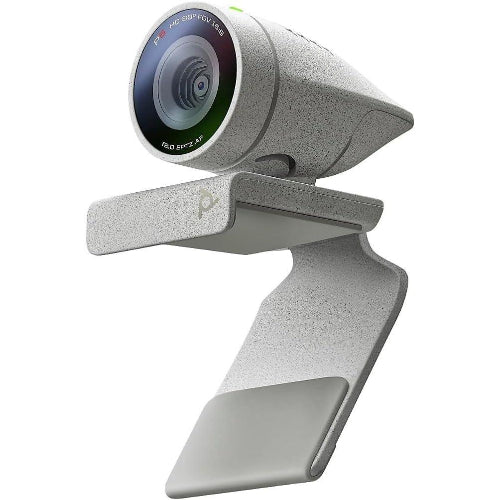
The Poly Studio P5 is a professional Full HD USB webcam designed for business video conferencing, remote work, online meetings, virtual classes, interviews and everyday professional communication. Developed by Poly, now part of HP, the Studio P5 combines 1080p Full HD video, autofocus, 4x zoom/EPTZ, an 80° diagonal field of view, automatic low-light compensation, a directional microphone and an integrated privacy shutter in a compact desktop webcam.
Unlike a basic laptop webcam, the Poly Studio P5 is built specifically around professional video conferencing. Its camera optics are designed to provide clear, natural-looking video, while autofocus helps maintain a sharp image. The relatively narrow 80° field of view keeps the camera focused on the user instead of unnecessarily showing the entire room.
The P5 also features automatic low-light compensation, helping improve the image when lighting conditions are less than ideal. Its built-in directional microphone is optimized for personal workspaces, focusing on the user's voice rather than simply capturing sound from every direction.
For privacy-conscious users, the integrated physical privacy shutter allows the camera lens to be covered when it is not in use. The webcam also includes an adjustable monitor clamp, tripod-ready design and an integrated USB-A port that can accommodate compatible Poly Bluetooth adapters such as the BT600/BT700.
For Pakistani customers searching for the Poly Studio P5 Price in Pakistan, it is an excellent choice for professionals who want a dependable, business-focused webcam rather than a basic consumer camera.
Key Features
- Professional Poly Studio P5 webcam
- Full HD 1080p video
- 1920 × 1080 resolution
- 30fps at 1080p
- 720p HD support
- Autofocus
- 4x digital zoom / EPTZ
- 80° diagonal field of view
- 4MP camera sensor
- High-quality camera optics
- Automatic low-light compensation
- True/natural color reproduction
- Built-in directional microphone
- 50Hz–16kHz microphone frequency response
- Integrated physical privacy shutter
- 360° swivel
- Adjustable monitor clamp
- Removable monitor clamp
- Tripod-ready design
- Integrated USB 2.0 Type-A cable
- 1.3m USB cable
- Built-in USB-A port for compatible wireless headset adapters
- Status LED for calling/mute indication
- UVC/UAC plug-and-play
- Compatible with standard USB/UVC applications
- Certified for Microsoft Teams
- Certified for Zoom
- Compatible with Poly Lens Desktop
- Poly Lens cloud management support
- Windows compatible
- macOS compatible
- Ideal for business video conferencing
- Suitable for remote work
- Suitable for online teaching
- Suitable for interviews
- Suitable for streaming and recording
- Compact professional design
The official specifications confirm 1080p/30fps, 720p/30fps, autofocus with 4x zoom/EPTZ, 80° DFOV, 4MP camera resolution, 360° swivel, privacy shutter and USB Type-A connectivity.
Key Features in Detail
1. Full HD 1080p Professional Video
The Poly Studio P5 captures video at 1920 × 1080 Full HD resolution at 30fps, providing clear and detailed video for professional communication. It also supports 1280 × 720 HD at 30fps.
1080p is an excellent resolution for:
- Business meetings
- Zoom calls
- Microsoft Teams
- Online interviews
- Remote work
- Online teaching
- Presentations
- Training sessions
- Content creation
The P5 is particularly suited to users who want consistently professional-looking video without moving to a dedicated camera system.
2. Autofocus with 4x Zoom / EPTZ
The Studio P5 features autofocus with 4x zoom/EPTZ capability.
Autofocus automatically adjusts the lens to keep the subject sharp. The 4x zoom capability can help bring the user closer into the frame when required.
EPTZ provides electronic pan, tilt and zoom functionality without physically moving the lens mechanism.
This can be useful when:
- Demonstrating a product
- Showing documents
- Moving closer to the camera
- Giving presentations
- Adjusting framing through software
3. 80° Diagonal Field of View
The P5 uses an 80° diagonal field of view.
Rather than using an extremely wide lens that captures a large amount of the room, the P5's framing is designed to keep the attention on the person speaking.
This makes it particularly useful for:
- One-person meetings
- Home offices
- Professional offices
- Interviews
- Remote consultations
- Client calls
For individual video conferencing, the 80° view provides a balanced perspective without making the user appear too distant.
4. Automatic Low-Light Compensation
Lighting can change significantly during a video meeting.
The Studio P5 includes automatic low-light compensation, helping maintain a usable image when your room is not brightly illuminated. Poly also highlights its ability to deliver low-light quality and true-color images.
This is particularly useful for:
- Home offices
- Evening meetings
- Rooms with limited natural light
- Offices with uneven lighting
- Laptop setups where lighting cannot easily be controlled
A dedicated light will still provide the best results, but the P5's automatic compensation makes everyday use more forgiving.
5. Professional Camera Optics
Poly designed the P5 specifically for professional video conferencing.
Its optics are intended to provide clear images and natural color reproduction, helping users appear more professional during important calls.
This makes it a strong upgrade from many integrated laptop cameras.
6. Built-In Directional Microphone
The P5 features a single directional microphone optimized for personal workspaces. Its microphone frequency response is specified at 50Hz–16kHz.
A directional microphone is designed to prioritize sound from the intended direction, making it particularly suitable for individual users sitting directly in front of the webcam.
It is ideal for:
- Zoom meetings
- Microsoft Teams
- Online interviews
- Remote work
- Online classes
- Business calls
A dedicated professional microphone may still be preferable for studio recording, but the integrated microphone is convenient for normal conferencing.
7. Integrated Privacy Shutter
Privacy is an important consideration for webcams.
The Poly Studio P5 includes a physical integrated privacy shutter, allowing users to cover the camera lens when the webcam is not being used.
This is especially valuable for:
- Home offices
- Corporate workstations
- Shared computers
- Remote workers
- Privacy-conscious users
The physical shutter provides a simple visual and mechanical way to block the camera.
8. 360° Swivel
The P5 supports 360° horizontal swivel, allowing users to reposition the webcam without moving the entire monitor.
This is helpful when switching between:
- Personal meetings
- Group discussions
- Product demonstrations
- Presentations
- Different seating positions
9. Adjustable Monitor Clamp
The included monitor clamp allows the P5 to be mounted securely on compatible laptop screens and desktop monitors.
The clamp is also removable, giving users greater flexibility in positioning the webcam.
10. Tripod Ready
The Studio P5 is tripod ready, making it possible to use it away from the top of a monitor when a different camera position is required.
This is useful for:
- Product demonstrations
- Recording tutorials
- Desk setups
- Presentations
- Content creation
11. Built-In USB-A Port for Wireless Adapter
One of the P5's more interesting features is its integrated USB-A port designed for compatible Poly Bluetooth adapters such as the BT600 or BT700.
This allows users to create a cleaner desktop setup when using compatible Poly wireless audio equipment.
12. Poly Lens Software
The P5 works with Poly Lens Desktop, which provides additional device controls and management functionality. Poly Lens also provides cloud-based management capabilities for supported environments.
This is especially useful for business users and IT departments managing multiple Poly devices.
13. Plug-and-Play USB Connectivity
The P5 uses USB 2.0 Type-A connectivity and supports UVC/UAC plug-and-play, meaning it is designed to work as a standard USB webcam without requiring complicated driver installation.
Simply connect the webcam to a compatible computer and select it in your video-conferencing software.
Specifications Chart
| Specification | Poly Studio P5 |
|---|---|
| Brand | Poly |
| Model | Studio P5 |
| Product Type | Professional USB Webcam |
| Camera Resolution | 1080p Full HD |
| Maximum Video Resolution | 1920 × 1080 |
| Full HD Frame Rate | 30fps |
| HD Resolution | 1280 × 720 |
| HD Frame Rate | 30fps |
| Camera Megapixels | 4MP |
| Focus | Autofocus |
| Zoom | 4x |
| Pan/Tilt/Zoom | EPTZ |
| Field of View | 80° DFOV |
| Framing | Fixed |
| Low-Light Compensation | Automatic |
| Color Reproduction | True / Natural Color |
| Microphone | Single Directional |
| Microphone Frequency Response | 50Hz–16kHz |
| Privacy Shutter | Integrated |
| Swivel | 360° |
| Mount | Adjustable Monitor Clamp |
| Clamp | Removable |
| Tripod Support | Yes |
| Main Connection | USB 2.0 Type-A |
| USB Cable | Integrated |
| Cable Length | 1.3m |
| Additional USB Port | USB-A |
| Wireless Adapter Support | Poly BT600 / BT700 |
| Status LED | Yes |
| Plug & Play | UVC/UAC |
| Windows | Supported |
| macOS | Supported |
| Zoom | Certified |
| Microsoft Teams | Certified |
| Poly Lens | Supported |
| Camera Body Dimensions | 37.7 × 34 × 62mm |
| Camera Body Weight | 68g |
| Weight with Clamp | 98g |
| Operating Temperature | 0°C to 40°C |
| Humidity | 5%–95%, non-condensing |
| Warranty | 2-Year Limited Warranty |
Specifications are based primarily on Poly/HP documentation and the Studio P5 datasheet.
Poly Studio P5 vs UGREEN 15728
| Feature | Poly Studio P5 | UGREEN 15728 |
|---|---|---|
| Video Resolution | 1080p | 1080p |
| Frame Rate | 30fps | 30fps |
| Autofocus | Yes | Not consistently specified |
| Zoom | 4x EPTZ | Not specified |
| Field of View | 80° | 85° |
| Microphone | Directional | Dual microphones |
| Low-Light Compensation | Yes | Yes |
| Privacy Shutter | Yes | Not consistently listed |
| 360° Rotation | Yes | Yes |
| Tripod Ready | Yes | Yes |
| USB | USB 2.0 Type-A | USB |
| Business Certification | Teams & Zoom | Standard USB webcam |
| Software | Poly Lens | Standard OS controls |
| Best For | Professional conferencing | General-purpose webcam |
| Professional Features | Higher | Basic/medium |
| Ideal User | Business professionals | Students/home users |
Which should you choose?
The Poly Studio P5 is the better choice when professional video conferencing, autofocus, privacy, software management and business certifications matter. The UGREEN 15728 is more appropriate for customers looking for a simpler Full HD webcam for everyday calls and online classes.
Poly Studio P5 vs Basic Laptop Webcam
| Feature | Poly Studio P5 | Typical Laptop Webcam |
|---|---|---|
| Resolution | 1080p | Often 720p/1080p |
| Autofocus | Yes | Usually limited |
| 4x Zoom | Yes | Usually No |
| Low-Light Compensation | Yes | Model dependent |
| Directional Microphone | Yes | Built-in |
| Privacy Shutter | Yes | Usually No |
| 360° Swivel | Yes | No |
| Tripod Ready | Yes | No |
| Adjustable Mount | Yes | No |
| Professional Software | Poly Lens | Manufacturer dependent |
| Teams Certification | Yes | Model dependent |
| Zoom Certification | Yes | Model dependent |
| Professional Meetings | Excellent | Basic to Good |
| Remote Work | Excellent | Good |
Who Should Buy Poly Studio P5?
1. Business Professionals
The P5 is designed around professional video conferencing and is particularly suitable for employees who spend significant time in Zoom or Microsoft Teams meetings.
2. Remote Workers
If you work from home and want a professional camera rather than relying on your laptop's built-in webcam, the P5 is an excellent upgrade.
3. Corporate Users
Its professional features, Poly Lens management and Teams/Zoom certifications make it suitable for corporate environments.
4. Freelancers
Freelancers can use the P5 for client meetings, consultations, interviews and presentations.
5. Online Teachers
The 1080p camera and directional microphone make it suitable for online classes and one-to-one teaching.
6. Online Interview Users
The professional optics and controlled 80° field of view help create a clean and focused interview setup.
7. Consultants
Doctors, trainers, financial consultants, coaches and other professionals who conduct remote consultations can benefit from the P5's professional design.
8. Content Creators
The P5 can also be used for webcam-based YouTube videos, tutorials, product demonstrations and live broadcasts.
9. IT Departments
Organizations using multiple Poly devices can benefit from Poly Lens for device management and configuration.
10. Privacy-Conscious Users
The integrated physical privacy shutter makes the P5 an attractive choice for users who want a simple way to block the camera when it is not being used.
Frequently Asked Questions
1. What is the Poly Studio P5?
The Poly Studio P5 is a professional 1080p USB webcam designed primarily for video conferencing, remote work, online meetings and professional communication.
2. What resolution does Poly Studio P5 support?
It supports 1920 × 1080 Full HD at 30fps and 1280 × 720 HD at 30fps.
3. Does Poly Studio P5 have autofocus?
Yes. The P5 uses autofocus and supports 4x zoom/EPTZ.
4. Does the P5 have 4K?
No. The maximum video resolution is 1080p Full HD, not 4K.
5. What is the field of view?
The Poly Studio P5 has an 80° diagonal field of view.
6. Does Poly Studio P5 have a microphone?
Yes. It includes a built-in directional microphone optimized for personal workspaces.
7. Does the microphone have noise cancellation?
The P5 uses a directional microphone designed to focus on the user's voice. It should not be marketed as having Poly's NoiseBlockAI technology, which is associated with other Poly products.
8. Does the P5 have a privacy shutter?
Yes. It has an integrated physical privacy shutter.
9. Can the Poly Studio P5 rotate?
Yes. It supports 360° swivel.
10. Can I mount the P5 on a monitor?
Yes. It includes an adjustable/removable monitor clamp.
11. Can I mount the P5 on a tripod?
Yes. The webcam is tripod ready.
12. Does the P5 work with Zoom?
Yes. The Poly Studio P5 is certified for Zoom applications.
13. Does it work with Microsoft Teams?
Yes. It is certified for Microsoft Teams.
14. Does it work with Google Meet?
Yes. Because it supports standard USB/UVC webcam standards, it can be used with compatible browser-based video-conferencing applications such as Google Meet.
15. Is Poly Studio P5 plug and play?
Yes. It supports UVC/UAC plug-and-play through USB 2.0.
16. Does it work with Windows?
Yes. Poly documentation lists Windows 8.1 and Windows 10 among the supported operating systems.
17. Does it work with Mac?
Yes. Poly documentation lists Mac OS X 10.7 or later, with Poly Lens Desktop available for Windows/Mac management.
18. Does the P5 have low-light correction?
Yes. It includes automatic low-light compensation to improve image quality in less-than-ideal lighting.
19. What type of USB does Poly Studio P5 use?
The webcam uses USB 2.0 Type-A connectivity and has an integrated USB Type-A cable.
20. How long is the USB cable?
The integrated USB cable is approximately 1.3 meters long.
21. Does the P5 have another USB port?
Yes. It has a USB-A port designed to accommodate compatible Poly wireless headset adapters such as the BT600/BT700.
22. Can Poly Studio P5 be used for streaming?
Yes. It can function as a standard USB webcam for compatible streaming applications, although its strongest use case is professional video conferencing.
23. Is Poly Studio P5 good for online teaching?
Yes. Its 1080p video, autofocus, directional microphone and controlled 80° field of view make it suitable for online teaching.
24. Is Poly Studio P5 better than a normal laptop webcam?
For professional use, generally yes. It offers dedicated 1080p optics, autofocus, 4x EPTZ, low-light compensation, a directional microphone, privacy shutter and flexible mounting.
25. Is Poly Studio P5 worth buying?
Yes, especially for business professionals, remote workers, freelancers and organizations that want a reliable professional 1080p webcam with strong conferencing-focused features.
Conclusion
The Poly Studio P5 Professional Webcam is a purpose-built conferencing camera that delivers much more than a basic USB webcam. With 1080p Full HD video, autofocus, 4x zoom/EPTZ, 80° DFOV, automatic low-light compensation, a directional microphone, integrated privacy shutter and 360° swivel, it is designed to make professional video calls easier and more polished.
Its Zoom and Microsoft Teams certifications, standard USB/UVC compatibility and Poly Lens software support further strengthen its position as a professional webcam.
For customers searching for the Poly Studio P5 Price in Pakistan, this webcam is particularly recommended for remote professionals, corporate users, freelancers, online teachers, consultants and anyone who wants to upgrade from an integrated laptop camera.
If your priority is 4K video, the P5 is not the right model because it tops out at 1080p. But if your priority is reliable professional Full HD conferencing with autofocus, privacy and business-oriented features, the Poly Studio P5 remains a strong choice.
Share
You may also like
Customers also bought these products
No recommendations available at this time.