


Mcdodo
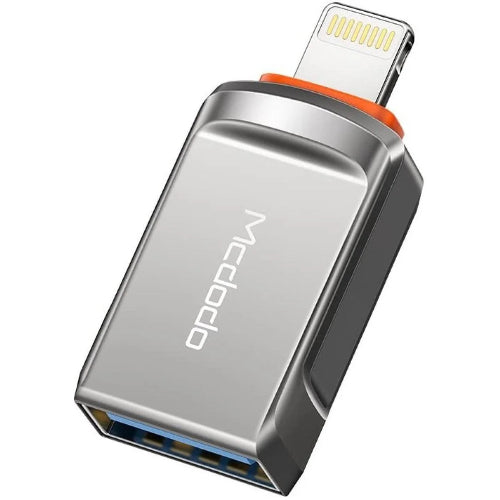
Mcdodo USB-A 3.0 to iPhone OTG Converter (OT-8600)
Mcdodo USB-A 3.0 to iPhone OTG Converter (OT-8600)
Couldn't load pickup availability
Mcdodo USB-A 3.0 to iPhone OTG Converter (OT-8600) — Connect USB Devices to Your iPhone
Expand what your iPhone can do with the Mcdodo USB-A 3.0 to iPhone Converter (OT-8600). This compact OTG adapter lets you connect USB flash drives, card readers, keyboards and other USB-A 3.0 devices directly to your Lightning iPhone or iPad. Fast USB 3.0 transfer speeds make moving photos, videos and files quick and effortless.
Why Buy the Mcdodo OTG Converter?
- USB-A 3.0 to Lightning: Connect USB devices straight to your iPhone.
- Fast USB 3.0 Speeds: Quick file, photo and video transfers.
- Plug & Play: No app or setup required.
- Compact & Portable: Fits easily in your pocket or bag.
- Wide Support: Flash drives, card readers, keyboards and more.
Comparison Chart
| Feature | Mcdodo OT-8600 | Basic Adapter |
|---|---|---|
| Connection | USB-A 3.0 to Lightning | USB 2.0 |
| Transfer Speed | USB 3.0 | Slow |
| Plug & Play | Yes | Yes |
How to Use
Plug the Lightning end into your iPhone or iPad, then connect your USB-A device to the adapter. Access files instantly.
Who Is It For?
Ideal for iPhone and iPad users who want to connect flash drives, card readers or keyboards for quick file transfer.
Frequently Asked Questions
Q: Does it support flash drives?
Yes, USB-A 3.0 flash drives, card readers and more.
Q: Which devices does it fit?
Lightning iPhones and iPads.
Q: Do I need an app?
No, it's plug and play.
Conclusion
Turn your iPhone into a USB device hub. Order the Mcdodo USB-A 3.0 to iPhone Converter from Techshek.pk with Cash on Delivery across Pakistan.
Specifications
| Specification | Detail |
|---|---|
| Brand | Mcdodo |
| Type | OTG Converter |
| Connection | USB-A 3.0 to Lightning |
| Compatibility | Lightning iPhone / iPad |
Share
You may also like
Customers also bought these products
No recommendations available at this time.