


Logitech
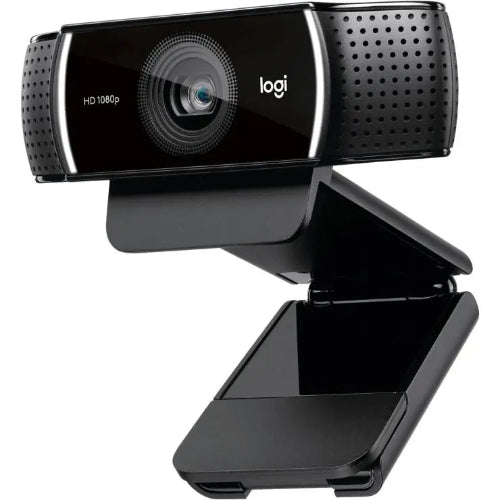
Logitech C922 Pro Stream Webcam
Logitech C922 Pro Stream Webcam
Couldn't load pickup availability
The Logitech C922 Pro Stream Webcam is a professional Full HD USB webcam designed for live streaming, gaming, video calls, online meetings, remote work, online teaching and content creation. It combines 1080p video at 30fps, 720p video at 60fps, HD autofocus, automatic low-light correction and dual omnidirectional microphones in a compact and flexible design. Logitech originally positioned the C922 Pro specifically for serious streamers and gamers who needed smooth, reliable webcam video.
One of the C922 Pro's biggest advantages is its ability to record or stream at 720p/60fps. While 1080p provides greater image detail, 60fps at 720p produces smoother motion, making the webcam particularly useful for gaming streams, fast-moving content and live broadcasts. Logitech officially specifies Full HD 1080p at 30fps and 720p at 60fps.
The webcam also features automatic low-light correction and autofocus, allowing it to adapt when room lighting changes or when the subject moves closer or farther away from the camera. Its dual omnidirectional microphones are designed to provide stereo audio for calls, streams and recordings.
For Pakistani customers looking for the Logitech C922 Pro Price in Pakistan, this webcam is an excellent option for users who want a proven Logitech streaming camera without moving to a more expensive 4K webcam.
Key Features
- Logitech C922 Pro Stream Webcam
- Full HD 1080p video
- 1920 × 1080 resolution
- 1080p at 30fps
- 720p at 60fps
- HD autofocus
- Automatic low-light correction
- Dual omnidirectional microphones
- Stereo audio recording
- USB-A connectivity
- 1.5-meter attached USB cable
- Universal mounting clip
- Tripod mounting thread
- LED activity indicator
- Suitable for live streaming
- Suitable for gaming
- Suitable for YouTube
- Suitable for Twitch
- Suitable for Facebook Live
- Suitable for video conferencing
- Suitable for online classes
- Suitable for remote work
- Suitable for interviews
- Suitable for content creation
- Compatible with Logitech Capture
- Compatible with popular streaming applications
- Background replacement support through compatible software
- Compact desktop-friendly design
Logitech's documentation confirms the C922's HD 1080p lens, autofocus, dual microphone, USB-A cable, universal mounting clip and tripod thread.
Key Features in Detail
1. Full HD 1080p Video
The Logitech C922 Pro can capture Full HD 1920 × 1080 video at 30fps, providing a sharp and detailed image suitable for professional video calls, recordings and streaming.
1080p is particularly useful for:
- YouTube videos
- Video conferencing
- Online interviews
- Remote work
- Online classes
- Product demonstrations
- Live broadcasts
- Social media content
For users upgrading from a basic 720p laptop webcam, the C922 Pro provides a significant improvement in resolution and dedicated-camera flexibility.
2. Smooth 720p at 60fps
For gamers and streamers, one of the C922 Pro's defining features is 720p video at 60fps. Logitech specifically highlights this mode for smoother live gameplay broadcasting.
The higher frame rate produces smoother movement, making it particularly useful for:
- Gaming streams
- Twitch streaming
- Fast-action content
- Live broadcasts
- Reaction videos
- Interactive streaming
If smooth motion is more important than maximum resolution, 720p/60fps can be an excellent choice.
3. HD Autofocus
The C922 Pro includes an HD autofocus lens that automatically adjusts focus to help keep the subject sharp.
Autofocus is useful when you:
- Move closer to the camera
- Move away from the camera
- Hold objects toward the lens
- Change your seating position
- Demonstrate products
- Present documents
This makes the C922 Pro more versatile than a fixed-focus webcam.
4. Automatic Low-Light Correction
The webcam features automatic low-light correction, designed to compensate for challenging lighting conditions. Logitech specifically notes that the C922 can adjust to flickering room lights and multiple computer screens while maintaining clearer video.
This is useful for:
- Gaming rooms
- Bedrooms
- Home offices
- Evening streaming
- Rooms with limited natural light
- Setups illuminated primarily by monitors
Good external lighting will still produce the best results, but automatic correction makes the webcam more forgiving.
5. Dual Omnidirectional Microphones
The C922 Pro includes two omnidirectional microphones for stereo audio capture. Logitech describes them as noise-cancelling microphones designed to provide crisp stereo audio for streaming and recorded video.
The integrated microphones eliminate the need for a separate microphone for many everyday uses.
They are suitable for:
- Video calls
- Zoom meetings
- Online classes
- Gaming chat
- Streaming
- Interviews
- Voice communication
For professional podcasting or studio-quality recording, however, a dedicated microphone remains preferable.
6. Designed for Streaming
The C922 Pro was developed specifically with streamers in mind. Logitech's original launch materials emphasized gameplay broadcasting and integration with streaming software.
It can be used with popular platforms and applications including:
- Twitch
- YouTube
- OBS
- XSplit
- Zoom
- Microsoft Teams
- Skype
- Other compatible webcam applications
The camera's combination of 1080p/30fps and 720p/60fps makes it flexible for different streaming requirements.
7. Background Replacement
The C922 Pro was originally promoted with dynamic background replacement software powered by Personify, allowing users to separate themselves from the background without requiring a traditional green screen.
Background replacement can be useful for:
- Gaming streams
- Online presentations
- YouTube videos
- Professional meetings
- Streaming overlays
Software availability and compatibility can change over time, so this should be considered a software-dependent feature rather than a hardware green-screen capability.
8. Universal Mounting Clip
The webcam comes with a universal mounting clip, allowing it to sit securely on compatible monitors and laptop displays.
This provides a simple solution for everyday video calls and streaming setups.
9. Tripod Thread
A built-in tripod thread gives the C922 Pro additional positioning flexibility. Logitech specifies the tripod thread, while the tripod itself is not included.
This is useful for:
- Studio setups
- Streaming
- Product demonstrations
- Tutorials
- Presentations
- Alternative camera angles
10. USB Plug-and-Play Connectivity
The C922 Pro uses an integrated USB-A cable, making it straightforward to connect to compatible computers. The supplied cable is approximately 1.5 meters / 5 feet long.
This provides enough length for most desktop and monitor configurations.
Specifications Chart
| Specification | Logitech C922 Pro |
|---|---|
| Brand | Logitech |
| Model | C922 Pro Stream |
| Product Type | Streaming Webcam |
| Camera Type | USB Webcam |
| Maximum Resolution | 1920 × 1080 |
| Video Resolution | Full HD 1080p |
| 1080p Frame Rate | 30fps |
| 720p Frame Rate | 60fps |
| Focus | HD Autofocus |
| Low-Light Correction | Automatic |
| Microphones | Dual |
| Microphone Type | Omnidirectional |
| Audio | Stereo |
| Connection | USB |
| USB Interface | USB-A |
| Cable Length | 1.5m / 5ft |
| Mounting | Universal Clip |
| Tripod Thread | Yes |
| Tripod Included | No |
| Activity Indicator | LED |
| Streaming | Yes |
| Gaming | Yes |
| Background Replacement | Software-dependent |
| Logitech Capture | Supported |
| Recommended Use | Streaming, Video Calls, Gaming, Content Creation |
| Color | Black |
| Included | Webcam, Attached USB-A Cable, Documentation |
The core specifications above are based on Logitech's official product materials and support documentation.
Logitech C922 Pro vs UGREEN 75594
| Feature | Logitech C922 Pro | UGREEN 75594 CM927 |
|---|---|---|
| Maximum Resolution | 1080p | 2K 1440p |
| 1080p | 30fps | Up to 30fps |
| 720p | 60fps | 30fps |
| Autofocus | Yes | Yes |
| Low-Light Correction | Yes | Model dependent |
| Microphones | Dual | Dual |
| Built-In Speaker | No | Yes |
| Streaming Focus | Excellent | Good |
| Gaming | Excellent | Good |
| Video Conferencing | Excellent | Excellent |
| Tripod Thread | Yes | Yes |
| USB | USB-A | USB-A |
| Best Advantage | 720p/60fps streaming | 2K + integrated speaker |
| Best For | Gamers & streamers | Video conferencing |
Choose Logitech C922 Pro if: your priority is gaming, streaming, smooth 60fps video and established Logitech software support.
Choose UGREEN 75594 if: you want higher 2K resolution and an integrated speaker for conferencing.
Logitech C922 Pro vs Poly Studio P5
| Feature | Logitech C922 Pro | Poly Studio P5 |
|---|---|---|
| Maximum Resolution | 1080p | 1080p |
| 1080p FPS | 30fps | 30fps |
| 720p/60fps | Yes | No |
| Autofocus | Yes | Yes |
| Low-Light Correction | Yes | Yes |
| Microphones | Dual | Single directional |
| FOV | Streaming-oriented | 80° |
| Privacy Shutter | No | Yes |
| Tripod Support | Yes | Yes |
| Streaming | Excellent | Good |
| Business Meetings | Excellent | Excellent |
| Teams/Zoom Focus | Good | Stronger business focus |
| Best For | Streaming & gaming | Professional conferencing |
The C922 Pro is the better choice for streaming and gaming, while the Poly Studio P5 is more focused on business conferencing and workplace use.
Who Should Buy Logitech C922 Pro?
1. Gamers
The C922 Pro is particularly well suited to gamers because it can deliver 720p at 60fps, providing smoother webcam footage during gameplay streams.
2. Twitch Streamers
Streamers can use the C922 Pro for face-cam footage while broadcasting gameplay or other live content.
3. YouTubers
The 1080p camera provides enough resolution for webcam videos, tutorials, reviews and live broadcasts.
4. Content Creators
Creators who need a reliable USB webcam can benefit from autofocus, low-light correction and flexible mounting.
5. Remote Workers
The C922 Pro is also an excellent general-purpose webcam for video meetings and remote work.
6. Online Teachers
1080p video and integrated stereo microphones make it suitable for online classes and tutoring.
7. Freelancers
Freelancers can use the webcam for client calls, interviews and virtual presentations.
8. Online Interview Users
Autofocus and Full HD video can provide a more professional appearance during remote interviews.
9. Podcasters and Streamers
While dedicated microphones remain preferable for serious audio production, the integrated stereo microphones are convenient for webcam-based content.
10. Users Upgrading From a Laptop Webcam
If your laptop's built-in webcam produces soft or low-quality video, the C922 Pro is a practical dedicated-camera upgrade.
Frequently Asked Questions
1. What is the Logitech C922 Pro?
The Logitech C922 Pro Stream is a Full HD USB webcam designed for streaming, gaming, video calls and content creation.
2. What resolution does the Logitech C922 Pro support?
It supports up to 1080p Full HD at 30fps.
3. Does Logitech C922 Pro support 60fps?
Yes. It supports 720p at 60fps, which is one of its key advantages for streaming and gaming.
4. Is Logitech C922 Pro a 4K webcam?
No. Its maximum resolution is 1080p Full HD.
5. Does C922 Pro have autofocus?
Yes. It features an HD autofocus lens.
6. Does the C922 Pro work in low light?
Yes. It features automatic low-light correction to improve video in challenging lighting conditions.
7. Does Logitech C922 Pro have a microphone?
Yes. It has dual omnidirectional microphones for stereo audio capture.
8. Does the C922 Pro have noise cancellation?
Logitech describes the dual microphones as noise-cancelling microphones in its original product announcement.
9. Does C922 Pro have a privacy shutter?
No dedicated physical privacy shutter is listed in Logitech's C922 Pro hardware documentation.
10. Can I use Logitech C922 Pro for Zoom?
Yes. It can be used as a standard USB webcam with compatible video-conferencing software such as Zoom.
11. Does it work with Microsoft Teams?
Yes. The C922 Pro can be used with Microsoft Teams as a standard USB webcam.
12. Is C922 Pro good for gaming?
Yes. It is particularly suitable for gaming because it supports 720p at 60fps, providing smoother webcam footage during gameplay.
13. Is Logitech C922 Pro good for Twitch?
Yes. Logitech designed the C922 Pro specifically with live streaming in mind and promoted it for platforms such as Twitch.
14. Can C922 Pro stream at 1080p?
Yes. It can stream or record at 1080p/30fps.
15. Can C922 Pro record at 60fps?
Yes, but 60fps is supported at 720p, rather than 1080p.
16. Can I mount the C922 Pro on a monitor?
Yes. It includes a universal mounting clip.
17. Can I use it on a tripod?
Yes. It has a built-in tripod thread. The tripod itself is not included.
18. What type of USB does C922 Pro use?
It uses an integrated USB-A cable.
19. How long is the C922 Pro cable?
The attached USB-A cable is approximately 1.5 meters / 5 feet long.
20. Does Logitech C922 Pro work with OBS?
Yes. It can be used as a standard webcam source in compatible streaming software, including OBS.
21. Can I use the C922 Pro for YouTube?
Yes. It is suitable for YouTube streaming, video recording, tutorials and webcam-based content.
22. Can I use background removal without a green screen?
The C922 was originally promoted with dynamic background replacement software powered by Personify. Background-removal performance depends on the software being used and its current compatibility.
23. Is the C922 Pro better than a laptop webcam?
For many laptops, yes. It provides dedicated 1080p video, autofocus, automatic low-light correction and dual microphones, along with flexible mounting.
24. Is Logitech C922 Pro still good for streaming?
Yes. Although newer webcams offer higher resolutions, the C922 Pro remains useful for users who prioritize reliable 1080p video and 720p/60fps streaming.
25. Is Logitech C922 Pro worth buying in Pakistan?
Yes, particularly if you want a reliable Logitech webcam for gaming, streaming, online meetings, teaching and content creation without requiring 4K resolution.
Conclusion
The Logitech C922 Pro Stream Webcam remains a highly capable Full HD webcam for users who need reliable video for streaming, gaming, meetings and content creation. Its combination of 1080p/30fps, 720p/60fps, HD autofocus, automatic low-light correction and dual omnidirectional microphones makes it considerably more versatile than a basic built-in laptop camera.
Its biggest advantage is the 720p/60fps mode, which gives gamers and live streamers smoother webcam footage. At the same time, 1080p/30fps provides better detail for meetings, YouTube videos and general recording.
For customers searching for the Logitech C922 Pro Price in Pakistan, it is best suited to gamers, Twitch streamers, YouTubers, freelancers, remote workers, online teachers and content creators.
If you specifically require 4K or 1080p/60fps, you should consider a newer higher-end webcam. However, if you want a dependable 1080p Logitech webcam with 60fps streaming capability, the C922 Pro remains a strong and practical choice.
Share
You may also like
Customers also bought these products
No recommendations available at this time.