


Logitech
Logitech Brio 100 1080p Full HD Webcam
Logitech Brio 100 1080p Full HD Webcam
Couldn't load pickup availability
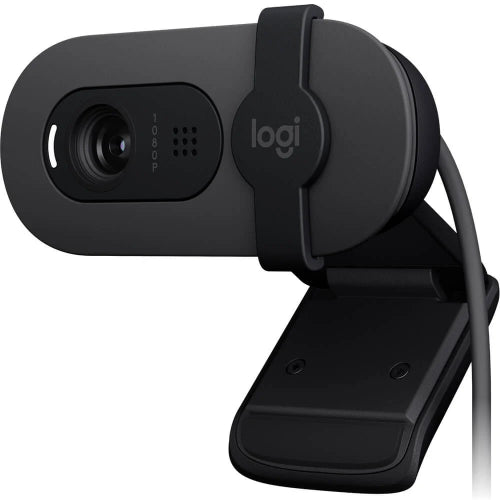
The Logitech Brio 100 is a compact and stylish Full HD 1080p USB webcam designed to provide a simple upgrade over built-in laptop cameras. It is ideal for video calls, online meetings, remote work, online classes, interviews, streaming and everyday communication.
With Full HD 1080p video at 30fps, automatic light correction, a built-in microphone and an integrated privacy shutter, the Brio 100 delivers the essential features most users need from a modern webcam without unnecessary complexity. Logitech's RightLight 2 technology automatically adjusts the image in low-light conditions to help you look clearer and brighter during calls.
The Brio 100 connects through USB-A and is designed for straightforward plug-and-play use with computers. Its universal mounting clip makes it suitable for laptops and monitors, while the adjustable privacy shutter lets you physically cover the camera lens whenever privacy is required.
For customers searching for the Logitech Brio 100 Price in Pakistan, this webcam is a practical choice for users who want a reliable Logitech Full HD webcam for work, education and communication without paying for advanced 4K or AI-camera features.
Key Features
- Logitech Brio 100
- Full HD 1080p resolution
- 1080p video at 30fps
- 2MP camera sensor
- RightLight 2 automatic light correction
- Fixed focus
- 58° diagonal field of view
- Built-in mono microphone
- Integrated privacy shutter
- USB-A connectivity
- Plug-and-play operation
- Universal mounting clip
- Laptop and monitor compatible
- Tripod mount compatible
- Compact design
- Modern minimalist appearance
- Works with Windows, macOS and ChromeOS
- Compatible with major video-conferencing applications
- Ideal for Zoom, Microsoft Teams and Google Meet
- Suitable for online classes
- Suitable for remote work
- Suitable for streaming
- Suitable for video calls
- Available in multiple color options depending on market
Logitech specifies Full HD 1080p/30fps video, a 58° diagonal field of view, fixed focus, a mono microphone, RightLight 2 and an integrated privacy shutter for the Brio 100.
Key Features in Detail
1. Full HD 1080p Video
The Logitech Brio 100 provides 1920 × 1080 Full HD video at 30fps, giving you a sharper and more detailed image than standard 720p webcams.
This makes it suitable for:
- Zoom meetings
- Microsoft Teams
- Google Meet
- Online classes
- Remote work
- Job interviews
- Client meetings
- Video calls
- Streaming
- Personal communication
For everyday webcam use, 1080p offers a good balance between image quality, bandwidth and computer performance.
2. Logitech RightLight 2 Technology
One of the Brio 100's key features is RightLight 2 automatic light correction.
The webcam automatically adjusts the image when lighting conditions change, helping improve visibility when you're sitting in a dim room or facing inconsistent indoor lighting. Logitech states that RightLight 2 can improve the appearance of users in low-light conditions.
This is particularly useful for:
- Home offices
- Bedrooms
- Evening calls
- Rooms with limited natural light
- Indoor meetings
While a dedicated light will always provide better results, RightLight 2 makes the Brio 100 more forgiving in everyday environments.
3. 58° Field of View
The Brio 100 has a 58° diagonal field of view.
This relatively focused view is designed primarily for individual users.
It works well when:
- You're sitting directly in front of the computer
- You want a professional head-and-shoulders frame
- You're attending one-to-one meetings
- You don't want too much of your room visible
For large groups or wider presentations, a webcam with a wider FOV would be more appropriate.
4. Built-In Microphone
The Brio 100 includes an integrated mono microphone designed to capture your voice during calls.
This eliminates the need for a separate microphone for normal:
- Video calls
- Online classes
- Business meetings
- Interviews
- Remote work
- Casual streaming
For professional voice recording, podcasts or studio-quality streaming, however, a dedicated microphone will still provide superior audio.
5. Integrated Privacy Shutter
Privacy is another important feature of the Brio 100.
The webcam includes an integrated privacy shutter that can physically cover the camera lens when you're not using it.
This is useful for:
- Home offices
- Shared workspaces
- Dorm rooms
- Business environments
- Privacy-conscious users
You can simply close the shutter when the webcam isn't required.
6. Fixed Focus
The Brio 100 uses a fixed-focus lens rather than autofocus. Logitech specifies a fixed focus range of approximately 30cm and beyond.
This is perfectly suitable for normal webcam usage where you remain seated in front of the camera.
However, if you frequently bring products or documents close to the camera, an autofocus webcam such as the A4Tech PK-980HA may be a better choice.
7. USB-A Connectivity
The Brio 100 uses a USB-A connection and is designed for straightforward computer connectivity.
Simply connect the webcam to a compatible USB port and select it as your camera in the desired application.
It is a practical choice for:
- Desktop PCs
- Laptops with USB-A
- Office computers
- Home workstations
Users with USB-C-only laptops may require an appropriate adapter.
8. Universal Mounting Clip
The Brio 100 includes an integrated mounting clip designed to sit on compatible laptop screens and monitors.
This allows you to position the webcam at approximately eye level without purchasing a separate stand.
Its compact design also makes it convenient for users who frequently move between workstations.
9. Tripod Compatibility
The Brio 100 supports mounting on a compatible tripod or other suitable mounting solution. Logitech lists a tripod mounting option as part of its physical specifications.
This can be useful for:
- Streaming
- Video recording
- Tutorials
- Presentations
- Alternative camera positioning
A tripod is not included as standard.
Specifications Chart
| Specification | Logitech Brio 100 |
|---|---|
| Brand | Logitech |
| Model | Brio 100 |
| Product Type | USB Webcam |
| Maximum Resolution | 1080p Full HD |
| Maximum Video | 1080p @ 30fps |
| Resolution | 1920 × 1080 |
| Sensor | 2MP |
| Focus Type | Fixed Focus |
| Focus Range | 30cm and Beyond |
| Field of View | 58° Diagonal |
| Light Correction | RightLight 2 |
| Microphone | Built-in Mono |
| Privacy Shutter | Yes |
| Connection | USB-A |
| USB Type | USB 2.0 |
| Mounting | Universal Clip |
| Tripod Support | Yes |
| Tripod Included | No |
| Rotation | Manual adjustment through mount |
| Color | Varies by version |
| Windows Compatibility | Windows 10 or Later |
| macOS Compatibility | macOS 10.15 or Later |
| ChromeOS | Supported |
| Software Support | Logitech software / compatible webcam applications |
| Recommended Use | Video Calls, Meetings, Classes & Remote Work |
Specifications are based on Logitech's official Brio 100 product information.
Logitech Brio 100 vs Logitech C920
| Feature | Logitech Brio 100 | Logitech C920 |
|---|---|---|
| Maximum Resolution | 1080p | 1080p |
| 1080p FPS | 30fps | 30fps |
| Autofocus | No | Yes |
| Focus Type | Fixed | Autofocus |
| Field of View | 58° | 78° |
| Microphone | Mono | Stereo |
| Light Correction | RightLight 2 | Automatic |
| Privacy Shutter | Yes | No built-in shutter |
| USB | USB-A | USB-A |
| Tripod Support | Yes | Yes |
| Best For | Simple everyday webcam use | More advanced video calls & content |
Which Should You Buy?
Choose the Brio 100 if you want a simple, affordable Logitech 1080p webcam with privacy protection and automatic light correction.
Choose the C920 if autofocus, a wider field of view and stereo microphones are more important to you.
Logitech Brio 100 vs A4Tech PK-980HA
| Feature | Logitech Brio 100 | A4Tech PK-980HA |
|---|---|---|
| Resolution | 1080p | 1080p |
| FPS | 30fps | 30fps |
| Focus | Fixed | Autofocus |
| FOV | 58° | 90° |
| Microphone | Mono | Dual Digital HD |
| Low-Light Correction | RightLight 2 | Yes |
| Privacy Shutter | Yes | Not listed |
| USB | USB-A | USB 2.0 |
| Tripod Mount | Yes | Yes |
| Best For | Personal video calls | Wider framing & autofocus |
The A4Tech PK-980HA is more flexible for product demonstrations and wider shots because of its autofocus and 90° view, while the Brio 100 offers Logitech's simple design, RightLight 2 and integrated privacy shutter.
Who Should Buy Logitech Brio 100?
Remote Workers
The Brio 100 is a simple upgrade for employees working from home who need better video quality than their laptop's built-in camera.
Students
It is suitable for online classes, presentations, virtual lectures and student meetings.
Online Teachers
Teachers can use it for video lessons and one-to-one sessions where a focused 58° view is sufficient.
Freelancers
Freelancers can use the webcam for client meetings, interviews and consultations.
Business Professionals
The 1080p image and integrated microphone make it practical for regular video conferencing.
Job Seekers
The Brio 100 can provide a cleaner and more professional video image during online interviews.
Content Creators
It can be used for basic YouTube videos, tutorials and webcam-based content.
Streamers
For users who need a straightforward 1080p webcam for streaming, the Brio 100 is a convenient option.
Home Office Users
Its compact design and privacy shutter make it especially suitable for permanent home-office setups.
Users Upgrading From a Laptop Camera
If your laptop's built-in camera produces poor-quality video, the Brio 100 offers a straightforward Full HD upgrade.
Frequently Asked Questions
1. What is Logitech Brio 100?
Logitech Brio 100 is a Full HD 1080p USB webcam designed for video calls, online meetings, remote work, classes and everyday communication.
2. What resolution does Logitech Brio 100 support?
It supports up to 1920 × 1080 Full HD at 30fps.
3. Is Logitech Brio 100 a 4K webcam?
No. The Brio 100 is a 1080p Full HD webcam.
4. Does Brio 100 have autofocus?
No. The Brio 100 uses fixed focus with a focus range starting at approximately 30cm.
5. What is the field of view of Brio 100?
It has a 58° diagonal field of view.
6. Does Logitech Brio 100 have a microphone?
Yes. It features a built-in mono microphone.
7. Does Brio 100 have noise cancellation?
Logitech's official Brio 100 specifications identify the microphone as a mono microphone but do not list dedicated noise-cancellation technology as a primary specification. Therefore, it should not be marketed as an ANC webcam.
8. Does Brio 100 have a privacy shutter?
Yes. It includes an integrated privacy shutter that physically covers the camera lens.
9. What is RightLight 2?
RightLight 2 is Logitech's automatic light-correction technology designed to improve image quality in changing and low-light conditions.
10. Is Brio 100 good for Zoom?
Yes. It is suitable for Zoom and other common video-conferencing applications.
11. Is Logitech Brio 100 good for Microsoft Teams?
Yes. It can be used as a standard USB webcam with Microsoft Teams and compatible conferencing software.
12. Is Brio 100 good for Google Meet?
Yes. It can be selected as the camera and microphone in Google Meet on compatible computers.
13. Is Logitech Brio 100 good for online classes?
Yes. Its 1080p video and integrated microphone make it a practical option for online education.
14. Is Brio 100 good for streaming?
Yes, especially for users who need a basic 1080p/30fps streaming webcam. More advanced creators may prefer a webcam with autofocus, wider FOV or higher frame rates.
15. Does Brio 100 support 60fps?
No. Its maximum specified resolution/frame-rate combination is 1080p at 30fps.
16. Does Logitech Brio 100 use USB-C?
The Brio 100 uses a USB-A connection.
17. Can Brio 100 be mounted on a laptop?
Yes. Its integrated mounting clip is designed for laptop and monitor mounting.
18. Can I use Brio 100 with a tripod?
Yes. The webcam supports tripod mounting; the tripod is sold separately.
19. Is Logitech Brio 100 compatible with Mac?
Yes. Logitech lists compatibility with macOS 10.15 or later.
20. Is Logitech Brio 100 compatible with Windows?
Yes. Logitech lists support for Windows 10 or later.
21. Is Logitech Brio 100 better than a laptop camera?
For many laptops, yes. The Brio 100 provides dedicated 1080p video and Logitech's RightLight 2 processing, making it a useful upgrade over lower-quality built-in webcams.
22. Can Brio 100 focus on objects close to the camera?
It uses fixed focus with a minimum specified focus distance of approximately 30cm, so it is not designed for close-up product demonstrations.
23. Is Logitech Brio 100 suitable for business meetings?
Yes. Its Full HD video, integrated microphone and privacy shutter make it suitable for everyday professional video conferencing.
24. Does Logitech Brio 100 require special drivers?
It is designed for standard USB webcam use and works with compatible operating systems and applications. Additional Logitech software may provide extra controls depending on the setup.
25. Is Logitech Brio 100 worth buying in Pakistan?
Yes. It is a good choice for users looking for a simple Logitech 1080p webcam with RightLight 2, a privacy shutter, integrated microphone and easy USB connectivity.
Conclusion
The Logitech Brio 100 1080p Full HD Webcam is a straightforward webcam designed around the features most people actually need for everyday video communication. Its 1080p/30fps resolution, RightLight 2 automatic light correction, integrated microphone and privacy shutter make it a practical upgrade for laptops and desktop computers.
Its 58° field of view provides a focused frame that works especially well for individual users, remote workers, students and professionals. The fixed-focus design is simple and reliable for normal seating distances, although users who frequently demonstrate products close to the camera should consider an autofocus webcam instead.
The integrated privacy shutter is another useful advantage for home and office users, while the universal mounting system makes installation simple on laptops and monitors.
For customers looking for the Logitech Brio 100 Price in Pakistan, it is best suited to remote work, online classes, Zoom meetings, Microsoft Teams, Google Meet, interviews, freelancing and everyday video calls.
Best For: Remote work, online classes, business meetings, video calls, interviews and everyday 1080p webcam use.
Share
You may also like
Customers also bought these products
No recommendations available at this time.