


Creative
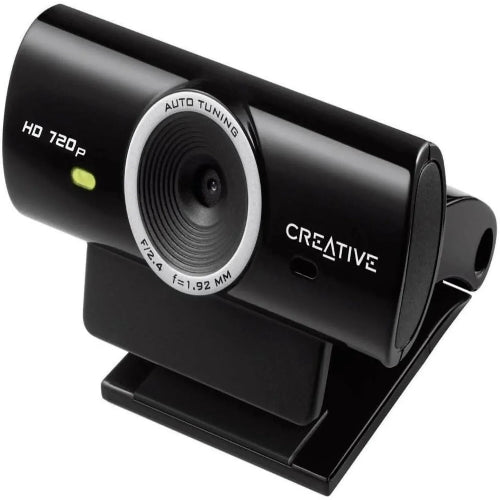
Creative Live! Cam Connect HD Webcam
Creative Live! Cam Connect HD Webcam
Couldn't load pickup availability
The Creative Live! Cam Connect HD Webcam is a practical USB webcam designed for everyday video communication, online meetings, remote work, online classes, video calls, and home-office setups. It provides a simple way to add a dedicated camera and microphone to a desktop or laptop, making it a useful upgrade over older or basic built-in computer cameras.
With HD video, an integrated microphone, USB connectivity, and a compact mounting design, the Creative Live! Cam Connect HD is aimed at users who want an easy-to-use webcam without the complexity of professional camera equipment.
Whether you are attending a business meeting, joining an online class, speaking with customers, conducting a remote interview, or making casual video content, this webcam offers a convenient everyday solution.
Model note: Creative has sold multiple webcams under the Live! Cam Connect family. Specifications can vary by exact regional/model version. The description below focuses on the standard Creative Live! Cam Connect HD Webcam positioning and common features rather than inventing model-specific specifications.
Key Features
- HD webcam for computers
- Clear HD video
- USB connectivity
- Built-in microphone
- Plug-and-play setup
- Adjustable mounting design
- Laptop and monitor compatible
- Compact desktop-friendly design
- Suitable for video conferencing
- Suitable for online classes
- Ideal for remote work
- Useful for video calls
- Suitable for online interviews
- Compatible with common conferencing applications
- Easy installation
- Designed for everyday communication
- Creative audio and imaging technology
- Suitable for home and office use
- Black finish
- Dedicated external webcam solution
Key Features in Detail
1. HD Video Quality
The Creative Live! Cam Connect is designed to provide clear HD video for everyday communication.
Compared with very basic low-resolution webcams, HD video provides a more detailed image of your face and surroundings during video calls.
It is suitable for:
- Online meetings
- Video calls
- Remote interviews
- Online classes
- Business presentations
- Casual streaming
- Remote collaboration
For standard communication, HD resolution provides a good balance between image quality, bandwidth usage and computer performance.
2. Dedicated External Webcam
Unlike a laptop's integrated camera, an external webcam gives you more flexibility over where the camera is positioned.
You can place the Creative Live! Cam Connect on a compatible:
- Laptop screen
- Desktop monitor
- Display
- Desk setup
This allows you to position the camera at a more natural eye level.
3. Built-In Microphone
The webcam includes an integrated microphone for convenient voice communication.
This means you can use the webcam for basic video calls without purchasing a separate microphone.
The microphone is useful for:
- Zoom meetings
- Video calls
- Online classes
- Remote interviews
- Microsoft Teams
- Google Meet
- Voice communication
For professional podcasting or studio-quality recording, a dedicated external microphone will still provide better audio performance.
4. USB Connectivity
The Creative Live! Cam Connect uses USB connectivity to communicate with a compatible computer.
USB makes the webcam easy to install and convenient to move between different computers.
Simply connect the webcam and select it from your video application's camera settings when required.
5. Plug-and-Play Convenience
The webcam is designed for easy everyday use rather than complicated professional configuration.
This makes it particularly useful for users who want to:
- Connect the webcam.
- Open their video application.
- Select the webcam.
- Start the meeting or call.
This straightforward setup is ideal for students, office workers, freelancers and home users.
6. Flexible Mounting
The webcam can be positioned on a compatible laptop or monitor.
A flexible mount allows you to adjust the camera position to achieve better framing.
For video meetings, positioning the webcam close to eye level generally creates a more natural and professional-looking image.
7. Useful for Remote Work
The Creative Live! Cam Connect is suitable for people working from home or hybrid offices.
It provides a dedicated camera for:
- Team meetings
- Client calls
- Interviews
- Presentations
- Online collaboration
- Video conferencing
An external webcam can also be positioned independently from your laptop, which is useful when using a second monitor or desktop workstation.
8. Ideal for Online Learning
Students can use the webcam for online lectures, tutoring sessions and virtual presentations.
Teachers and instructors can also use it as a dedicated camera for remote teaching.
The integrated microphone provides a convenient all-in-one setup for basic communication.
9. Compact Design
The compact design allows the webcam to fit naturally into most desktop workstations.
It does not require a large dedicated camera setup, making it suitable for:
- Small desks
- Home offices
- Student workstations
- Gaming setups
- Business desks
10. Suitable for Everyday Video Calls
The Creative Live! Cam Connect is designed primarily for communication.
It is a practical choice for users who need a dependable webcam for regular:
- Family video calls
- Work meetings
- Online classes
- Client meetings
- Remote interviews
- Virtual presentations
Specifications Chart
| Specification | Creative Live! Cam Connect HD |
|---|---|
| Brand | Creative |
| Product Series | Live! Cam |
| Product Type | USB HD Webcam |
| Video Quality | HD |
| Resolution | HD resolution* |
| Frame Rate | Model/application dependent* |
| Microphone | Built-in |
| Connectivity | USB |
| Installation | Plug & Play |
| Mounting | Adjustable Clip/Stand |
| Compatible Devices | Laptop, Desktop PC |
| Primary Use | Video Calls & Conferencing |
| Online Meetings | Yes |
| Online Classes | Yes |
| Remote Work | Yes |
| Streaming | Suitable for basic use |
| Video Applications | Compatible applications |
| Color | Black |
| Design | Compact External Webcam |
*Exact resolution, frame rate, sensor and field-of-view specifications can vary between Creative Live! Cam Connect variants. Verify the model number printed on the retail packaging before publishing model-specific technical numbers.
Creative Live! Cam Connect vs Laptop Built-In Camera
| Feature | Creative Live! Cam Connect | Basic Laptop Camera |
|---|---|---|
| Dedicated Webcam | Yes | No |
| External Positioning | Yes | Limited |
| USB Connection | Yes | No |
| Built-In Microphone | Yes | Yes |
| Laptop Compatible | Yes | Built-in |
| Monitor Mounting | Yes | No |
| Online Meetings | Very Good | Good |
| Online Classes | Very Good | Good |
| Remote Work | Very Good | Good |
| Flexibility | Higher | Lower |
| Easy to Move Between PCs | Yes | No |
| Best For | Dedicated webcam users | Basic laptop users |
Creative Live! Cam Connect vs Basic Webcam
| Feature | Creative Live! Cam Connect | Basic Generic Webcam |
|---|---|---|
| Brand | Creative | Generic |
| HD Video | Yes | Model dependent |
| USB | Yes | Usually |
| Built-In Microphone | Yes | Usually |
| Plug & Play | Yes | Usually |
| Mounting Clip | Yes | Usually |
| Video Meetings | Excellent | Good |
| Online Classes | Excellent | Good |
| Remote Work | Excellent | Good |
| Brand Support | Creative | Varies |
| Build Quality | Branded | Varies |
| Everyday Reliability | Strong | Varies |
Who Should Buy Creative Live! Cam Connect HD Webcam?
1. Remote Workers
If you regularly work from home and attend video meetings, this webcam provides a dedicated camera for your workstation.
2. Students
Students can use it for online classes, presentations, tutoring and virtual meetings.
3. Teachers
It is useful for teachers and tutors conducting remote lessons.
4. Freelancers
Freelancers can use the webcam for client meetings, interviews and remote collaboration.
5. Office Professionals
A dedicated external webcam can make desktop video conferencing more flexible.
6. Home Users
It is suitable for family video calls and everyday communication.
7. Online Interview Users
The webcam can be used for remote job interviews, university interviews and professional calls.
8. Casual Content Creators
It can be used for basic webcam-based videos, tutorials and online content.
9. Gamers
Gamers can use an external webcam for video calls, Discord and basic livestreaming.
Who Should Not Buy This Webcam?
The Creative Live! Cam Connect HD may not be the right choice if your priority is professional cinematic video production.
Consider a more advanced camera if you require:
- 4K recording
- Advanced autofocus
- Large image sensors
- Interchangeable lenses
- Manual exposure controls
- Professional color profiles
- Cinematic depth of field
For everyday video conferencing, online classes and general communication, an HD webcam is much more practical.
Frequently Asked Questions
1. What is Creative Live! Cam Connect HD?
It is an external USB HD webcam designed for computers, video calls, online meetings, remote work and online classes.
2. Is Creative Live! Cam Connect a USB webcam?
Yes. It is designed to connect to a compatible computer through USB.
3. Does it have a built-in microphone?
Yes. The webcam includes an integrated microphone for voice communication.
4. Is Creative Live! Cam Connect good for Zoom?
Yes. It can be used with compatible video-conferencing applications such as Zoom.
5. Can I use it with Google Meet?
Yes. It can be selected as a webcam in compatible Google Meet setups.
6. Can I use it with Microsoft Teams?
Yes. It can be used as a camera for Microsoft Teams on compatible computers.
7. Is it suitable for online classes?
Yes. It is a practical option for students, teachers and online tutors.
8. Is it good for remote work?
Yes. It can be used for meetings, client calls, interviews and presentations.
9. Can I use it with a laptop?
Yes. It is designed as an external webcam for compatible laptops.
10. Can I use it with a desktop PC?
Yes. It can be connected to a compatible desktop computer through USB.
11. Is the Creative Live! Cam Connect plug and play?
It is designed for straightforward USB setup, although exact driver requirements can depend on the operating system and specific model.
12. Can I mount the webcam on a monitor?
Yes. Its mounting design allows it to be positioned on compatible monitors and displays.
13. Can I use it for video interviews?
Yes. It is suitable for remote job interviews, meetings and other video-based communication.
14. Is it good for YouTube?
It can be used for basic webcam-based YouTube videos, tutorials and presentations.
15. Can I use it for streaming?
Yes, it can be used for basic streaming and webcam applications.
16. Does it work with Windows?
It is designed for use with compatible computer operating systems. Exact compatibility should be checked against the specific Creative model.
17. Does it work with Mac?
Compatibility depends on the exact Live! Cam Connect model and macOS version. Check the model's current Creative support information before purchase.
18. Is an external webcam better than a laptop camera?
An external webcam provides greater positioning flexibility and can be upgraded or moved between computers.
19. Is Creative Live! Cam Connect good for business meetings?
Yes. It is suitable for standard business video meetings and remote communication.
20. Is Creative Live! Cam Connect worth buying?
If you need a simple branded webcam for video calls, online meetings, remote work, online classes and everyday communication, Creative Live! Cam Connect is a practical choice.
21. Does the webcam require a separate microphone?
No. It includes a built-in microphone for normal video calls and meetings.
22. Can I use it for online teaching?
Yes. Teachers can use it for online lectures, tutoring and presentations.
23. Can I use it for Discord?
Yes. It can be used as a camera in compatible Discord desktop setups.
24. Can I use it for Skype?
Yes. It can be used with compatible Skype installations.
25. Is it suitable for home-office use?
Yes. Its compact USB design makes it suitable for home-office workstations.
Conclusion
The Creative Live! Cam Connect HD Webcam is a straightforward solution for users who need a dedicated external camera for everyday computer communication. Its HD video, integrated microphone, USB connectivity and convenient mounting design make it suitable for video calls, online meetings, remote work, online education and basic content creation.
Rather than investing in complicated professional camera equipment, users who simply need a reliable webcam for their laptop or desktop can benefit from the convenience of a dedicated USB camera.
For Pakistani customers searching for a Creative Live! Cam Connect HD Webcam price in Pakistan, TechShek.pk can be a convenient destination for checking availability and purchasing computer accessories.
Share
You may also like
Customers also bought these products
No recommendations available at this time.