


Techshek.pk
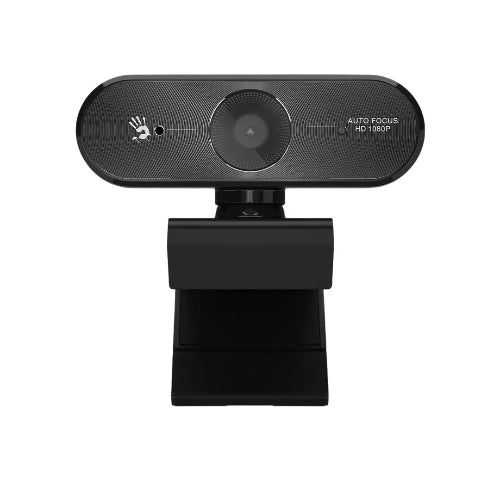
Bloody GK30 1080P Full HD Auto Focus Gaming Webcam
Bloody GK30 1080P Full HD Auto Focus Gaming Webcam
Couldn't load pickup availability
The Bloody GK30 is a Full HD gaming webcam designed for users who need sharp 1080p video, fast autofocus, clear voice capture and flexible positioning for streaming, video calls, online meetings, gaming and content creation. Bloody officially lists the GK30 as a Full HD Auto Focus Gaming Webcam with a 1920 × 1080 resolution, 30fps frame rate, 75° viewing angle, USB 2.0 connectivity and built-in digital microphone.
Unlike a basic fixed-focus webcam, the GK30 uses rapid autofocus, helping keep your face sharp when you move closer to or farther from the camera. Bloody specifies autofocus from approximately 10 cm to infinity, making it practical for both normal video calls and situations where you occasionally move around in front of the camera.
The camera also features a 75° wide-angle lens, 360° horizontal rotation and 40° vertical adjustment, giving users considerable flexibility when positioning it on a monitor, laptop or tripod. It also includes a built-in 1/4-inch tripod mounting thread.
For audio, the GK30 incorporates a single-directional digital microphone with noise-cancelling technology, designed to improve speech clarity during meetings, streaming and calls. Its UVC support enables driver-free operation on supported systems.
For Pakistani customers searching for the Bloody GK30 Webcam Price in Pakistan, the GK30 is a strong option for anyone looking for a capable 1080p webcam with autofocus, flexible mounting and integrated audio.
Key Features
- Bloody GK30 Full HD Gaming Webcam
- 1920 × 1080 Full HD resolution
- 30fps video
- Rapid autofocus
- 75° wide viewing angle
- Full HD glass lens
- Built-in digital microphone
- Single-directional microphone
- Noise-cancelling microphone technology
- Superior low-light performance
- Driver-free UVC support
- USB 2.0 connectivity
- 360° horizontal rotation
- 40° vertical adjustment
- Built-in 1/4-inch tripod mount
- Tripod compatible
- Dust-resistant lens design
- Suitable for streaming
- Suitable for video conferencing
- Suitable for online classes
- Suitable for remote work
- Suitable for gaming
- Suitable for content creation
- Suitable for video calls
- Plug-and-play operation
These core specifications are based on Bloody's official GK30 product page.
Key Features in Detail
1. Full HD 1080p Video
The Bloody GK30 provides Full HD 1920 × 1080 resolution at up to 30fps, delivering detailed video for everyday communication and content creation.
1080p provides a significant upgrade over basic 720p webcams and is well suited to:
- Zoom meetings
- Microsoft Teams
- Google Meet
- Online classes
- Streaming
- YouTube
- Video interviews
- Gaming
- Remote work
The camera also supports 720p video calling at 30fps when required by the application or selected video settings.
2. Rapid Auto Focus
One of the GK30's most important features is its rapid autofocus system.
Instead of requiring you to remain at a fixed distance from the camera, the autofocus system automatically adjusts focus to help keep the subject sharp.
This is particularly useful for:
- Streamers who move while talking
- Online teachers
- Product demonstrations
- Video presentations
- Interviews
- Video calls
- Content creators
Bloody specifies an autofocus range of approximately 10cm to infinity.
3. Wide 75° Viewing Angle
The GK30 uses a 75° viewing angle, providing a wider frame than a narrowly focused webcam.
This makes it useful for:
- Individual video calls
- Streaming
- Presentations
- Small group calls
- Online teaching
- Content creation
The 75° field of view provides enough space to capture the user while still maintaining a relatively focused composition.
4. Full HD Glass Lens
Bloody equips the GK30 with an FHD glass lens.
The lens is designed to work with the 1080p imaging system to produce clear and detailed video.
The glass lens is also described by Bloody as dust resistant, helping protect the optical assembly during normal use.
5. Built-In Digital Microphone
The webcam includes a single-directional digital microphone, eliminating the need for a separate microphone for standard video calls.
This is convenient for:
- Zoom
- Google Meet
- Microsoft Teams
- Online classes
- Skype
- Video interviews
- Casual streaming
For professional studio-quality recordings, an external microphone may still offer better sound control, but the integrated microphone is convenient for everyday communication.
6. Noise-Cancelling Technology
The built-in digital microphone uses noise-cancelling technology to help improve speech clarity by reducing unwanted background sound.
This can be helpful in home offices, bedrooms, classrooms and other environments where some background noise is unavoidable.
7. Superior Low-Light Performance
Bloody lists superior low-light performance as one of the GK30's features.
This makes the webcam more useful in rooms where lighting isn't perfect.
However, even with low-light optimization, good front-facing lighting will always improve webcam quality.
For the best results, place a soft light in front of your face rather than directly behind you.
8. 360° Horizontal Rotation
The GK30 supports 360° horizontal rotation, allowing users to adjust the camera's horizontal orientation without moving the entire mounting position.
This is particularly convenient when sharing a webcam between different users or adjusting the camera for presentations and demonstrations.
9. 40° Vertical Adjustment
The webcam also supports 40° vertical movement, making it easier to position the lens at eye level.
Correct positioning can make a major difference in video-call quality.
Ideally, position the camera approximately at eye level and slightly angle it toward your face.
10. Tripod Support
The GK30 includes a built-in 1/4-inch screw mounting point, allowing it to be attached to compatible tripods.
This gives content creators more flexibility than simply placing the webcam on a laptop or monitor.
A tripod can be useful for:
- YouTube recording
- Streaming
- Product demonstrations
- Tutorials
- Interviews
- Presentations
- Desk recording
Tripod is not included according to Bloody's official specifications.
11. Driver-Free UVC Technology
The GK30 supports UVC (USB Video Class) operation, providing driver-free connectivity on supported systems.
This means users can generally connect the webcam through USB and select it directly inside their preferred video application.
This simplifies setup for users who don't want to install complicated webcam software.
12. USB 2.0 Connectivity
The GK30 connects through USB 2.0.
It is designed for straightforward wired operation, eliminating batteries, wireless pairing and charging.
Specifications Chart
| Specification | Bloody GK30 |
|---|---|
| Brand | Bloody |
| Model | GK30 |
| Product Type | Gaming Webcam |
| Resolution | Full HD 1920 × 1080 |
| Maximum Video | 1080p |
| Frame Rate | 30fps |
| Focus Type | Auto Focus |
| Autofocus Range | Approx. 10cm to Infinity |
| Lens | FHD Glass |
| Viewing Angle | 75° |
| Microphone | Built-in Digital Microphone |
| Microphone Type | Single-Directional |
| Noise Cancellation | Yes |
| Low-Light Performance | Yes |
| UVC | Yes |
| Driver-Free | Yes |
| Interface | USB 2.0 |
| Horizontal Rotation | 360° |
| Vertical Adjustment | 40° |
| Tripod Mount | 1/4-inch Screw |
| Tripod Included | No |
| Lens Protection | Dust Resistant |
| Color | Black |
| Recommended Use | Gaming, Streaming, Calls, Meetings |
| System Requirements | Windows 10 / 11 |
Official Bloody specifications list Windows 10/11 as the system requirement and specify 1080p/30fps, autofocus, 75° viewing angle and USB 2.0 connectivity.
Bloody GK30 vs Logitech Brio 100
| Feature | Bloody GK30 | Logitech Brio 100 |
|---|---|---|
| Resolution | 1080p | 1080p |
| Maximum FPS | 30fps | 30fps |
| Autofocus | Yes | Fixed Focus |
| Viewing Angle | 75° | 58° |
| Built-in Mic | Yes | Yes |
| Noise Cancellation | Yes | Noise reduction |
| Low-Light Performance | Yes | Auto-light balance |
| Horizontal Rotation | 360° | Limited |
| Vertical Adjustment | 40° | Limited |
| Tripod Mount | Yes | No |
| UVC | Yes | Yes |
| Gaming Focus | Yes | General Use |
| Best For | Gaming, Streaming & Calls | Meetings & Everyday Use |
Which Should You Buy?
Choose the Bloody GK30 if you want autofocus, a wider 75° field of view, flexible rotation and tripod mounting.
Choose the Logitech Brio 100 if you prefer a straightforward webcam primarily for meetings and everyday communication.
Bloody GK30 vs A4Tech PK-910H
| Feature | Bloody GK30 | A4Tech PK-910H |
|---|---|---|
| Resolution | 1080p | 1080p |
| Frame Rate | 30fps | 30fps |
| Focus | Auto Focus | Fixed Focus |
| Viewing Angle | 75° | 70° |
| Lens | FHD Glass | FHD Glass |
| Microphone | Digital Mic | Digital HD Mic |
| Noise Cancellation | Yes | Yes |
| Low-Light | Yes | Yes |
| Horizontal Rotation | 360° | 360° |
| Vertical Adjustment | 40° | — |
| Tripod Mount | Yes | — |
| USB | USB 2.0 | USB 2.0 |
| Best For | Streaming & Dynamic Use | Video Calls & Office |
The biggest practical difference is autofocus: the GK30 automatically adjusts focus, while A4Tech's official PK-910H specification identifies that model as fixed focus.
Who Should Buy Bloody GK30?
Gamers
The GK30 is an excellent webcam addition to a gaming PC, particularly for gamers who stream gameplay or participate in gaming communities.
Streamers
The autofocus system, 1080p resolution and 75° field of view make it suitable for Twitch, YouTube and other streaming platforms.
Content Creators
The 1080p camera and tripod support provide flexibility for creating videos, tutorials and demonstrations.
Remote Workers
The GK30 provides clear Full HD video for online meetings and remote collaboration.
Online Teachers
The wide-angle lens and autofocus make it convenient for teachers who move around during lessons.
Students
Students can use it for online classes, presentations, interviews and video calls.
YouTubers
The tripod mounting support is useful when the webcam needs to be positioned away from the computer monitor.
Online Interview Candidates
1080p video and autofocus can provide a more professional presentation during remote interviews.
Professionals
For users attending frequent Zoom, Teams or Google Meet meetings, the GK30 provides a convenient camera-and-microphone solution.
Frequently Asked Questions
1. What is Bloody GK30?
The Bloody GK30 is a Full HD 1080p autofocus gaming webcam designed for streaming, gaming, video conferencing, online classes and content creation.
2. What resolution does Bloody GK30 support?
It supports 1920 × 1080 Full HD resolution.
3. Does Bloody GK30 support 30fps?
Yes. The GK30 supports 30fps at its specified video resolutions.
4. Does Bloody GK30 have autofocus?
Yes. It features rapid autofocus. Bloody specifies an autofocus range from approximately 10cm to infinity.
5. What is the viewing angle of Bloody GK30?
The GK30 has a 75° viewing angle.
6. Does Bloody GK30 have a built-in microphone?
Yes. It has a single-directional digital microphone.
7. Does the GK30 microphone have noise cancellation?
Yes. Bloody states that the microphone uses noise-cancelling technology to improve speech clarity.
8. Does Bloody GK30 work in low light?
Yes. Bloody lists superior low-light performance as one of its features.
9. Can Bloody GK30 rotate?
Yes. It supports 360° horizontal rotation and 40° vertical adjustment.
10. Can Bloody GK30 be mounted on a tripod?
Yes. It has a built-in 1/4-inch tripod mounting screw.
11. Is the tripod included?
No. Bloody states that the tripod is not included.
12. Does Bloody GK30 use USB?
Yes. It uses USB 2.0 connectivity.
13. Is Bloody GK30 plug and play?
Yes. It supports driver-free UVC operation, simplifying setup on compatible systems.
14. Is Bloody GK30 good for Zoom?
Yes. Its 1080p video and integrated microphone make it suitable for compatible video-conferencing applications.
15. Is Bloody GK30 good for Google Meet?
Yes. It can be used as a standard USB webcam and microphone with compatible Google Meet setups.
16. Is Bloody GK30 good for Microsoft Teams?
Yes. The GK30 is suitable for Teams meetings and video calls on compatible Windows systems.
17. Is Bloody GK30 good for streaming?
Yes. The 1080p/30fps video, autofocus and 75° viewing angle make it well suited to streaming.
18. Is Bloody GK30 good for online classes?
Yes. Its autofocus, Full HD video and integrated microphone make it suitable for online learning and teaching.
19. Is Bloody GK30 compatible with Windows?
Bloody officially lists Windows 10 and Windows 11 as the system requirements.
20. Does Bloody GK30 need separate drivers?
No. It supports driver-free UVC operation.
21. Can I use Bloody GK30 for YouTube?
Yes. It can be used for Full HD webcam recording, tutorials, live streams and other content.
22. Is Bloody GK30 suitable for gaming?
Yes. It is specifically marketed as a gaming webcam, making it particularly suitable for gamers and streamers.
23. Does Bloody GK30 have a privacy shutter?
The official Bloody specification does not list a privacy shutter, so TechShek.pk should not advertise one unless the specific retail package being sold includes it.
24. Does Bloody GK30 support 4K?
No. The official maximum resolution is Full HD 1920 × 1080, not 4K.
25. Is Bloody GK30 worth buying in Pakistan?
Yes. It is a strong choice for users looking for 1080p video, rapid autofocus, a 75° wide-angle lens, built-in digital microphone, flexible rotation and tripod support at a more accessible price than many premium webcams.
Conclusion
The Bloody GK30 1080P Full HD Auto Focus Gaming Webcam is a versatile webcam for gamers, streamers, professionals, students and content creators.
Its biggest strengths are its Full HD 1080p resolution, rapid autofocus, 75° viewing angle and integrated digital microphone. These features make it suitable for everything from gaming streams and YouTube videos to Zoom meetings and online classes.
The GK30 is particularly flexible because of its 360° horizontal rotation, 40° vertical adjustment and 1/4-inch tripod mounting support. This gives users more control over camera positioning than a basic fixed webcam.
Its driver-free UVC support and USB 2.0 connectivity also keep installation simple on supported Windows systems. The autofocus system is another major advantage for users who move during presentations, demonstrations or streams.
For customers searching for the Bloody GK30 Webcam Price in Pakistan, the GK30 is a well-rounded option for anyone wanting a 1080p autofocus webcam with integrated microphone and flexible mounting without stepping into a premium 4K webcam category.
Best For: Gaming, streaming, YouTube, video calls, Zoom, online classes, remote work, interviews and content creation.
Share
You may also like
Customers also bought these products
No recommendations available at this time.