


Apple
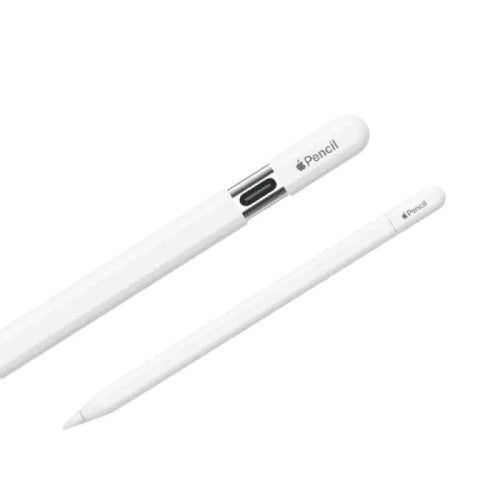
Apple Pencil (USB-C) for iPad
Apple Pencil (USB-C) for iPad
Couldn't load pickup availability
The Apple Pencil (USB-C) is a versatile iPad stylus designed for precise writing, note-taking, sketching, marking up documents, annotating PDFs and everyday creative work. It combines the familiar precision of Apple Pencil with a USB-C charging connection, low-latency performance and a slim, lightweight design.
Built specifically for compatible iPad models, Apple Pencil (USB-C) provides a natural writing experience that feels responsive and accurate on the screen. Its pixel-perfect precision, low latency and tilt sensitivity make it suitable for students, professionals, artists, designers and anyone who prefers handwriting or drawing directly on an iPad.
Unlike Apple Pencil (2nd generation), the USB-C model is positioned as a more affordable Apple Pencil option while still offering many of the core features users expect from an Apple stylus.
If you're looking for the Apple Pencil USB-C Price in Pakistan, an original Apple Pencil for iPad, or a precision stylus for note-taking and drawing, the Apple Pencil (USB-C) is a practical choice for compatible iPad users.
Key Features
- Apple Pencil (USB-C)
- Designed for Compatible iPad Models
- Pixel-Perfect Precision
- Low-Latency Response
- Tilt Sensitivity
- Excellent for Writing and Drawing
- Ideal for Notes and Markup
- USB-C Charging and Pairing
- Magnetic Attachment to iPad
- Hover Support on Compatible iPad Models
- Lightweight and Comfortable Design
- Matte White Finish
- No Pressure Sensitivity
- No Wireless Charging
- No Double-Tap Controls
- Easy to Pair with Compatible iPad
Precise and Natural Writing Experience
The main reason to choose Apple Pencil is precision.
Apple Pencil (USB-C) is designed to provide accurate input for handwriting, drawing, annotation and navigation. The fine tip allows you to write small text, draw detailed lines and interact with compatible iPad applications more naturally than using your finger.
Whether you're writing class notes or sketching an idea, the Pencil is designed to respond quickly to your movements.
It is particularly useful for:
- Handwritten notes
- Digital signatures
- PDF annotation
- Drawing
- Sketching
- Graphic design
- Mind maps
- Diagrams
- Document markup
- iPad navigation
Low-Latency Performance
Apple Pencil (USB-C) is engineered for a responsive writing experience with low latency.
Low latency means there is very little perceived delay between moving the Pencil and seeing the corresponding mark appear on the iPad screen.
This is especially important when:
- Writing quickly
- Taking lecture notes
- Sketching
- Drawing curves
- Annotating documents
- Making precise selections
The responsive experience makes the Pencil feel much closer to writing with a conventional pen or pencil.
Pixel-Perfect Precision
Apple Pencil (USB-C) offers pixel-level precision, allowing the tip to accurately control where marks, selections and strokes appear on the iPad display.
This is useful when working with detailed drawings or small interface elements.
For example, you can use the Pencil to:
- Draw fine lines
- Write small notes
- Edit images
- Annotate documents
- Create diagrams
- Make precise selections
- Sign documents
Its accuracy is one of the biggest advantages over generic capacitive styluses.
Tilt Sensitivity
Apple Pencil (USB-C) supports tilt sensitivity.
Tilt sensitivity allows compatible apps to respond differently depending on the angle at which you hold the Pencil.
For drawing applications, this can be particularly useful for creating different stroke effects or shading techniques.
Artists can hold the Pencil at different angles to create a more natural drawing experience, while note-taking users can simply use it like a conventional writing instrument.
Ideal for Note-Taking
For students and professionals, Apple Pencil (USB-C) can turn a compatible iPad into a powerful digital notebook.
You can write directly on the screen in supported apps and organize your notes digitally instead of carrying multiple notebooks.
It is useful for:
Students
Write lecture notes, solve equations, create diagrams and annotate study material.
Professionals
Mark up documents, review PDFs, sign files and create quick handwritten notes.
Teachers
Create diagrams, explain concepts and annotate documents during presentations.
Researchers
Highlight papers, make comments and organize research notes.
General Users
Write shopping lists, reminders, sketches and personal notes directly on the iPad.
Great for Drawing and Sketching
Apple Pencil (USB-C) is also suitable for casual and professional digital drawing on compatible iPad models.
Its precise tip and tilt sensitivity make it useful for:
- Digital sketches
- Concept drawings
- Illustrations
- Hand lettering
- Diagrams
- Digital signatures
- Photo editing
- Graphic design
Apps such as drawing, illustration and note-taking applications can take advantage of Apple Pencil input.
USB-C Charging and Pairing
As its name suggests, Apple Pencil (USB-C) uses USB-C for pairing and charging.
The sliding cap reveals the USB-C connector, allowing the Pencil to connect directly to a compatible iPad or USB-C power source using a USB-C cable.
This is particularly convenient for users who already use USB-C accessories.
The Pencil does not require a proprietary Lightning connector for charging.
Magnetic Attachment
Apple Pencil (USB-C) can magnetically attach to the side of compatible iPad models for convenient storage.
The magnetic attachment helps prevent the Pencil from being misplaced when it isn't being used.
However, the USB-C model's magnetic attachment is primarily for storage rather than wireless charging.
This is an important difference compared with Apple Pencil (2nd generation).
Apple Pencil Hover
On supported iPad models, Apple Pencil (USB-C) supports the Apple Pencil hover feature.
Hover allows the iPad to detect the Pencil above the screen before the tip actually touches the display.
In compatible apps, this can provide useful visual feedback when drawing, selecting or positioning the Pencil.
Hover support depends on the iPad model and application.
Lightweight and Comfortable
The Apple Pencil (USB-C) has a slim, cylindrical design that is comfortable to hold for extended periods.
Its lightweight construction makes it suitable for long note-taking sessions without the bulk associated with larger digital pens.
The matte white finish also gives it the clean, minimalist appearance associated with Apple's iPad accessories.
Important Feature Differences
The Apple Pencil (USB-C) is not simply an Apple Pencil 2 with a USB-C connector.
It intentionally omits several premium features.
No Pressure Sensitivity
Apple Pencil (USB-C) does not support pressure sensitivity.
This is an important consideration for professional artists who require pressure-based brush size or opacity control.
No Wireless Charging
The Pencil charges through USB-C rather than wirelessly from the side of the iPad.
No Double-Tap
There is no double-tap gesture for switching tools or changing functions.
Magnetic Storage
It can attach magnetically to compatible iPads for storage, but the USB-C model does not use that connection for wireless charging.
These differences help position Apple Pencil (USB-C) as a more affordable option within Apple's Pencil lineup.
Apple Pencil (USB-C) Compatibility
Compatibility is extremely important before purchasing.
Apple Pencil (USB-C) works with supported iPad models, including many recent USB-C iPads. Compatibility can depend on the exact iPad generation and software version.
Compatible models include supported versions of:
- iPad Pro
- iPad Air
- iPad
- iPad mini
Because Apple regularly updates the iPad lineup, users should confirm their exact iPad model before purchasing.
Apple Pencil (USB-C) Specifications
| Specification | Details |
|---|---|
| Product | Apple Pencil (USB-C) |
| Brand | Apple |
| Product Type | Active Stylus |
| Connectivity | USB-C / Wireless |
| Charging | USB-C |
| Precision | Pixel-Level Precision |
| Latency | Low Latency |
| Tilt Sensitivity | Yes |
| Pressure Sensitivity | No |
| Hover | Yes, on supported iPad models |
| Magnetic Attachment | Yes |
| Wireless Charging | No |
| Double-Tap Gesture | No |
| Finish | White |
| Compatibility | Selected iPad Models |
| Primary Uses | Writing, Drawing, Notes, Markup |
| Connector | USB-C |
Apple Pencil (USB-C) vs Apple Pencil (2nd Generation)
| Feature | Apple Pencil (USB-C) | Apple Pencil (2nd Gen) |
| Pixel-Perfect Precision | Yes | Yes |
| Low Latency | Yes | Yes |
| Tilt Sensitivity | Yes | Yes |
| Pressure Sensitivity | No | Yes |
| USB-C Charging | Yes | No |
| Magnetic Attachment | Yes | Yes |
| Magnetic Wireless Charging | No | Yes |
| Double-Tap | No | Yes |
| Hover | Supported iPads | Supported iPads |
| Best For | Notes, markup, everyday use | Advanced drawing & creative work |
The USB-C model is particularly attractive if you mainly need a Pencil for note-taking, PDF annotation, studying, document markup and general iPad use.
Professional artists who need pressure-sensitive input may prefer a compatible Apple Pencil model that supports pressure sensitivity.
Who Should Buy Apple Pencil (USB-C)?
Students
It is an excellent tool for taking handwritten notes, solving problems and annotating lecture material.
Office Professionals
Use it to sign documents, annotate PDFs and make handwritten notes.
Digital Artists
It works well for sketching and illustration, particularly for users who don't require pressure sensitivity.
iPad Users
If you want a more natural way to interact with your iPad, Apple Pencil provides significantly more precision than finger input.
Casual Creators
For simple drawing, journaling and creative projects, the USB-C Pencil offers the core Apple Pencil experience without some of the premium features of higher-end models.
Why Buy Apple Pencil (USB-C) from TechShek.pk?
Original Apple Accessory
Choose an authentic Apple Pencil designed specifically for compatible iPad models.
Precision Input
Enjoy pixel-perfect control for writing, drawing and annotation.
Low Latency
Experience responsive interaction while writing or sketching.
USB-C Convenience
Charge and pair using the widely adopted USB-C connection.
Magnetic Storage
Keep your Pencil attached to your compatible iPad when not in use.
Lightweight Design
Comfortable for extended note-taking and creative sessions.
iPad Integration
Enjoy an accessory designed to work seamlessly with supported iPad models and compatible apps.
Frequently Asked Questions
1. What is Apple Pencil (USB-C)?
Apple Pencil (USB-C) is Apple's USB-C compatible stylus for supported iPad models, designed for precise writing, drawing, note-taking and document annotation.
2. Does Apple Pencil USB-C support pressure sensitivity?
No. The Apple Pencil (USB-C) does not support pressure sensitivity.
3. Does Apple Pencil USB-C support tilt sensitivity?
Yes. It supports tilt sensitivity, which is useful for drawing and shading in compatible apps.
4. How does Apple Pencil USB-C charge?
It charges through its built-in USB-C connector.
5. Can Apple Pencil USB-C attach magnetically to an iPad?
Yes. It can magnetically attach to compatible iPad models for convenient storage.
6. Does Apple Pencil USB-C support wireless charging?
No. Unlike Apple Pencil (2nd generation), the USB-C model does not support wireless charging from the iPad.
7. Does Apple Pencil USB-C support double-tap?
No. The USB-C model does not include the double-tap gesture available on Apple Pencil (2nd generation).
8. Is Apple Pencil USB-C good for note-taking?
Yes. Its precise input and low latency make it well suited for handwritten notes, studying and document annotation.
9. Can Apple Pencil USB-C be used for drawing?
Yes. It supports precise drawing and tilt sensitivity on compatible iPad models. However, the lack of pressure sensitivity may matter to professional artists.
10. Does Apple Pencil USB-C support hover?
Yes, on supported iPad models. Hover allows the iPad to detect the Pencil above the screen before the tip touches it.
11. Is Apple Pencil USB-C compatible with every iPad?
No. Compatibility depends on the iPad model. Always check the exact iPad generation before purchasing.
12. Is Apple Pencil USB-C better than Apple Pencil 2?
It depends on your needs. The USB-C model is a strong choice for notes, markup and everyday use, while Apple Pencil 2 offers additional features such as pressure sensitivity, double-tap and wireless charging.
13. Can I use Apple Pencil USB-C with iPhone?
No. Apple Pencil is designed for compatible iPad models and is not an iPhone stylus.
14. What color is Apple Pencil USB-C?
Apple Pencil (USB-C) is available in a white finish.
Conclusion
The Apple Pencil (USB-C) is a practical and precise stylus for compatible iPad users who want an easy way to write, draw, annotate documents and interact with their tablet.
Its pixel-perfect precision, low latency, tilt sensitivity, magnetic storage and USB-C charging make it especially useful for students, professionals and everyday iPad users.
While it lacks pressure sensitivity, wireless charging and double-tap controls found on higher-end Apple Pencil models, those omissions also make the USB-C version a compelling option for users who primarily need a Pencil for note-taking, studying, PDF markup, signatures and everyday drawing.
If you're searching for the Apple Pencil (USB-C) Price in Pakistan and want an Apple-designed stylus for your compatible iPad, this model provides a streamlined combination of precision, portability and convenience.
Share

You may also like
Customers also bought these products
No recommendations available at this time.