


Apple
Apple Magic Mouse USB-C (Type-C) – Wireless Multi-Touch Mouse for Mac & iPad
Apple Magic Mouse USB-C (Type-C) – Wireless Multi-Touch Mouse for Mac & iPad
Couldn't load pickup availability
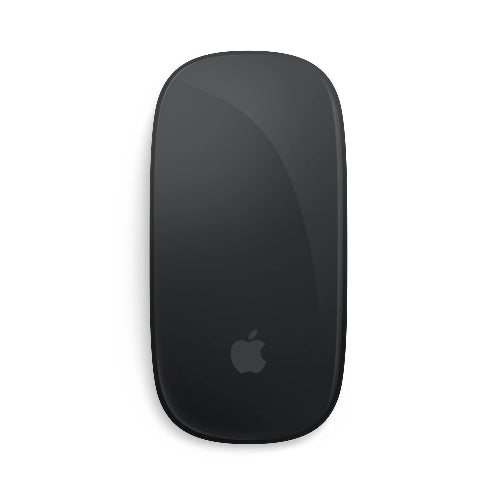
The Apple Magic Mouse USB-C is a sleek, rechargeable wireless mouse designed for Mac and iPad users who want a clean, minimalist pointing experience with Apple's signature Multi-Touch surface. Its low-profile design, smooth glass-like top surface and gesture controls make it more than a traditional computer mouse.
Instead of relying on a conventional scroll wheel, Magic Mouse uses a Multi-Touch surface that lets you scroll vertically and horizontally, swipe between pages and perform supported gestures with simple finger movements.
The USB-C version brings the Magic Mouse into Apple's modern USB-C accessory lineup, replacing the older Lightning charging connector with USB-C. It can be paired wirelessly with compatible Mac and iPad devices through Bluetooth and recharged using a USB-C cable.
For customers searching for Apple Magic Mouse USB-C Price in Pakistan, original Apple Magic Mouse Type-C, Apple wireless mouse for MacBook, Multi-Touch mouse for Mac or a premium rechargeable Bluetooth mouse for iPad, the Magic Mouse USB-C offers a refined combination of minimalist design and gesture-based control.
Key Features
- Apple Magic Mouse with USB-C
- Wireless Bluetooth Mouse
- Multi-Touch Surface
- Rechargeable Internal Battery
- USB-C Charging Port
- Smooth, Low-Profile Design
- Designed for Mac
- Compatible with Supported iPad Models
- Multi-Touch Gestures
- Vertical Scrolling
- Horizontal Scrolling
- Swipe Between Pages
- Swipe Between Full-Screen Apps
- Bluetooth Connectivity
- Automatic Pairing with Compatible Apple Devices
- Optimized for macOS
- Supports iPadOS Features
- Lightweight and Portable
- Compact Design
- White Multi-Touch Surface
- Apple Minimalist Aesthetic
Iconic Apple Magic Mouse Design
Magic Mouse is instantly recognizable thanks to its extremely slim profile and minimalist appearance.
Apple keeps the exterior almost completely free of conventional mouse buttons and scroll wheels. The entire top surface acts as a touch-sensitive interface, creating a clean and uncluttered look that complements MacBook, iMac and other Apple hardware.
Its low-profile body makes it easy to carry between home, office and travel setups.
The smooth surface also provides a different experience from traditional mice, particularly for users who regularly use gestures on MacBooks and iPhones.
Multi-Touch Surface
The defining feature of Magic Mouse is its Multi-Touch surface.
Rather than using a physical scroll wheel, the mouse detects finger movements across its surface.
Supported gestures can include:
- Scroll vertically
- Scroll horizontally
- Swipe between pages
- Swipe between full-screen applications
- Additional gestures depending on macOS configuration
This makes navigating long webpages, documents and applications feel natural and fluid.
For users who already use Apple's trackpad gestures, Magic Mouse can provide a familiar gesture-based experience while retaining the precision of a mouse.
Smooth Scrolling
With the Multi-Touch surface, you can move through webpages, documents and long lists using a finger swipe.
There is no traditional wheel that needs to be physically rotated.
This can be especially useful when browsing:
- Websites
- Documents
- Spreadsheets
- Photo libraries
- Large folders
- Timelines
- Creative projects
Scrolling behavior can also be adjusted through compatible system settings.
Horizontal Scrolling
Magic Mouse isn't limited to vertical scrolling.
Its Multi-Touch surface can detect horizontal movements, making it useful for applications where you need to move from side to side.
Horizontal scrolling can be helpful when working with:
- Wide spreadsheets
- Large design canvases
- Video timelines
- Long documents
- Image editing applications
- Web pages with horizontal content
Swipe Between Pages
Supported gestures allow you to swipe between pages using the mouse surface.
This provides a quick way to navigate compatible web browsers and applications without reaching for keyboard shortcuts.
For users who frequently browse the web or work with documents, this gesture can make everyday navigation more efficient.
Swipe Between Full-Screen Apps
Magic Mouse also supports gestures for moving between full-screen applications on compatible versions of macOS.
This can make multitasking easier when working with multiple applications.
For example, you could move between:
- Safari
- Notes
- Photoshop
- Final Cut Pro
- Microsoft Word
- Other supported applications
without repeatedly clicking through windows.
Wireless Bluetooth Connectivity
Magic Mouse connects wirelessly to compatible devices using Bluetooth.
This removes the need for a traditional USB receiver and keeps your desk free from additional cables or dongles.
A wireless connection is particularly convenient for MacBook users because it does not require occupying a USB port simply to use the mouse.
USB-C Rechargeable Battery
The USB-C version features a built-in rechargeable battery.
Instead of replacing disposable batteries, you simply recharge the mouse using a compatible USB-C cable.
USB-C is now common across Apple's newer accessories and devices, making charging more convenient for users who already carry USB-C cables.
Once charged, the mouse can be used wirelessly without keeping the charging cable connected during normal operation.
Designed for Mac
Magic Mouse is designed primarily around the Mac experience.
It works particularly well with compatible:
- MacBook Air
- MacBook Pro
- iMac
- Mac mini
- Mac Studio
- Mac Pro
Compatibility and available gestures depend on the operating system and specific device.
macOS provides system-level settings that allow users to customize supported mouse behavior.
Compatible with iPad
Magic Mouse can also be used with supported iPad models running compatible versions of iPadOS.
When connected to an iPad, the mouse can provide more traditional pointer-based control for productivity and navigation.
This can be particularly useful when an iPad is being used as a laptop-style workstation with a keyboard and external display.
Available mouse features and gestures can vary depending on iPadOS and the connected iPad model.
Ideal for MacBook Users
For MacBook users who want a dedicated mouse without sacrificing Apple's minimalist aesthetic, Magic Mouse is a natural choice.
It can complement a MacBook setup for:
- Office work
- Browsing
- Productivity
- Graphic design
- Content creation
- Video editing
- Programming
- General navigation
The wireless design also makes it easy to switch between a portable MacBook setup and a desktop workstation.
Perfect Companion for iMac
The Magic Mouse has long been associated with Apple's desktop computers.
Its slim profile and minimalist appearance pair particularly well with an iMac setup.
It can help create a clean workspace without the visual bulk of a conventional ergonomic mouse.
Portable for MacBook and Travel
Magic Mouse is relatively compact and easy to carry.
Its slim shape takes up less room than many traditional desktop mice, making it convenient for:
- Students
- Business professionals
- Remote workers
- Designers
- Travelers
- Digital nomads
You can keep it in a laptop bag and use it whenever you need a more precise pointing device.
Precision Pointer Control
While the Multi-Touch surface provides gesture support, Magic Mouse still functions as a precision pointing device.
It is suitable for everyday tasks such as:
- Selecting files
- Opening applications
- Dragging objects
- Editing documents
- Browsing websites
- Managing windows
- Navigating menus
- Working with desktop applications
The mouse can therefore combine traditional pointer control with touch-based gestures.
Minimalist Workspace
One of the biggest reasons users choose Apple accessories is design consistency.
Magic Mouse fits naturally into an Apple-focused workspace alongside:
- MacBook
- iMac
- Studio Display
- Magic Keyboard
- AirPods
- iPad
Its compact wireless design helps maintain a clean desktop without unnecessary cables or receivers.
USB-C: A Modern Charging Standard
The move to USB-C makes the newer Magic Mouse easier to integrate into modern setups.
Users who already own USB-C accessories can potentially use the same charging ecosystem across multiple devices.
For example, a USB-C cable can be used for compatible:
- Mac accessories
- iPad accessories
- iPhone accessories
- Power banks
- Chargers
This reduces the need to keep separate Lightning cables specifically for the mouse.
Easy Pairing
Magic Mouse is designed to connect easily to compatible Apple devices.
Once paired, it can remain associated with the device and reconnect when the mouse is turned on and within range.
This provides a straightforward setup compared with wireless mice that require separate USB receiver software or proprietary drivers.
Magic Mouse for Productivity
For office and productivity users, Magic Mouse provides a clean combination of pointer control and gesture navigation.
It is useful for:
- Microsoft Office
- Google Workspace
- Web browsing
- File management
- Presentations
- Research
- Writing
- General desktop productivity
Multi-Touch scrolling can be especially convenient when working through long documents and webpages.
Magic Mouse for Creative Work
Magic Mouse can also be used with compatible creative applications.
Its smooth pointer movement and gesture surface can complement workflows involving:
- Adobe Photoshop
- Adobe Illustrator
- Final Cut Pro
- Logic Pro
- Figma
- Other creative applications
However, professional users who require highly customizable buttons or specialized ergonomic controls may prefer a dedicated productivity or creative mouse.
Magic Mouse for Students
Students can use Magic Mouse for:
- Research
- Online learning
- Writing assignments
- Presentations
- Browsing
- Document editing
- Multitasking
Its compact form factor makes it easy to carry alongside a MacBook or iPad.
Magic Mouse for iPad Productivity
When paired with a compatible iPad, Magic Mouse can turn the tablet into a more desktop-like productivity environment.
This can be useful when combined with:
- iPad keyboard
- External monitor
- USB-C hub
- Apple Pencil
The mouse can provide pointer control for compatible iPadOS applications while the touchscreen remains available for touch interaction.
Rechargeable and Cable-Free
The integrated rechargeable battery eliminates the need for disposable AA or AAA batteries.
When the battery needs charging, connect a compatible USB-C cable.
Once charged, you can disconnect the cable and return to wireless use.
This keeps the desk cleaner and makes long-term ownership more convenient.
Apple Magic Mouse USB-C Specifications
| Specification | Details |
|---|---|
| Brand | Apple |
| Product | Magic Mouse |
| Connectivity | Wireless Bluetooth |
| Connection Type | Bluetooth |
| Charging | USB-C |
| Battery | Built-in Rechargeable Battery |
| Surface | Multi-Touch |
| Scrolling | Multi-Touch Scrolling |
| Gestures | Supported |
| Horizontal Scrolling | Supported |
| Page Navigation | Supported |
| Full-Screen App Navigation | Supported |
| Design | Low Profile |
| Compatibility | Compatible Mac and iPad Devices |
| Power | Rechargeable |
| Cable | USB-C Charging Cable |
| Use | Productivity, Browsing & General Computing |
| Color | White |
| Form Factor | Compact Wireless Mouse |
Apple Magic Mouse USB-C vs Traditional Wireless Mouse
| Feature | Apple Magic Mouse USB-C | Traditional Wireless Mouse |
| Connection | Bluetooth | Bluetooth/USB Receiver |
| Charging | USB-C Rechargeable | Battery/Rechargeable |
| Scroll Wheel | No | Usually Yes |
| Multi-Touch | Yes | Usually No |
| Gestures | Yes | Limited |
| USB Receiver | Not Required | Often Required |
| Mac Integration | Excellent | Varies |
| iPad Compatibility | Supported | Varies |
| Design | Minimalist | Varies |
| Apple Ecosystem | Deep Integration | Limited |
Who Should Buy Apple Magic Mouse USB-C?
MacBook Users
Ideal if you want a wireless mouse that complements your MacBook and doesn't require a USB receiver.
iMac Users
A natural match for Apple's desktop setup and minimalist workspace.
iPad Users
Useful for users who want a pointer-based workflow with a compatible iPad.
Apple Ecosystem Users
If you already use multiple Apple devices, Magic Mouse fits naturally into your setup.
Designers and Creators
Its Multi-Touch surface provides convenient gesture navigation for supported applications.
Office Professionals
The wireless design and scrolling gestures make everyday productivity straightforward.
Students
Its compact shape makes it easy to carry with a MacBook or iPad.
Minimalist Setup Enthusiasts
If you prefer a clean desktop without cables, dongles or bulky peripherals, Magic Mouse is a strong match.
Why Buy Apple Magic Mouse USB-C from TechShek.pk?
Genuine Apple Accessory
Choose an Apple-designed mouse made specifically to integrate with compatible Apple hardware.
USB-C Charging
Enjoy Apple's modern USB-C charging interface.
Wireless Convenience
Connect through Bluetooth without occupying a USB port with a receiver.
Multi-Touch Gestures
Scroll and navigate using intuitive finger gestures.
Mac and iPad Support
Use the mouse with compatible Mac and iPad devices.
Compact Design
Its slim profile is easy to carry and complements modern Apple workspaces.
Frequently Asked Questions
1. What is Apple Magic Mouse USB-C?
Apple Magic Mouse USB-C is Apple's rechargeable wireless Multi-Touch mouse with a USB-C charging connector, designed primarily for compatible Mac computers and also usable with supported iPad devices.
2. Does Apple Magic Mouse use Bluetooth?
Yes. Magic Mouse connects wirelessly to compatible devices using Bluetooth.
3. Does Magic Mouse have a scroll wheel?
No. It uses a Multi-Touch surface for scrolling and supported gestures.
4. Can Magic Mouse scroll vertically?
Yes. Its Multi-Touch surface supports vertical scrolling.
5. Can Magic Mouse scroll horizontally?
Yes. Supported horizontal scrolling is one of its useful Multi-Touch functions.
6. Can Magic Mouse swipe between pages?
Yes. Supported macOS gestures allow page navigation using swipes.
7. Does Apple Magic Mouse support gestures?
Yes. Multi-Touch gestures are one of its main features.
8. Does the USB-C Magic Mouse have a rechargeable battery?
Yes. It contains a built-in rechargeable battery.
9. How does Apple Magic Mouse charge?
The USB-C version charges through its USB-C charging connector.
10. Can I use Magic Mouse while charging?
Apple's Magic Mouse charging design places the charging connector on the underside, so it is intended to be used wirelessly rather than as a wired mouse while connected for charging.
11. Is Apple Magic Mouse compatible with MacBook?
Yes. It is designed to work with compatible Mac computers, including MacBook models.
12. Does Magic Mouse work with iMac?
Yes. Magic Mouse is designed to work with compatible iMac computers.
13. Can Apple Magic Mouse work with iPad?
Yes, it can work with supported iPad models and compatible iPadOS versions.
14. Does Magic Mouse require a USB receiver?
No. It uses Bluetooth, so a separate USB receiver is not required.
15. Is Magic Mouse good for MacBook?
Yes. It provides wireless connectivity, Multi-Touch gestures and a compact design that works well with MacBook setups.
16. Is Magic Mouse good for graphic design?
It can be useful for general creative work, browsing and navigation. However, professionals who need programmable buttons, highly precise DPI controls or ergonomic designs may prefer specialized mice.
17. Is Magic Mouse suitable for gaming?
It is not designed as a gaming mouse. Users looking for gaming performance should consider a dedicated gaming mouse with specialized sensors and controls.
18. Is Apple Magic Mouse rechargeable?
Yes. The USB-C model has an integrated rechargeable battery.
19. Does Magic Mouse work with Windows?
Compatibility may be possible through Bluetooth, but Magic Mouse is primarily designed and optimized for Apple's operating systems. Some Apple-specific gestures and functionality may not be available on Windows.
20. Is Apple Magic Mouse worth buying?
For users who value Apple's minimalist design, Multi-Touch gestures, Bluetooth connectivity and integration with Mac and iPad, Magic Mouse can be an excellent premium wireless mouse.
Conclusion
The Apple Magic Mouse USB-C combines Apple's minimalist hardware design with a unique Multi-Touch surface that replaces the traditional scroll wheel with intuitive finger gestures.
Its wireless Bluetooth connection keeps your workspace clean, while the built-in rechargeable battery eliminates the need for disposable batteries. The addition of USB-C charging makes the newer model especially convenient for users who have already transitioned to Apple's modern USB-C ecosystem.
For Mac users, Magic Mouse provides smooth pointer control alongside gestures for scrolling, page navigation and switching between compatible full-screen applications. It can also be used with supported iPad models, giving users another option for building a desktop-style iPad productivity setup.
The mouse is particularly well suited to MacBook, iMac and iPad users, office professionals, students, designers and anyone who values a clean, minimalist workspace.
For customers searching for Apple Magic Mouse USB-C Price in Pakistan, original Apple Magic Mouse Type-C, Apple wireless mouse for MacBook, Multi-Touch mouse for Mac or a rechargeable Bluetooth mouse for iPad, the Apple Magic Mouse USB-C remains one of the most distinctive premium mouse options in Apple's accessory lineup.
Share

You may also like
Customers also bought these products
No recommendations available at this time.