


Anker
Anker PowerConf C310 4K AI Webcam
Anker PowerConf C310 4K AI Webcam
Couldn't load pickup availability
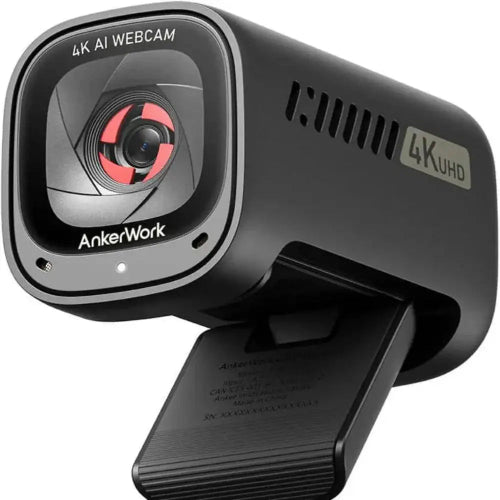
The Anker PowerConf C310 4K Webcam is a feature-rich professional webcam designed for users who want 4K image quality, AI-powered autofocus, AI framing, HDR, adjustable field of view and intelligent noise cancellation in one compact camera. It is suitable for professional video conferencing, remote work, online teaching, livestreaming, content creation, interviews and business meetings.
With a 12MP 4K sensor, the C310 can capture video at up to 3840 × 2160 at 30fps. It can also deliver 1080p at up to 60fps, making it particularly useful when smooth motion is more important than maximum resolution. Anker also equips the webcam with a 1/2.5-inch sensor and f/2.0 aperture to help handle different lighting conditions.
The C310 stands out from ordinary webcams because of its AI features. AI autofocus helps keep the subject sharp, while AI framing can automatically keep the user centered in the frame. Its dual microphones use AI-powered noise cancellation to reduce unwanted background sound during meetings and livestreams.
It also includes an integrated physical privacy cover, adjustable viewing angles, USB-C connectivity, a universal monitor mount and tripod compatibility. The AnkerWork software provides additional controls for image, microphone and camera settings.
For customers searching for the Anker PowerConf C310 Price in Pakistan, this webcam is an excellent option for anyone looking for a premium 4K AI webcam for professional communication and content creation.
Key Features
- AnkerWork PowerConf C310
- 4K Ultra HD webcam
- 12MP camera
- 3840 × 2160 resolution
- 4K at 30fps
- 1080p at up to 60fps
- HDR support
- 1/2.5-inch image sensor
- f/2.0 aperture
- AI autofocus
- AI-powered auto framing
- AI subject tracking
- Adjustable field of view
- 65° / 78° / 90° FOV options
- Dual built-in microphones
- AI noise cancellation
- 360° or 90° microphone pickup options
- Built-in privacy cover
- USB-C webcam connection
- USB 3.0 support
- USB-A to USB-C cable included
- Universal monitor/laptop mount
- 1/4-inch tripod mounting
- AnkerWork software support
- Automatic image optimization
- Suitable for Zoom
- Suitable for Microsoft Teams
- Suitable for Google Meet
- Suitable for Skype
- Suitable for OBS
- Suitable for YouTube
- Suitable for livestreaming
- Suitable for remote work
- Suitable for online classes
- Suitable for business meetings
- Suitable for content creation
The official product information confirms the C310's 12MP 4K capability, AI autofocus, AI framing, dual-microphone AI noise cancellation, privacy cover, USB 3.0 transmission and 1080p/60fps HDR capability.
Key Features in Detail
1. 4K Ultra HD Resolution
The PowerConf C310 features a 12MP camera capable of 4K video at 30fps. This provides considerably more image detail than standard 1080p webcams.
4K is particularly useful for:
- Professional video production
- Product demonstrations
- Content creation
- Detailed presentations
- Online teaching
- High-quality video recording
- Professional video calls
- Cropping or reframing footage
The higher resolution gives you additional detail to work with when recording locally.
2. 1080p at 60fps
The C310 is not limited to 4K/30fps. It can also provide 1080p at up to 60fps.
This is especially useful for livestreaming because 60fps creates smoother movement.
For example:
4K/30fps: Best when maximum detail is the priority.
1080p/60fps: Best when smooth motion and high-speed transmission are more important.
Anker specifies USB 3.0 and YUV encoding for high-speed 1080p/60fps transmission.
3. AI Autofocus
The C310 uses AI-powered autofocus to help keep your face or subject sharp.
This is particularly useful if you:
- Move around during presentations
- Lean toward or away from the webcam
- Hold products toward the camera
- Demonstrate objects
- Stand while teaching
- Move around during livestreams
Instead of remaining fixed at one focus distance, the camera can automatically adjust focus according to the subject.
4. AI Auto Framing
AI framing is one of the C310's standout features.
The webcam can automatically adjust the framing to keep the subject centered. This is particularly useful for presenters who move around rather than remaining stationary.
AnkerWork software also provides customizable framing and field-of-view controls.
This makes the C310 useful for:
- Presentations
- Online teaching
- Standing meetings
- Livestreaming
- Demonstrations
- Content creation
5. Adjustable Field of View
The C310 provides multiple field-of-view options.
Depending on the software/firmware version, Anker documentation and regional specifications list selectable FOV modes including 65°, 78° and 90°/95°.
A narrower view is useful for individual professional meetings, while a wider view can include more people or more of your workspace.
65° FOV
Best for:
- Individual meetings
- Interviews
- Professional head-and-shoulders framing
78° FOV
A balanced option for:
- Remote work
- Online classes
- Video calls
90°/95° Wide View
Useful for:
- Presentations
- Multiple people
- Demonstrations
- Standing presenters
- Wider workspace views
6. HDR Support
The C310 supports HDR, with HDR modes available up to 1080p/60fps according to Anker's support documentation.
HDR can help the webcam handle scenes containing both brighter and darker areas.
It can be useful when:
- Sitting near a window
- Working in mixed lighting
- Using bright background lighting
- Recording in changing indoor conditions
However, HDR is not automatically ideal in every environment, so users can adjust settings through AnkerWork software.
7. Large 1/2.5-Inch Sensor and f/2.0 Aperture
The C310 uses a 1/2.5-inch sensor with an f/2.0 aperture. Anker designed this combination to help the webcam adapt to different ambient lighting conditions.
This helps make the camera suitable for:
- Home offices
- Professional offices
- Indoor studios
- Evening calls
- Streaming setups
- Rooms with variable lighting
8. AI Noise Cancellation
The C310 features dual microphones with AI-powered noise cancellation.
The system is designed to reduce unwanted surrounding noise and make speech easier to hear during calls and recordings.
This can be helpful around:
- Fans
- Air conditioners
- Keyboard noise
- General room noise
- Household activity
The microphones can also be configured for different pickup modes through the AnkerWork software. Independent testing has found the microphones useful for reducing background noise, although a dedicated microphone remains preferable for professional audio recording.
9. Built-In Privacy Cover
The C310 includes an integrated physical privacy cover.
When the camera isn't needed, simply close the cover over the lens.
This provides an easy physical privacy solution for:
- Home offices
- Corporate offices
- Shared workspaces
- Bedrooms
- Online classrooms
The camera's LED also indicates when the privacy cover is open and the webcam is being used by software.
10. USB 3.0 Connectivity
The C310 uses USB-C on the webcam side and supports USB 3.0 for high-speed data transmission. The standard package includes a USB-A to USB-C cable.
This is important because 4K video requires USB 3.0 or higher. Anker specifically states that USB 2.0 cables or hubs cannot provide the required bandwidth for 4K output.
11. AnkerWork Software
The C310 can be configured through AnkerWork software.
Depending on the available options, users can customize:
- Resolution
- Field of view
- Focus
- Exposure
- Image settings
- Microphone settings
- HDR
- Framing
- Camera modes
- Firmware
Anker also provides firmware updates through the software.
This gives the C310 considerably more control than a basic plug-and-play webcam.
12. Universal Mounting
The C310 includes a universal monitor/laptop mounting system.
It can be:
- Mounted on a monitor
- Mounted on a laptop
- Placed on a desk
- Mounted on a tripod
Anker confirms compatibility with a 1/4-inch tripod thread.
Specifications Chart
| Specification | Anker PowerConf C310 |
|---|---|
| Brand | AnkerWork / Anker |
| Model | PowerConf C310 |
| Model Number | A3367 |
| Product Type | AI 4K Webcam |
| Maximum Resolution | 4K Ultra HD |
| 4K Resolution | 3840 × 2160 |
| 4K Frame Rate | Up to 30fps |
| 1080p Frame Rate | Up to 60fps |
| Sensor | 1/2.5-inch |
| Sensor Resolution | 12MP |
| Aperture | f/2.0 |
| Autofocus | AI Autofocus |
| Auto Framing | AI Powered |
| HDR | Yes |
| Field of View | 65° / 78° / 90° or 95° depending on specification/software |
| Microphones | Dual |
| Noise Cancellation | AI Noise Cancellation |
| Microphone Pickup | 90° / 360° modes |
| Privacy Cover | Built-in |
| Webcam Port | USB-C |
| USB Standard | USB 3.0 |
| Included Cable | USB-A to USB-C |
| Monitor Mount | Yes |
| Laptop Mount | Yes |
| Tripod Mount | Yes |
| Tripod Thread | 1/4 inch |
| Software | AnkerWork |
| Windows | Supported |
| macOS | Supported |
| ChromeOS | Supported |
| Best For | Video Conferencing, Streaming, Content Creation |
Official and regional Anker specifications confirm 4K/30fps, 1080p/60fps, 12MP imaging, adjustable FOV and USB 3.0 connectivity; exact FOV listings vary by regional product documentation.
Comparison Chart
Anker PowerConf C310 vs Anker PowerConf C200
| Feature | Anker PowerConf C310 | Anker PowerConf C200 |
|---|---|---|
| Maximum Resolution | 4K | 2K |
| Sensor | 12MP | Lower resolution |
| 1080p/60fps | Yes | No |
| Autofocus | AI Autofocus | Fixed Focus |
| AI Framing | Yes | No |
| HDR | Yes | No |
| Adjustable FOV | Yes | Yes |
| AI Noise Cancellation | Yes | Yes |
| Privacy Cover | Yes | Yes |
| Best For | Professional & Content Creation | Meetings & Remote Work |
C310 Advantage
The C310 is the better choice if you need 4K, autofocus, AI framing, HDR and 60fps Full HD streaming.
Anker PowerConf C310 vs Logitech C922 Pro
| Feature | Anker PowerConf C310 | Logitech C922 Pro |
|---|---|---|
| Maximum Resolution | 4K | 1080p |
| 4K/30fps | Yes | No |
| 1080p/60fps | Yes | No |
| 720p/60fps | Yes | Yes |
| Autofocus | AI Autofocus | Autofocus |
| AI Framing | Yes | No |
| HDR | Yes | No |
| FOV | Adjustable | 78° |
| Microphones | Dual AI Noise Cancelling | Dual Stereo |
| Privacy Cover | Yes | No |
| USB | USB-C / USB 3.0 | USB |
| Software Controls | Extensive | Logitech software |
| Best For | 4K Professional/AI Use | Full HD Streaming |
Which One Should You Buy?
Choose the Anker C310 if you want the more advanced feature set, especially 4K, AI framing, HDR, 1080p/60fps and privacy protection.
Choose the Logitech C922 Pro if you want a proven Full HD webcam primarily for gaming streams and video calls.
Who Should Buy Anker PowerConf C310?
Remote Workers
The C310 is an excellent upgrade for professionals who spend hours in online meetings and want sharper video and better control over framing.
Business Professionals
Its 4K resolution, adjustable FOV, autofocus and AI noise cancellation make it suitable for professional conference calls.
Online Teachers
AI framing can be especially useful for teachers who move around during lessons and presentations.
Streamers
The combination of 4K/30fps and 1080p/60fps makes the C310 flexible for different streaming requirements.
YouTubers
Content creators can use the 4K sensor for high-resolution webcam footage and video production.
Product Reviewers
Autofocus makes it easier to show products, accessories and objects closer to the camera.
Freelancers
Freelancers can use it for client meetings, interviews and remote consultations.
Online Interview Users
The adjustable FOV and autofocus allow users to create a professional-looking camera setup.
Presenters
AI framing can help maintain a centered composition when moving around during presentations.
Privacy-Conscious Users
The built-in physical privacy cover makes it convenient to block the camera whenever it isn't being used.
Frequently Asked Questions
1. What is Anker PowerConf C310?
The Anker PowerConf C310 is a 4K AI-powered webcam designed for video conferencing, streaming, remote work, online teaching and content creation.
2. What resolution does Anker C310 support?
The C310 supports up to 4K 3840 × 2160 at 30fps.
3. Does Anker C310 support 1080p at 60fps?
Yes. It supports 1080p at up to 60fps.
4. Is Anker PowerConf C310 a true 4K webcam?
Yes. Anker specifies a 12MP sensor and 4K resolution, with 3840 × 2160 output at 30fps.
5. Does C310 have autofocus?
Yes. It features AI-powered autofocus.
6. Does C310 have AI framing?
Yes. AI framing automatically helps keep the subject centered in the frame.
7. Does Anker C310 have HDR?
Yes. HDR is supported, with Anker documenting HDR operation up to 1080p/60fps.
8. What is the field of view of C310?
The C310 offers adjustable viewing angles. Official/regional specifications list 65°, 78° and approximately 90°/95° options depending on software and regional specification.
9. Does C310 have built-in microphones?
Yes. It features dual microphones with AI-powered noise cancellation.
10. Does Anker C310 have noise cancellation?
Yes. Its microphones use AI noise cancellation to reduce unwanted background sound.
11. Does C310 have a privacy shutter?
Yes. It includes a built-in physical privacy cover.
12. Does C310 use USB-C?
Yes. The webcam uses USB-C, and the standard package includes a USB-A to USB-C cable.
13. Do I need USB 3.0 for 4K?
Yes. Anker specifically recommends using USB 3.0 or higher for 4K operation. USB 2.0 cables and hubs may prevent the 4K option from appearing.
14. Can I use C310 with a USB 2.0 port?
It may operate at lower resolutions, but 4K requires USB 3.0 or higher bandwidth.
15. Can C310 be mounted on a laptop?
Yes. Its universal mounting clip can be used on compatible laptops and monitors.
16. Can Anker C310 be mounted on a tripod?
Yes. It supports a 1/4-inch tripod thread.
17. Does C310 work with Zoom?
Yes, although the actual maximum resolution can depend on the conferencing software. Anker notes that third-party applications may limit output resolution.
18. Why can't I select 4K in Zoom or Teams?
The webcam itself supports 4K, but third-party applications can impose their own resolution limits. Anker specifically notes that some versions of Zoom and Microsoft Teams may output at lower resolutions even when the webcam supports 4K.
19. Can C310 be used with OBS?
Yes. It can be used as a standard webcam source in compatible streaming software such as OBS.
20. Is Anker C310 good for streaming?
Yes. Its 4K/30fps and 1080p/60fps modes, AI framing and AI noise cancellation make it well suited to livestreaming.
21. Is C310 good for online classes?
Yes. AI framing, autofocus, 4K video and noise-cancelling microphones make it a strong option for online teaching.
22. Is C310 good for professional meetings?
Yes. Its adjustable FOV, autofocus, HDR, AI framing and AI noise cancellation make it particularly suitable for professional video conferencing.
23. Can C310 track me when I move?
Its AI framing can automatically adjust the composition to keep the subject centered.
24. Does C310 require AnkerWork software?
The webcam can function as a standard USB webcam, but AnkerWork software provides additional controls for camera, image, audio and firmware settings.
25. Is Anker PowerConf C310 worth buying in Pakistan?
Yes. It is a strong choice for users who want a 4K webcam with AI autofocus, AI framing, HDR, 1080p/60fps, AI noise cancellation and a physical privacy cover.
Conclusion
The Anker PowerConf C310 4K AI Webcam is designed for users who want more than a basic Full HD camera. Its 12MP 4K sensor, AI autofocus, AI framing, HDR, adjustable FOV and AI-powered dual-microphone noise cancellation give it a versatile feature set for modern video communication and content creation.
Its ability to switch between 4K/30fps and 1080p/60fps is particularly useful. You can prioritize maximum image detail when recording in 4K or switch to Full HD 60fps when smoother motion and high-speed streaming are more important.
The integrated privacy cover, USB-C connectivity, universal mount and tripod compatibility further improve its practicality. Users should remember that 4K requires USB 3.0 or higher, and video-conferencing applications may impose their own resolution limitations.
For customers searching for the Anker PowerConf C310 Price in Pakistan, this webcam is best suited to professionals, streamers, YouTubers, online teachers, freelancers, business users and content creators who want a premium 4K webcam with intelligent camera and audio features.
Best For: 4K video calls, professional meetings, streaming, online teaching, YouTube, content creation, presentations and remote work.
Share
You may also like
Customers also bought these products
No recommendations available at this time.