


Anker
Anker PowerConf C302 2K AI Webcam
Anker PowerConf C302 2K AI Webcam
Couldn't load pickup availability
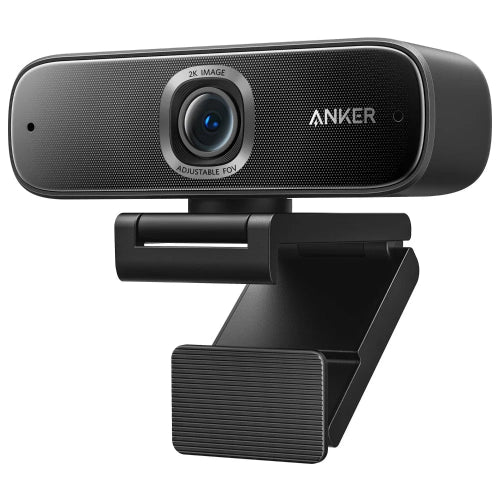
The Anker PowerConf C302 is a premium 2K USB webcam designed for professional video conferencing, remote work, online teaching, streaming, interviews, presentations and content creation. With a 5MP CMOS sensor, 2K resolution at 30fps, AI-powered framing, autofocus, automatic low-light correction and dual stereo microphones, the C302 is built to deliver a significantly more capable webcam experience than a standard laptop camera.
The C302 combines intelligent image processing with practical hardware features. Its AI framing can automatically adjust the composition according to the number of people in the frame, while AI-powered autofocus can focus on people or objects in approximately 0.35 seconds. The webcam also provides adjustable fields of view from 78° to 115°, allowing users to choose between a tighter personal view and a wider meeting-room perspective.
For audio, the PowerConf C302 uses dual stereo microphones with AGC and ANC, helping provide clearer voice pickup and reduce unwanted background noise. Anker specifies a voice pickup distance of up to approximately 3 meters.
The webcam connects through USB-C and supports plug-and-play operation. It can be mounted on a laptop or monitor, placed on a desk, or attached to a tripod using its 1/4-inch tripod thread. A physical privacy cover is also included.
If you are searching for the Anker PowerConf C302 Price in Pakistan, it is an excellent choice for users who want a professional-grade 2K webcam with AI features without moving to a dedicated mirrorless or DSLR camera setup.
Key Features
- Anker PowerConf C302
- Model A3362
- 2K Full HD webcam
- Up to 2K resolution at 30fps
- 5MP 1/2.7-inch CMOS sensor
- AI-powered autofocus
- Fast autofocus
- 0.35-second autofocus response
- Adjustable 78° / 90° / 115° FOV
- AI framing
- Automatic subject framing
- Motion tracking
- AI color adjustment
- AI exposure adjustment
- HDR support
- Automatic low-light correction
- Auto white balance
- Dual stereo microphones
- Automatic noise cancellation
- Automatic gain control
- Voice pickup up to approximately 3 meters
- USB-C connectivity
- USB-C plug-and-play
- H.264 and MJPEG video codecs
- Physical privacy shutter
- Adjustable clip/stand
- 1/4-inch tripod mount
- Laptop mounting
- Monitor mounting
- Desktop placement
- AnkerWork software support
- Windows compatibility
- macOS compatibility
- Zoom compatibility
- Google Meet compatibility
- Microsoft Teams compatibility
- OBS compatibility
- YouTube compatibility
- Twitch compatibility
- Skype compatibility
Anker's own documentation confirms the C302's 2K/30fps output, 5MP CMOS sensor, 78°–115° FOV, autofocus, dual stereo microphones, AGC/ANC and 3m voice pickup distance.
Key Features in Detail
1. 2K Resolution at 30fps
The PowerConf C302 captures video at up to 2K resolution at 30fps, giving you more image detail than a conventional 1080P webcam. It also supports 1080P, 720P and 320 × 240 resolution modes.
The extra resolution is useful when you want a sharper image for:
- Business meetings
- Online presentations
- Remote work
- Online teaching
- Interviews
- YouTube videos
- Product demonstrations
- Streaming
- Professional video calls
The C302 is particularly useful for people who want their webcam image to look more detailed and polished than a standard built-in laptop camera.
2. 5MP CMOS Sensor
The webcam uses a 5MP 1/2.7-inch CMOS sensor, giving it a solid imaging foundation for its 2K video output.
The larger sensor capability combined with Anker's image-processing features helps the C302 produce a more detailed image across different lighting conditions.
3. AI-Powered Autofocus
The C302 features AI-powered autofocus that can automatically focus on people or objects.
Anker states that the webcam can automatically focus in approximately 0.35 seconds, making it useful when your subject moves or when you bring an object closer to the camera.
This is especially useful for:
- Product demonstrations
- Presentations
- Online teaching
- Craft tutorials
- Unboxing videos
- Document demonstrations
- Content creation
Instead of manually adjusting focus, the camera automatically attempts to keep the subject sharp.
4. Adjustable Field of View
The C302 provides three field-of-view options:
- 78°
- 90°
- 115°
This allows you to choose the framing according to your setup.
78° FOV
Best for:
- Individual meetings
- Interviews
- Personal workspace
- Professional presentations
90° FOV
A balanced option for:
- Remote work
- Online classes
- Business meetings
- Small groups
115° FOV
Useful for:
- Group meetings
- Wider desk setups
- Multiple people
- Presentations
- Small meeting rooms
5. AI Framing
One of the C302's standout features is AI framing.
Its AI system can recognize people and automatically adjust the composition to keep the subject or group appropriately positioned in the frame. Anker describes this as useful when presenting alone, working in a group or moving around.
This means you don't have to constantly reposition the webcam if your seating position changes.
6. AI Motion Tracking
The C302 can use AI-based motion tracking to follow movement and adjust the framing accordingly.
This is useful when:
- Teaching
- Presenting
- Demonstrating products
- Moving around during meetings
- Creating instructional videos
For example, a teacher can move slightly around a presentation area while the camera maintains more suitable framing.
7. AI Color Adjustment
The C302 uses AI-assisted image processing to optimize colors, skin tones and contrast.
Anker describes its AI color adjustment as working with automatic white balancing and image optimization to maintain natural-looking video in inconsistent lighting.
This can be particularly helpful in rooms where artificial and natural light are mixed.
8. AI Exposure and HDR
The webcam also incorporates AI exposure adjustment and HDR technology.
These features are designed to help balance highlights and shadows, especially in challenging lighting situations.
This is useful if:
- You sit near a window
- Your room has uneven lighting
- You make calls at different times of the day
- Your background is significantly brighter than your face
9. Automatic Low-Light Correction
The C302 includes automatic low-light correction that adjusts the image when the environment becomes darker.
This is useful for:
- Evening meetings
- Home offices
- Bedrooms
- Low-light workspaces
- Late-night streaming
It does not replace a dedicated light source, but it can improve the webcam's ability to produce usable video in less-than-ideal conditions.
10. Dual Stereo Microphones
The PowerConf C302 contains two stereo microphones designed for voice pickup.
The microphones are supported by:
- AGC — Automatic Gain Control
- ANC — Automatic Noise Cancellation
Anker specifies a voice pickup distance of approximately 3 meters.
This makes the C302 suitable for:
- Video meetings
- Zoom calls
- Online teaching
- Remote work
- Interviews
- Presentations
- Casual streaming
11. Physical Privacy Cover
The C302 includes a physical privacy cover that slides over the camera lens when the webcam is not being used.
This gives users a simple physical method of blocking the camera without relying only on software privacy settings.
12. USB-C Plug-and-Play
The webcam uses USB-C connectivity and supports plug-and-play operation.
The package includes USB-C connectivity options so that the camera can be connected to compatible computers without complicated installation.
13. Multiple Mounting Options
The C302's adjustable clip/stand allows several placement options.
You can:
- Mount it on a laptop
- Mount it on a monitor
- Place it on a desk
- Attach it to a tripod
The webcam includes a 1/4-inch tripod thread, while the tripod itself is not included.
14. AnkerWork Software
The C302 works with AnkerWork software, which provides access to additional camera controls and AI features.
Depending on the software and firmware version, users can adjust:
- Field of view
- Framing
- AI features
- Image settings
- Camera behavior
Anker recommends updating the webcam firmware and software to fully utilize the AI functions.
Specifications Chart
| Specification | Anker PowerConf C302 |
|---|---|
| Brand | Anker |
| Product Series | PowerConf |
| Model | C302 |
| Model Number | A3362 |
| Product Type | AI USB Webcam |
| Maximum Resolution | 2K |
| Maximum Video | 2K @ 30fps |
| 1080P | 30fps |
| 720P | 30fps |
| Sensor | 5MP CMOS |
| Sensor Size | 1/2.7-inch |
| Focus | Automatic / AI Autofocus |
| Focus Distance | 15cm – 3m |
| Autofocus Speed | Approx. 0.35 seconds |
| Field of View | 78° / 90° / 115° |
| AI Framing | Yes |
| Motion Tracking | Yes |
| AI Color Adjustment | Yes |
| AI Exposure | Yes |
| HDR | Yes |
| Low-Light Correction | Yes |
| Microphones | Dual Stereo |
| Noise Cancellation | ANC |
| Automatic Gain Control | AGC |
| Voice Pickup Distance | Approx. 3m |
| Video Codec | H.264 / MJPEG |
| Connection | USB-C |
| Plug & Play | Yes |
| Privacy Cover | Yes |
| Tripod Mount | 1/4-inch |
| Tripod Included | No |
| Mounting | Laptop / Monitor / Desk / Tripod |
| Software | AnkerWork |
| Windows | Windows 7 or later |
| macOS | macOS 10.11 or later |
| Color | Black |
| Recommended Use | Personal Workspace & Small Meeting Room |
Specifications are compiled from Anker's official product page, comparison documentation and C302 manual.
Anker PowerConf C302 vs Anker PowerConf C200
| Feature | PowerConf C302 | PowerConf C200 |
|---|---|---|
| Resolution | 2K | 2K |
| Maximum FPS | 30fps | 30fps |
| Sensor | 5MP CMOS | CMOS |
| FOV | 78° / 90° / 115° | 65° / 78° / 95° |
| Autofocus | AI Autofocus | Autofocus |
| AI Framing | Yes | No |
| Motion Tracking | Yes | No |
| AI Color Adjustment | Yes | No |
| AI Exposure | Yes | No |
| Microphones | Dual Stereo | Dual Stereo |
| ANC | Yes | Noise cancellation |
| Privacy | Physical cover | Built-in cover |
| Connection | USB-C | USB-C |
| Best For | Professional meetings & AI features | Personal workspace |
The C302 is the better choice when AI framing, motion tracking, adjustable wide-angle coverage and advanced image processing are priorities. Anker's own comparison identifies C302's AI Frame and autofocus features while the C200 does not offer AI Frame.
Anker PowerConf C302 vs Logitech C922 Pro
| Feature | Anker PowerConf C302 | Logitech C922 Pro |
|---|---|---|
| Maximum Resolution | 2K | 1080P |
| 2K Video | Yes | No |
| 1080P | 30fps | 30fps |
| 720P/60fps | No | Yes |
| Autofocus | AI Autofocus | Yes |
| FOV | 78° / 90° / 115° | More focused |
| AI Framing | Yes | No |
| Motion Tracking | Yes | No |
| Low-Light Correction | AI | Automatic |
| Microphones | Dual Stereo | Dual Stereo |
| ANC | Yes | No equivalent AI ANC |
| Privacy Cover | Yes | Not standard |
| Tripod Mount | Yes | Yes |
| Best For | Professional meetings & AI video | Gaming & streaming |
Which One Should You Choose?
Choose the Anker PowerConf C302 if you want 2K resolution, AI framing, AI autofocus, adjustable FOV and advanced meeting features.
Choose the Logitech C922 Pro if you prioritize gaming and streaming at 720p/60fps.
Who Should Buy Anker PowerConf C302?
1. Remote Workers
The C302 is excellent for professionals working from home who need a higher-quality webcam for daily meetings.
2. Business Professionals
Its 2K resolution, AI framing and dual microphones make it suitable for professional video conferences.
3. Online Teachers
AI framing and motion tracking can be particularly useful for teachers who move around while presenting.
4. Freelancers
Freelancers can use the C302 for client calls, interviews and consultations.
5. Content Creators
The 2K sensor, autofocus and adjustable framing make it suitable for YouTube and tutorial content.
6. Streamers
The C302 works well as a high-quality webcam for live streaming and webcam-based content.
7. Online Interview Users
The 2K camera and AI image processing can provide a more polished appearance during important interviews.
8. Small Meeting Rooms
Its adjustable FOV and AI framing make it useful when multiple people need to fit into the camera frame.
9. Product Demonstrators
The fast autofocus is useful when moving products or objects toward the camera.
10. Privacy-Conscious Users
The physical privacy cover provides an easy way to block the lens when the camera is not in use.
Frequently Asked Questions
1. What is Anker PowerConf C302?
The Anker PowerConf C302 is a 2K AI-powered USB webcam designed for video conferencing, remote work, online education, streaming and content creation.
2. What resolution does the PowerConf C302 support?
It supports up to 2K at 30fps, along with 1080P, 720P and 320 × 240 modes.
3. Is Anker PowerConf C302 a 4K webcam?
No. The C302 supports up to 2K resolution at 30fps.
4. Does C302 have autofocus?
Yes. It uses automatic/AI-powered autofocus. Anker states that it can focus on people or objects in approximately 0.35 seconds.
5. What sensor does C302 use?
The webcam uses a 5MP 1/2.7-inch CMOS sensor.
6. What is the field of view of C302?
The field of view can be adjusted between 78°, 90° and 115°.
7. Does PowerConf C302 have AI framing?
Yes. AI framing automatically adjusts the composition to keep people appropriately positioned in the frame.
8. Does C302 support motion tracking?
Yes. The AI system can track movement and adjust framing.
9. Does it have low-light correction?
Yes. The C302 includes automatic low-light correction and AI-based image optimization.
10. Does Anker C302 have built-in microphones?
Yes. It has dual stereo microphones.
11. Does C302 have noise cancellation?
Yes. Its voice processing includes automatic noise cancellation (ANC) and automatic gain control (AGC).
12. How far can the C302 microphone pick up sound?
Anker specifies a voice pickup distance of approximately 3 meters.
13. Does PowerConf C302 have a privacy cover?
Yes. A physical privacy cover is included.
14. Does C302 connect through USB-C?
Yes. It uses USB-C connectivity and supports plug-and-play operation.
15. Can I mount C302 on a monitor?
Yes. The adjustable clip/stand can be used for monitor and laptop mounting.
16. Can I use C302 with a tripod?
Yes. It has a 1/4-inch tripod thread. The tripod is not included.
17. Does the C302 require special drivers?
It supports plug-and-play operation. However, AnkerWork software is recommended for advanced AI and customization features.
18. Does PowerConf C302 work with Zoom?
Yes. Zoom is among the supported applications listed by Anker.
19. Does C302 work with Microsoft Teams?
Yes. Microsoft Teams is supported. However, the actual resolution available during a call can depend on the conferencing application's limitations. Anker notes that third-party software may restrict the resolution below the webcam's native maximum.
20. Does C302 work with Google Meet?
Yes. Google Meet is listed among the supported applications.
21. Is Anker PowerConf C302 good for online classes?
Yes. Its 2K video, autofocus, AI framing and dual microphones make it particularly suitable for online teaching and learning.
22. Is C302 good for streaming?
Yes. It supports 2K/30fps and works with applications such as OBS, YouTube and Twitch.
23. Does C302 support 60fps?
No. Its maximum 2K video frame rate is 30fps.
24. Can I adjust the webcam's field of view?
Yes. The C302 supports 78°, 90° and 115° framing options. AnkerWork software can be used for manual zoom and framing controls.
25. Is Anker PowerConf C302 worth buying in Pakistan?
Yes. The C302 is an excellent option for users who want 2K video, AI autofocus, AI framing, adjustable FOV, dual noise-cancelling microphones, low-light correction and a physical privacy cover in one webcam.
Conclusion
The Anker PowerConf C302 2K AI Webcam is a premium webcam designed for users who want more than basic video calling. Its combination of 2K/30fps video, a 5MP CMOS sensor, AI autofocus, AI framing, motion tracking, automatic low-light correction and adjustable 78°–115° field of view makes it particularly capable for professional video communication.
Its dual stereo microphones with ANC and AGC, physical privacy cover, USB-C plug-and-play connectivity and tripod compatibility further improve its practicality for home offices and professional workspaces.
For customers searching for the Anker PowerConf C302 Price in Pakistan, it is best suited to remote professionals, business users, teachers, freelancers, streamers, content creators and small meeting rooms.
One important consideration is that the webcam's 2K capability does not guarantee 2K output in every conferencing application. Anker notes that applications such as Zoom and Microsoft Teams can impose their own resolution limitations.
Best for: Professional video meetings, remote work, online teaching, interviews, presentations, streaming and AI-assisted webcam use.
Share
You may also like
Customers also bought these products
No recommendations available at this time.