


Anker
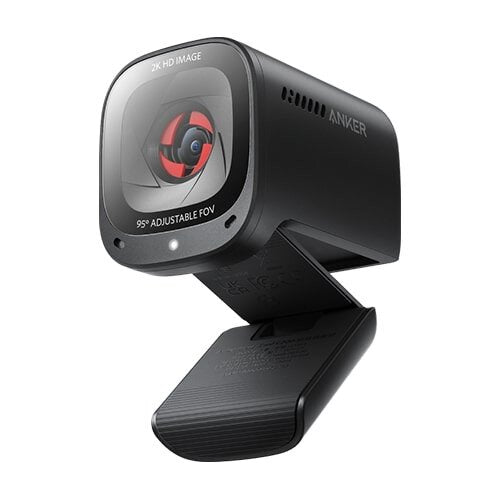
Anker PowerConf C200 2K Webcam
Anker PowerConf C200 2K Webcam
Couldn't load pickup availability
The Anker PowerConf C200 2K Webcam is a premium USB webcam designed for professionals, remote workers, students, online teachers, streamers, freelancers and anyone who wants sharper video and clearer voice communication from a computer. With 2K resolution, autofocus, dual microphones, adjustable field of view, built-in privacy cover and automatic low-light optimization, the PowerConf C200 is built to deliver a more polished video-call experience without requiring a dedicated camera setup.
The C200 uses a 2K 2560 × 1440 resolution at up to 30fps, giving it considerably more image detail than a conventional 1080p webcam. It also lets you choose between 65°, 78° and 95° fields of view, making it possible to frame only yourself or include more of your workspace.
For audio, Anker combines dual microphones with stereo pickup, directional/omnidirectional pickup options and noise cancellation. The webcam also includes a physical privacy cover, so you can block the lens when the camera is not being used.
Key Features
- 2K Ultra HD video resolution
- 2560 × 1440 maximum resolution
- Up to 30fps
- 4MP-class 2K imaging capability
- Fast autofocus
- Adjustable 65°, 78° and 95° field of view
- Dual stereo microphones
- AI-assisted noise cancellation
- Directional voice pickup
- Omnidirectional voice pickup
- Automatic low-light correction
- Adaptive light sensor
- Light-absorbing glass lenses
- Built-in sliding privacy cover
- Manual digital zoom/framing through AnkerWork software
- Adjustable brightness
- Adjustable sharpness
- Adjustable saturation
- Adjustable contrast
- USB-C webcam connection
- USB-A computer connection through supplied cable
- Plug-and-play operation
- Monitor and laptop mounting
- 1/4-inch tripod mounting
- AnkerWork software support
- Firmware update support
- Windows compatibility
- macOS compatibility
- Ideal for Zoom, Teams, Meet and other conferencing software
- Professional-looking compact design
Anker officially lists the C200 as model A3369, with 2K resolution, autofocus, dual microphones, adjustable 65°/78°/95° FOV, built-in privacy cover and AnkerWork software support.
Key Features in Detail
1. 2K Ultra-Clear Video
The biggest advantage of the PowerConf C200 is its 2K resolution.
It can capture video at 2560 × 1440 and up to 30fps, providing more detail than standard 1080p webcams. This is particularly noticeable when the camera is used for professional meetings, presentations or content where facial detail and image clarity matter.
The 2K resolution is useful for:
- Business meetings
- Remote work
- Online interviews
- Online teaching
- Product demonstrations
- YouTube videos
- Streaming
- Video calls
2. Fast Autofocus
The PowerConf C200 features autofocus, allowing the camera to maintain focus as the subject changes position.
This is particularly useful when you:
- Move closer to the webcam
- Move away from the webcam
- Hold an object toward the camera
- Demonstrate products
- Change your seating position
For technology reviewers and online teachers, autofocus can be especially useful when demonstrating products or physical materials.
3. Adjustable Field of View
One of the C200's strongest features is its adjustable framing.
Through AnkerWork software, you can choose between:
- 65° — tighter framing, ideal for one person
- 78° — balanced everyday view
- 95° — wider view for showing more of the surroundings
Anker officially confirms these three selectable viewing angles.
This means you don't need to physically move the camera every time you want a tighter or wider composition.
4. Dual Stereo Microphones
The C200 has dual microphones designed for stereo pickup and clearer communication.
The microphone system supports selectable pickup patterns, including 90° directional and 180° omnidirectional pickup, allowing you to optimize voice capture according to your environment.
For a typical one-person office setup, directional pickup can help focus on the speaker while reducing unwanted sound coming from outside the selected pickup area.
5. AI Noise Cancellation
Background noise can make online meetings difficult, especially in a home office.
The PowerConf C200 uses noise-cancellation technology to help improve vocal clarity and reduce unwanted background sound. Anker identifies the C200's smart function as AI Noise Cancellation.
It is useful when working around:
- Keyboard noise
- Fans
- General room noise
- Household activity
- Other ambient sounds
Noise cancellation cannot completely eliminate extremely loud sounds, but it can make normal communication cleaner.
6. Automatic Low-Light Correction
The C200 is designed to perform well in different lighting conditions.
Its adaptive light sensor and larger-aperture design help capture more available light, while automatic adjustment helps improve the image when lighting is less than ideal.
This is useful for:
- Home offices
- Evening meetings
- Rooms with limited lighting
- Indoor video calls
- Workstations without dedicated ring lights
Anker notes that the C200 does not have HDR, so heavily backlit environments may still require manual lighting adjustments.
7. Light-Absorbing Glass Lenses
The C200 uses glass lenses designed to allow an appropriate amount of light into the camera.
This helps support sharper and brighter images, particularly in indoor environments. Anker specifically highlights the C200's light-absorbing lenses as part of its image-quality system.
8. Built-In Privacy Cover
Privacy is an important consideration for a webcam that remains connected to your computer.
The PowerConf C200 features a built-in sliding privacy cover. When the camera is not being used, you can physically cover the lens.
This provides a simple visual and physical indication that the camera lens is blocked.
Importantly, the microphones can still be used while the privacy cover is closed.
9. AnkerWork Software
The C200 is more configurable than a basic plug-and-play webcam.
With AnkerWork software, you can customize settings such as:
- Resolution
- Field of view
- Digital zoom
- Brightness
- Sharpness
- Saturation
- Contrast
- Microphone pickup direction
- Firmware
Anker recommends keeping the webcam firmware updated for the best experience.
10. Plug-and-Play USB Connection
Setting up the C200 is straightforward.
The supplied cable connects to the webcam's USB-C port and uses a USB-A connection for the computer. Anker states that the webcam supports plug-and-play recognition.
This makes it easy to use with compatible desktop and laptop computers.
11. Monitor, Laptop and Tripod Mounting
The C200 can be clipped onto a compatible monitor or laptop screen.
It can also be mounted on a tripod using its 1/4-inch thread, although the tripod itself is not included.
This provides more flexibility for users who want to position the webcam away from the top of a display.
Specifications Chart
| Specification | Anker PowerConf C200 |
|---|---|
| Brand | AnkerWork / Anker |
| Product Name | PowerConf C200 Webcam |
| Model | A3369 |
| Product Type | 2K USB Webcam |
| Maximum Resolution | 2560 × 1440 |
| Video Quality | 2K |
| Maximum Frame Rate | 30fps |
| Focus | Autofocus |
| Field of View | 65° / 78° / 95° |
| Microphones | Dual Microphones |
| Audio | Stereo Pickup |
| Voice Pickup | Directional 90° / Omnidirectional 180° |
| Noise Cancellation | AI Noise Cancellation |
| Low-Light Correction | Yes |
| Adaptive Light Sensor | Yes |
| Privacy Cover | Built-in |
| Lens | Glass / Light-Absorbing |
| Connectivity | USB-C on Webcam |
| Computer Connection | USB-A |
| Connection Type | Plug & Play |
| Software | AnkerWork |
| Digital Zoom | Supported through software |
| Image Controls | Brightness, Sharpness, Saturation, Contrast |
| Mounting | Monitor/Laptop Clip |
| Tripod Mount | 1/4-inch |
| Tripod Included | No |
| AI Frame | No |
| Bluetooth | No |
| Windows Support | Yes |
| macOS Support | Yes |
| Recommended Use | Personal Workspace |
| Color | Black |
Specifications are based primarily on AnkerWork's official C200 documentation and product pages.
Anker PowerConf C200 vs Basic 1080p Webcam
| Feature | Anker PowerConf C200 | Basic 1080p Webcam |
|---|---|---|
| Resolution | 2K 2560×1440 | 1080p |
| Maximum FPS | 30fps | Usually 30fps |
| Autofocus | Yes | Model dependent |
| FOV | 65° / 78° / 95° | Usually fixed |
| Dual Microphones | Yes | Usually |
| Noise Cancellation | AI Noise Cancellation | Model dependent |
| Low-Light Correction | Yes | Basic/model dependent |
| Privacy Cover | Built-in | Often absent |
| Software Controls | Extensive | Limited |
| Brightness Control | Yes | Varies |
| Contrast Control | Yes | Varies |
| Saturation Control | Yes | Varies |
| Sharpness Control | Yes | Varies |
| Tripod Mount | Yes | Model dependent |
| Best For | Professional everyday use | Basic calls |
Anker PowerConf C200 vs 1080p vs 4K Webcam
| Feature | PowerConf C200 | Typical 1080p Webcam | Typical 4K Webcam |
|---|---|---|---|
| Resolution | 2K | 1080p | 4K |
| Video Detail | Very High | High | Excellent |
| Maximum FPS | 30fps | Usually 30fps | Model dependent |
| Autofocus | Yes | Model dependent | Usually |
| Adjustable FOV | 65°/78°/95° | Often fixed | Often adjustable |
| Dual Microphones | Yes | Varies | Usually |
| Noise Cancellation | Yes | Varies | Usually |
| Privacy Cover | Yes | Varies | Varies |
| Software Controls | Yes | Limited | Usually advanced |
| Bandwidth Requirement | Moderate | Lower | Higher |
| Video Meetings | Excellent | Very Good | Excellent |
| Remote Work | Excellent | Very Good | Excellent |
| Streaming | Very Good | Good | Excellent |
| Content Creation | Very Good | Good | Excellent |
| Value for Everyday Use | Excellent | Good | Higher Cost |
Who Should Buy Anker PowerConf C200?
Remote Workers
The C200 is particularly well suited to people who spend hours every week in online meetings. Its 2K image, adjustable framing and noise-cancelling microphones create a more professional meeting setup.
Business Professionals
For client meetings, interviews and presentations, the C200 provides better control over framing and image settings than a basic webcam.
Freelancers
Freelancers who communicate with clients through Zoom, Google Meet or other platforms can benefit from the professional video and audio features.
Online Teachers
The adjustable field of view can be useful for teaching because you can choose a tighter view for talking or a wider view when more of your workspace needs to be visible.
Students
The C200 is an excellent upgrade for students who regularly attend online classes, presentations or virtual interviews.
Content Creators
For webcam-based YouTube videos, tutorials and product demonstrations, the 2K resolution and autofocus provide a strong combination.
Streamers
The C200 can work well as a streaming camera where high-quality 2K video and clear microphone pickup are more important than advanced DSLR-style controls.
Home Office Users
Its compact design, privacy cover and monitor/laptop mounting make it particularly convenient for home-office setups.
Important Compatibility Note
Although the C200 supports up to 2K at 30fps, the actual resolution you see can depend on the application.
Anker specifically notes that third-party conferencing software can limit webcam resolution. For example, its support documentation says that Zoom and Microsoft Teams may use lower maximum resolutions depending on their current limitations, meaning the C200 will not necessarily deliver 2K inside every meeting application.
This is an important point for customers purchasing a 2K webcam: the webcam can output 2K, but the conferencing application, operating system, network and computer may determine the final displayed quality.
Frequently Asked Questions
1. What is Anker PowerConf C200?
The Anker PowerConf C200 is a 2K USB webcam designed for video meetings, remote work, online education, streaming and everyday video communication.
2. What resolution does PowerConf C200 support?
It supports up to 2560 × 1440 2K resolution at 30fps.
3. Does PowerConf C200 support 60fps?
No. The C200 supports up to 30fps.
4. Does PowerConf C200 have autofocus?
Yes. The C200 uses autofocus.
5. What field of view does the C200 have?
You can select 65°, 78° or 95° through AnkerWork software.
6. Does the C200 have a microphone?
Yes. It has dual built-in microphones with stereo pickup and noise-cancellation capabilities.
7. Does the C200 have noise cancellation?
Yes. Anker identifies the C200's smart audio function as AI Noise Cancellation.
8. Can I change the microphone pickup direction?
Yes. The C200 supports directional and omnidirectional pickup modes through AnkerWork software.
9. Does PowerConf C200 have a privacy cover?
Yes. It has a built-in sliding privacy cover.
10. Can the microphone work while the privacy cover is closed?
Yes. Anker states that the microphones can still be used when the privacy cover is closed.
11. Does the C200 work in low light?
Yes. It uses an adaptive light sensor and light-absorbing lenses to improve image quality in less-than-ideal lighting.
12. Does the C200 have HDR?
No. Anker specifically states that the PowerConf C200 does not have HDR.
13. Does PowerConf C200 need software?
The webcam is plug-and-play, but Anker recommends the AnkerWork software for adjusting settings and receiving firmware updates.
14. Can I adjust brightness and contrast?
Yes. AnkerWork software allows users to adjust brightness, sharpness, saturation and contrast.
15. Can I change the field of view?
Yes. The FOV can be changed between 65°, 78° and 95° through AnkerWork software.
16. Can I zoom with the C200?
Yes. Manual zoom in/out and framing adjustments are supported through AnkerWork software.
17. Can I mount the C200 on a laptop?
Yes. The webcam can be clipped onto a compatible laptop display.
18. Can I mount the C200 on a monitor?
Yes. It can be clipped onto the top of a compatible monitor.
19. Can I mount PowerConf C200 on a tripod?
Yes. The webcam has a 1/4-inch tripod thread. The tripod is not included.
20. Does PowerConf C200 support Bluetooth?
No. Anker confirms that the C200 does not support Bluetooth connectivity.
21. Does the C200 support AI framing?
No. The C200 does not have AI-Frame functionality. Users can manually adjust framing through AnkerWork software.
22. Is PowerConf C200 good for Zoom?
Yes, it is well suited to Zoom and other video-conferencing applications. However, the final resolution may be limited by the conferencing platform.
23. Is PowerConf C200 good for Microsoft Teams?
Yes. It can be used with Microsoft Teams, although Teams may limit the actual resolution available during calls.
24. Is PowerConf C200 good for online classes?
Yes. Its 2K camera, autofocus and dual microphones make it a strong choice for online education.
25. Is PowerConf C200 good for streaming?
Yes. It is suitable for webcam-based livestreaming, gaming streams and content creation.
26. Is PowerConf C200 suitable for YouTube?
Yes. The 2K resolution and autofocus make it useful for tutorials, talking-head videos and product demonstrations.
27. Can multiple C200 webcams be connected to one computer?
Yes. Anker states that multiple PowerConf C200 units can be connected to one computer.
28. Does PowerConf C200 support Windows Hello?
No. Anker confirms that Windows Hello is not supported.
29. What operating systems are supported?
The C200 is compatible with supported Windows and macOS systems. Anker lists Windows 7/8/10/11 and macOS 10.13 or later for the webcam, while AnkerWork software has its own supported OS requirements.
30. Is Anker PowerConf C200 worth buying?
Yes. If you want a 2K autofocus webcam with adjustable framing, dual microphones, noise cancellation, low-light optimization and a built-in privacy cover, the C200 is a feature-rich option for professional and personal use.
Conclusion
The Anker PowerConf C200 2K Webcam is an excellent choice for users who want more than a basic computer webcam. Its combination of 2K 2560 × 1440 video, autofocus, adjustable 65°/78°/95° FOV, dual stereo microphones, AI noise cancellation, adaptive light correction and built-in privacy cover gives it a strong feature set for its class.
The adjustable field of view is particularly useful because you can switch between a close personal frame and a wider workspace view without physically moving the camera. The dual microphones and selectable pickup modes also help make the C200 a convenient all-in-one communication device.
For Pakistani customers searching for the Anker PowerConf C200 2K Webcam Price in Pakistan, it is a strong option for remote work, Zoom meetings, online classes, business calls, interviews, streaming and content creation.
One important consideration is that applications such as Zoom and Microsoft Teams can restrict the resolution they accept, so 2K capability does not guarantee 2K video inside every conferencing application.
Share
You may also like
Customers also bought these products
No recommendations available at this time.