


Amaze
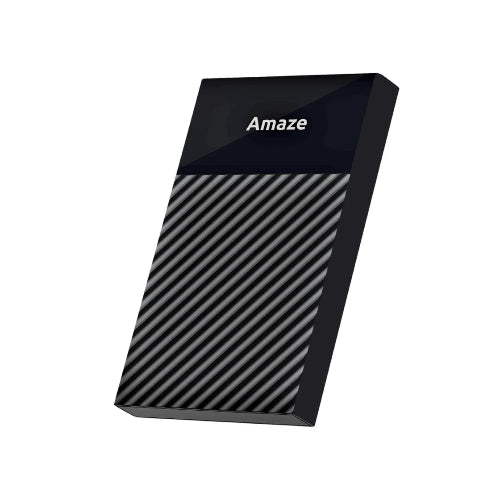
AMAZE A210C Ultra Series 2.5" SSD Case 6Gbps
AMAZE A210C Ultra Series 2.5" SSD Case 6Gbps
Couldn't load pickup availability
The AMAZE A210C Ultra Series 2.5" SSD Case 6Gbps is a high-speed external enclosure designed for compatible 2.5-inch SATA SSDs and HDDs. It provides a convenient way to convert an internal laptop drive into portable external storage, making it useful for backups, file transfers, storage expansion, and reusing an old SATA drive.
The A210C features a Type-C to USB-A 3.1 connection and supports transfer speeds of up to 6Gbps. It also supports USB 3.1, USB 2.0, and USB 1.1 for broad compatibility with modern and older systems. The enclosure supports 2.5-inch drives up to 9.5mm thick and drives with capacities up to 6TB.
With its compact 40cm cable, durable ABS construction, and plug-and-play operation, the A210C is a practical choice for users who want faster external access to a 2.5-inch SATA SSD or HDD without installing the drive internally.
Detail Description
Turn Your 2.5" SATA Drive into an External Drive
The AMAZE A210C allows you to reuse a compatible 2.5-inch SATA SSD or HDD as an external storage device.
This is particularly useful after upgrading a laptop. Instead of leaving your old SATA drive unused, you can install it into the A210C and access the stored data through a USB connection.
It can be used for:
-
Laptop HDDs
-
2.5-inch SATA SSDs
-
External backups
-
File transfers
-
Portable media storage
-
Secondary storage
-
Old laptop drive recovery
-
Data migration
Up to 6Gbps Transfer Speed
The A210C supports USB 3.1 speeds of up to 6Gbps, providing a fast interface for compatible 2.5-inch SATA storage devices.
This makes it suitable for moving large files, photographs, videos, documents, software, and backup data.
Keep in mind that 6Gbps is the maximum interface speed, not a guaranteed real-world SSD read/write speed. Actual performance depends on the installed drive, computer, USB controller, cable, file size, and operating system.
Type-C to USB-A 3.1
The A210C uses a Type-C-to-USB-A 3.1 cable, making it convenient for connecting modern USB-C storage hardware to computers equipped with conventional USB-A ports.
This configuration is particularly useful if your computer has USB-A ports but you want a Type-C connection at the enclosure.
Supports 2.5" SSDs and HDDs
The A210C is optimized for 2.5-inch SATA SSDs and HDDs, with support for drives up to 9.5mm thick. It is also listed as compatible with drives up to 6TB.
This provides flexibility when choosing the storage drive you want to install.
Compact 40cm Cable
The included 40cm cable keeps the setup compact while providing enough length for convenient connection to a laptop or desktop computer.
It is especially useful for portable storage because the short cable helps reduce unnecessary cable clutter.
Plug & Play
The A210C is designed for convenient operation without requiring additional drivers or an external power adapter. AMAZE specifies plug-and-play operation for the enclosure.
Once a compatible drive is installed, connect the enclosure to your computer and the operating system can detect the storage device.
Key Features
-
AMAZE A210C
-
Ultra Series
-
2.5" SSD Case
-
2.5" HDD/SSD Enclosure
-
Up to 6Gbps Transfer Speed
-
USB 3.1 Support
-
Type-C to USB-A Connection
-
USB-A 3.1 Host Interface
-
Supports 2.5" SATA SSDs
-
Supports 2.5" SATA HDDs
-
Supports Drives up to 9.5mm Thick
-
Supports Drives up to 6TB
-
USB 3.1 / 2.0 / 1.1 Compatibility
-
40cm Cable
-
Durable ABS Plastic Construction
-
Compact Design
-
Portable Storage Solution
-
External SSD Solution
-
External HDD Solution
-
Laptop HDD Enclosure
-
Laptop SSD Enclosure
-
Backup Storage
-
File Transfer
-
Data Migration
-
Storage Expansion
-
Plug & Play
-
No External Power Required
-
Suitable for Desktop PCs
-
Suitable for Laptops
-
6-Month Warranty
Specifications are based primarily on the official AMAZE A210C listing.
Why Buy the AMAZE A210C from TechShek.pk?
6Gbps High-Speed Connectivity
The A210C offers up to 6Gbps USB 3.1 interface speed, making it a strong option for users looking for a faster 2.5-inch external drive enclosure.
Reuse Your Existing Drive
If you have a spare 2.5-inch SATA SSD or HDD, you don't need to purchase a complete external drive. Install your existing storage into the A210C and use it externally.
Ideal for Laptop Upgrades
Upgrading from a laptop HDD to SSD often leaves the old drive unused. The A210C provides a simple way to turn that old drive into portable storage.
Type-C Enclosure Connection
The Type-C connection provides a modern connection at the enclosure while the supplied USB-A 3.1 side allows connection to conventional USB-A computers.
Supports Up to 6TB
The A210C is specified for compatible 2.5-inch storage drives up to 6TB, giving users plenty of flexibility for external storage applications.
Compact & Portable
The 40cm cable and compact enclosure make the A210C suitable for carrying with a laptop or keeping in a computer accessory bag.
Comparison Chart
| Feature | AMAZE A210C | AMAZE A210M | AMAZE A210C Pro |
|---|---|---|---|
| Series | Ultra Series | Ultra Series | Ultra Series |
| Product Type | 2.5" SSD Case | 2.5" SSD Case | 2.5" SSD Case |
| Maximum Speed | 6Gbps | 5Gbps | 6Gbps |
| Enclosure Connection | Type-C | USB 3.0 | Type-C |
| Host Connection | USB-A 3.1 | USB-A 3.0 | USB-C |
| Cable | 40cm | — | 40cm |
| Cable Type | Type-C to USB-A | USB 3.0 | Type-C to Type-C |
| USB Protocol | USB 3.1 / 2.0 / 1.1 | USB 3.0 | USB-C 3.1 |
| Drive Type | 2.5" SATA SSD/HDD | 2.5" SATA SSD/HDD | 2.5" SATA SSD/HDD |
| Max Thickness | 9.5mm | — | 9.5mm |
| Capacity Support | Up to 6TB | — | Up to 6TB |
| Best For | USB-C Storage + USB-A Computer | USB 3.0 Systems | USB-C to USB-C Systems |
AMAZE's current enclosure collection lists the A210M at 5Gbps, A210C at 6Gbps, and A210C Pro at 6Gbps.
Specification Chart
| Specification | Details |
|---|---|
| Brand | AMAZE |
| Model | A210C |
| Series | Ultra Series |
| Product Type | 2.5" SSD Case |
| Compatible Storage | 2.5" SATA SSD / HDD |
| Maximum Drive Thickness | 9.5mm |
| Maximum Capacity | Up to 6TB |
| Interface | USB 3.1 |
| Enclosure Connector | Type-C |
| Host Connector | USB-A |
| Cable Type | Type-C to USB-A |
| Maximum Transfer Speed | Up to 6Gbps |
| Supported Protocols | USB 3.1 / 2.0 / 1.1 |
| Cable Length | 40cm |
| Material | ABS Plastic |
| Power | USB Powered |
| Operation | Plug & Play |
| Warranty | 6 Months |
Ideal Uses
Old Laptop HDD
Convert your old 2.5-inch SATA laptop HDD into a portable external drive.
SATA SSD
Use a spare 2.5-inch SATA SSD as a fast external storage device.
Data Backup
Keep an additional copy of important files, photographs, videos, documents, and work projects.
File Transfer
Move data between computers without installing the storage drive internally.
Laptop Upgrade
After upgrading your laptop storage, use the previous drive as external storage.
Portable Media
Store movies, music, photographs, and other large files on a compatible high-capacity drive.
How to Install a Drive
-
Prepare a compatible 2.5-inch SATA HDD or SSD.
-
Open the A210C enclosure.
-
Connect the drive to the internal SATA connector.
-
Make sure the connection is secure.
-
Close the enclosure.
-
Connect the Type-C end of the supplied cable to the A210C.
-
Connect the USB-A end to your computer.
-
Wait for the operating system to detect the drive.
-
Open the drive through File Explorer or your operating system's file manager.
If the drive is new, it may need to be initialized and formatted.
Important: Formatting an existing drive can permanently erase data. Always back up important files before formatting.
Important Compatibility Information
The A210C is designed for 2.5-inch SATA SSDs and HDDs with a maximum thickness of 9.5mm and capacity support up to 6TB.
It is not designed for M.2 NVMe or M.2 SATA SSDs.
For M.2 storage, a dedicated M.2 enclosure such as an NVMe enclosure should be used instead.
Also, the advertised 6Gbps refers to the enclosure's interface capability. The actual transfer speed will depend on the installed storage drive and the computer's USB hardware.
Frequently Asked Questions
1. What is the AMAZE A210C?
The AMAZE A210C is an Ultra Series 2.5-inch SATA SSD/HDD enclosure supporting USB 3.1 speeds of up to 6Gbps.
2. Can I use an HDD with A210C?
Yes. The A210C supports compatible 2.5-inch SATA HDDs as well as SATA SSDs.
3. What is the maximum speed of A210C?
The A210C supports transfer speeds of up to 6Gbps through its USB 3.1 interface.
4. What size SSD does A210C support?
The A210C supports compatible 2.5-inch SSDs and HDDs up to 6TB and up to 9.5mm thick.
5. Does A210C support USB 2.0?
Yes. It supports USB 3.1, USB 2.0, and USB 1.1 protocols.
6. What cable comes with A210C?
The A210C uses a Type-C to USB-A 3.1 cable with a compact 40cm length.
7. Is the A210C an M.2 enclosure?
No. The A210C is designed for 2.5-inch SATA HDDs and SSDs, not M.2 SSDs.
8. Does A210C require drivers?
AMAZE specifies plug-and-play operation, so no additional drivers are required for normal supported use.
9. What is the difference between A210C and A210M?
The A210C supports up to 6Gbps and uses Type-C to USB-A 3.1, while the A210M is the 5Gbps USB 3.0 model.
10. What is the difference between A210C and A210C Pro?
Both models are rated up to 6Gbps, but the A210C uses a Type-C to USB-A connection, whereas the A210C Pro uses Type-C to Type-C.
11. What warranty does AMAZE A210C have?
The official AMAZE listing specifies a 6-month warranty.
Conclusion
The AMAZE A210C Ultra Series 2.5" SSD Case 6Gbps is a practical external storage enclosure for users who want to reuse a compatible 2.5-inch SATA SSD or HDD. With 6Gbps USB 3.1 connectivity, Type-C to USB-A connection, support for drives up to 9.5mm thick and 6TB capacity, a 40cm cable, ABS construction, and plug-and-play operation, it provides a convenient solution for portable storage, backups, laptop upgrades, and data transfers.
For customers searching for AMAZE A210C Price in Pakistan, AMAZE A210C SSD Case, AMAZE A210C HDD Enclosure, AMAZE A210C 6Gbps, AMAZE A210C Type-C SSD Enclosure, or 2.5-inch SATA SSD Case Pakistan, the A210C is a strong Ultra Series option.
Share
You may also like
Customers also bought these products
No recommendations available at this time.